Every time you open an app, switch between browser tabs, edit a photo, watch a video, or play a game, your computer or smartphone performs millions—even billions—of calculations in the blink of an eye. Yet none of this would be possible without one essential component quietly working behind the scenes: RAM.
Although many people have heard the term “RAM,” it is often misunderstood. Some think it stores photos and files, while others believe adding more RAM automatically makes a computer infinitely faster. The reality is more fascinating. RAM acts as your device’s short-term memory, temporarily holding the information that the processor needs immediately. Without it, even the fastest processor would spend much of its time waiting for data instead of doing useful work.
From smartphones and laptops to gaming consoles, servers, and supercomputers, RAM is one of the most important pieces of modern computing. Understanding how it works not only helps explain why devices perform the way they do but also makes it easier to choose the right hardware when buying or upgrading a computer.
What Is RAM?
RAM stands for Random Access Memory. It is a type of computer memory that temporarily stores data and instructions currently being used by the processor.
Unlike long-term storage devices such as solid-state drives (SSDs) or hard disk drives (HDDs), RAM is designed for speed rather than permanent storage. It allows the processor to access information almost instantly, making applications run smoothly and enabling users to multitask efficiently.
The word “random” in Random Access Memory refers to the ability to access any memory location directly and in nearly the same amount of time. The processor does not need to search through memory sequentially. Instead, it can immediately retrieve the exact data it needs.
RAM is often described as the computer’s working memory because it holds everything the system is actively using.
Why Does a Computer Need RAM?
Imagine a chef preparing several dishes in a kitchen.
The refrigerator stores all the ingredients, much like an SSD or hard drive stores your files. However, the chef does not repeatedly walk back to the refrigerator every few seconds. Instead, the necessary ingredients are placed on the kitchen counter, where they are easy to reach.
RAM works like that kitchen counter.
The processor, also known as the CPU, constantly needs quick access to data. Retrieving information directly from long-term storage every time would be far too slow. Instead, the operating system loads frequently used programs and data into RAM, allowing the CPU to work efficiently.
Without RAM, even simple tasks like opening a web browser or editing a document would become frustratingly slow.
What Does RAM Store?
RAM temporarily holds the information that your device is actively using.
When you open a web browser, the browser is loaded into RAM.
When you edit a document, the document is stored in RAM while you work.
When you play a game, textures, character models, sound effects, and game logic are continuously loaded into RAM.
When you stream a video, portions of the video are buffered in RAM to ensure smooth playback.
Even the operating system itself resides largely in RAM while your computer is running.
This temporary storage allows the processor to retrieve information much faster than it could from permanent storage.
Why Is RAM Called Volatile Memory?
One unique characteristic of RAM is that it is volatile memory.
This means it requires electrical power to retain data.
As soon as the power is turned off, all information stored in RAM disappears.
For this reason, files saved only in RAM are lost if the computer unexpectedly shuts down before they are written to permanent storage.
This explains why applications may ask whether you want to save your work before closing. Saving transfers the information from temporary RAM into long-term storage where it remains even after the computer is powered off.
How Does RAM Work?
RAM works by temporarily storing digital information that the processor needs immediately.
When you launch an application, the operating system copies the necessary files from the SSD or hard drive into RAM.
The CPU then reads instructions from RAM, performs calculations, and writes new information back into RAM as needed.
This process happens billions of times every second.
For example, when typing a document, every keystroke briefly updates data in RAM before eventually being saved to permanent storage.
When editing a photograph, every adjustment is processed using information already loaded into RAM.
The faster the processor can exchange data with RAM, the smoother and more responsive the computer feels.
How the CPU and RAM Work Together
The relationship between the CPU and RAM is one of the most important partnerships inside a computer.
The CPU performs calculations.
RAM supplies the information needed for those calculations.
If the processor constantly had to retrieve data from an SSD or hard drive, much of its computing power would be wasted waiting for information.
Instead, RAM acts as a high-speed workspace positioned between long-term storage and the processor.
The CPU continuously reads instructions from RAM, processes them, and stores intermediate results back into RAM.
This rapid exchange allows modern computers to perform incredibly complex tasks in fractions of a second.
RAM vs Storage
Many people confuse RAM with storage because both hold digital information.
However, they serve completely different purposes.
Storage devices such as SSDs and hard drives permanently keep your operating system, applications, photos, videos, music, and documents.
RAM temporarily holds only the information currently needed.
For example, imagine opening a movie stored on an SSD.
The movie remains permanently on the SSD, but portions of it are copied into RAM while you watch it.
Once you close the movie player or restart your computer, those temporary copies disappear from RAM, while the original movie remains safely stored on the SSD.
In simple terms, storage remembers everything, while RAM remembers only what is happening right now.
Why More RAM Often Makes a Computer Faster
Adding more RAM does not increase the processor’s speed directly.
Instead, it gives the computer more working space.
Imagine trying to complete a large puzzle on a tiny table.
You constantly need to remove pieces and bring them back later.
A larger table allows more pieces to remain available at once.
RAM works similarly.
If your computer has enough RAM, more applications and data can stay available simultaneously.
This reduces the need to repeatedly move information between RAM and slower storage devices.
As a result, multitasking becomes smoother, applications load faster, and overall responsiveness improves.
However, once your workload fits comfortably within available RAM, adding even more memory may produce little noticeable improvement.
What Happens When RAM Is Full?
When RAM becomes nearly full, the operating system begins using part of the SSD or hard drive as temporary memory.
This process is called virtual memory or paging.
Although this prevents applications from crashing immediately, storage devices are much slower than RAM.
As a result, the computer may become noticeably slower.
Applications can freeze.
Programs may take longer to switch between.
Games may experience stuttering.
The computer may seem unresponsive while waiting for information to move between RAM and storage.
Having sufficient RAM helps reduce reliance on virtual memory.
Different Types of RAM
Over the years, engineers have developed several kinds of RAM for different purposes.
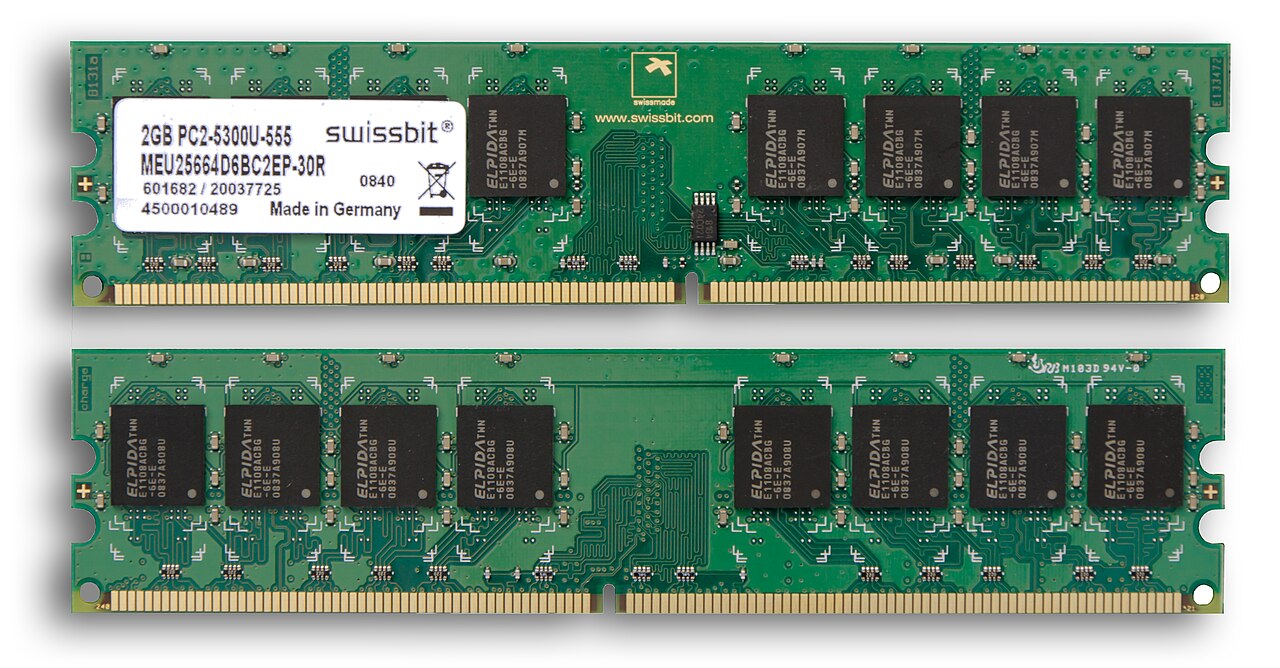
Most desktop and laptop computers use Dynamic Random Access Memory, commonly called DRAM.
Modern computers typically use newer generations such as DDR4 or DDR5 memory, which offer higher speeds and greater efficiency than earlier versions.
Smartphones usually use specialized low-power memory that consumes less electricity while maintaining high performance.
Graphics cards contain their own dedicated memory known as Video RAM, or VRAM, which stores images, textures, and graphics data for the graphics processing unit (GPU).
Servers and scientific computers may use specialized memory that can automatically detect and correct certain data errors, improving reliability during continuous operation.
Although these technologies differ internally, they all serve the same basic purpose: providing fast temporary memory for computing tasks.
Dynamic RAM and Static RAM
Two important categories of RAM are Dynamic RAM (DRAM) and Static RAM (SRAM).
Dynamic RAM stores each bit of information inside tiny capacitors that gradually lose electrical charge.
Because of this, the memory must be refreshed thousands of times every second.
Despite requiring constant refreshing, DRAM is relatively inexpensive and offers high storage capacity, making it the standard memory used in personal computers.
Static RAM works differently.
Instead of capacitors, it uses electronic circuits called flip-flops to store data.
Static RAM is much faster than DRAM and does not require refreshing while powered.
However, it is significantly more expensive and occupies more physical space.
For this reason, SRAM is commonly used as processor cache memory rather than main system memory.
RAM Speed Matters
Not all RAM performs equally.
Modern RAM is characterized not only by capacity but also by speed.
Faster RAM can transfer more information between memory and the processor every second.
Memory speed is measured in millions of data transfers per second.
Higher-speed RAM can improve performance in tasks involving large amounts of data, such as gaming, video editing, scientific simulations, software development, and professional content creation.
However, the processor and motherboard must also support those speeds.
Otherwise, the RAM may operate at a lower compatible speed.
What Is RAM Capacity?
RAM capacity refers to the total amount of temporary memory available.
It is measured in gigabytes (GB).
Devices with small amounts of RAM can perform everyday tasks but may struggle when many applications run simultaneously.
Larger amounts of RAM provide more room for multitasking and memory-intensive applications.
Modern operating systems, web browsers, creative software, artificial intelligence tools, and high-resolution games often benefit from increased memory capacity.
Choosing the right amount depends on how the computer will be used rather than simply purchasing the largest available capacity.
RAM in Smartphones
Smartphones rely on RAM just as computers do.
When switching between messaging apps, social media, cameras, web browsers, and games, RAM keeps these applications ready for quick access.
Devices with more RAM can often keep more apps active in the background.
This reduces the need to reload applications every time users switch between them.
Modern smartphones also use sophisticated memory management systems that intelligently prioritize the most important tasks while minimizing power consumption.
RAM in Gaming
Games are among the most demanding applications for RAM.
Modern games load enormous amounts of information, including detailed environments, realistic textures, sound effects, artificial intelligence, and physics simulations.
Having sufficient RAM allows more of this information to remain immediately available.
This helps reduce loading times, improves texture streaming, and minimizes interruptions during gameplay.
However, gaming performance also depends heavily on the graphics card, processor, and storage speed.
RAM is only one part of the overall system.
RAM in Artificial Intelligence
Artificial intelligence applications require enormous amounts of memory.
Large language models, image generation systems, scientific simulations, and machine learning software often process huge datasets simultaneously.
Both system RAM and graphics memory play essential roles in these workloads.
As AI models become increasingly sophisticated, memory capacity and bandwidth have become major factors determining overall performance.
Data centers supporting AI research often contain servers equipped with hundreds of gigabytes—or even several terabytes—of memory.
Common Myths About RAM
Many misconceptions surround RAM.
One common belief is that more RAM always makes every computer dramatically faster.
In reality, additional RAM helps only when existing memory is insufficient for the tasks being performed.
Another myth is that RAM permanently stores files.
It does not.
Everything stored in RAM disappears when power is removed.
Some people also believe deleting files frees RAM.
Deleting files affects storage capacity, not temporary memory.
Closing unused applications, however, can free RAM because those programs no longer require working memory.
How Engineers Continue Improving RAM
Memory technology continues evolving rapidly.
Researchers constantly develop faster, denser, and more energy-efficient memory chips.
Modern RAM generations provide higher bandwidth while consuming less power than earlier designs.
Scientists are also exploring entirely new memory technologies that may eventually combine the speed of RAM with the permanence of storage.
Such innovations could significantly improve future computers, smartphones, autonomous vehicles, scientific instruments, and artificial intelligence systems.
The Invisible Technology Behind Everyday Computing
RAM rarely receives the attention given to processors or graphics cards, yet it is one of the most essential components inside every modern digital device. It provides the fast, temporary workspace that allows processors to perform billions of operations every second without constantly waiting for information from slower storage.
Whether you are browsing the internet, editing photos, attending online classes, developing software, streaming movies, or exploring immersive virtual worlds, RAM is quietly making those experiences smooth and responsive.
Understanding how RAM works reveals an important truth about computing: speed is not determined by a single component but by the seamless cooperation between memory, processors, storage, and software. In that partnership, RAM serves as the indispensable bridge that keeps information flowing quickly, allowing modern technology to operate at the remarkable speeds we often take for granted.