Every time you open a MacBook, iMac, Mac mini, Mac Studio, or Mac Pro, something remarkable happens before you even begin your work. Within seconds, the computer wakes up, displays a familiar desktop, connects to your files, and launches your favorite apps. Behind this smooth experience is macOS, the operating system that powers every modern Mac.
Most people use macOS every day without thinking much about it. They browse the web, edit photos, watch movies, write documents, create music, or communicate with friends. Yet macOS is doing thousands of complex tasks every second behind the scenes. It manages memory, communicates with hardware, protects your data, runs applications, and keeps everything working together seamlessly.
More than just software, macOS is the foundation of the Mac experience. It combines elegant design with powerful engineering to create an operating system known for its speed, stability, security, and ease of use. Whether you are a student, creative professional, software developer, scientist, or someone who simply wants a reliable computer, understanding macOS helps you appreciate why millions of people around the world choose a Mac.
What Is macOS?
macOS is Apple’s desktop operating system designed exclusively for Mac computers. An operating system, often called an OS, is the essential software that allows a computer’s hardware and applications to work together. Without an operating system, a computer would not be able to perform useful tasks.
Think of macOS as the conductor of an orchestra. Every component inside a Mac—the processor, memory, storage, graphics chip, keyboard, display, speakers, and wireless connections—works together because macOS coordinates their actions.
When you click an icon, open a document, connect to Wi-Fi, or save a photo, macOS manages countless operations behind the scenes. It allocates system resources, communicates with hardware, and ensures applications run smoothly and efficiently.
Unlike operating systems that are built for computers from many different manufacturers, macOS is developed specifically for Apple’s own hardware. Because Apple designs both the software and the hardware, the two are carefully optimized to work together.
What Does an Operating System Actually Do?
An operating system is the bridge between people and computers.
Instead of asking users to communicate directly with electronic circuits, the operating system provides windows, buttons, menus, icons, and graphical controls that make computers easy to use.
At the same time, macOS manages the processor, memory, storage devices, graphics hardware, networking, security, and applications. It decides which programs receive processing power, organizes files, handles input from the keyboard and mouse, displays graphics on the screen, and protects the system from many types of software problems.
Without an operating system, every application would need to communicate directly with computer hardware, making modern computing nearly impossible.
The History of macOS
The story of macOS began long before the first MacBook.
In 1984, Apple introduced the original Macintosh computer with a graphical user interface that helped popularize windows, icons, menus, and the mouse. At a time when many personal computers relied primarily on text commands, the Macintosh made computing more intuitive and accessible.
Over the following decades, Apple’s operating system evolved significantly. The classic Mac OS eventually gave way to Mac OS X in 2001, a major redesign that introduced a modern software architecture based on technologies originally developed by NeXT, the company founded by Steve Jobs during his time away from Apple.
Mac OS X brought greater stability, improved multitasking, stronger security, and a visually distinctive interface.
In 2016, Apple officially renamed the operating system macOS to better align its naming with iOS, watchOS, and tvOS. Since then, each major release has introduced new capabilities, performance improvements, enhanced privacy features, and deeper integration across Apple’s ecosystem.
Why Is macOS Different?
One of the defining characteristics of macOS is its close integration with Apple’s hardware.
Because Apple controls the design of both the operating system and the computer itself, engineers can optimize every layer of the experience. The processor, graphics system, battery management, storage, display, speakers, and software are designed together rather than independently.
This integration often results in smooth performance, efficient power usage, long battery life on laptops, and consistent user experiences across different Mac models.
The transition to Apple Silicon processors beginning in 2020 further strengthened this integration. Chips such as the M1, M2, M3, and newer generations combine powerful CPUs, graphics processors, neural processing units, and memory into highly efficient systems that work closely with macOS.
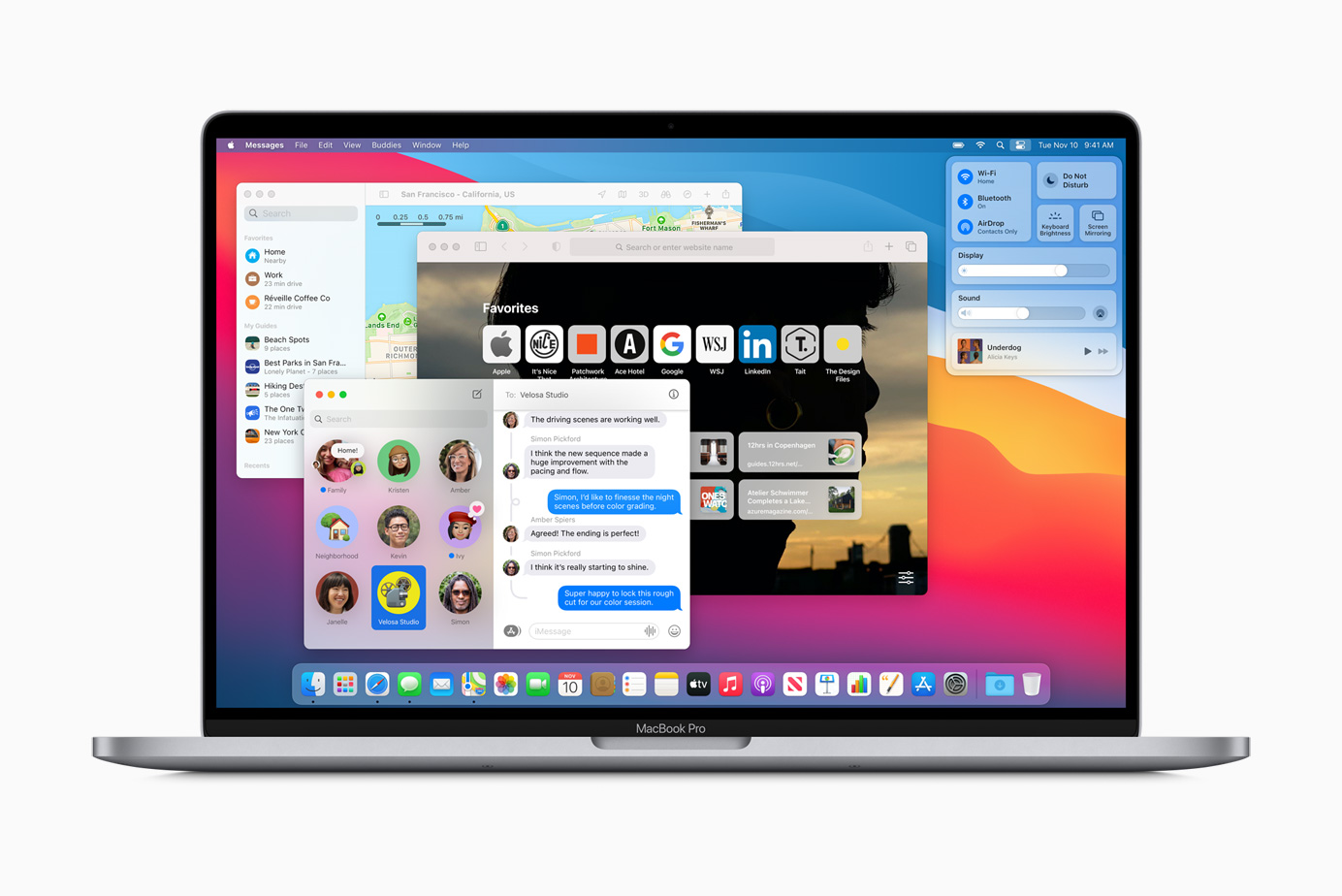
The macOS Desktop
The desktop is the workspace users see after logging in.
It provides quick access to files, folders, applications, and connected storage devices. Users can customize the desktop with wallpapers, organize documents, and arrange shortcuts according to their preferences.
The desktop is designed to remain clean and uncluttered while providing immediate access to frequently used resources.
The Finder
One of the most important parts of macOS is the Finder.
Finder is the application’s primary tool for managing files and folders. It allows users to browse documents, organize photos, copy files, rename folders, search for content, and connect to cloud storage or external drives.
Although users may not think about it often, Finder serves as the central hub for navigating nearly everything stored on a Mac.
Its design emphasizes simplicity while still providing powerful tools for managing large collections of files.
The Dock
The Dock is another familiar feature of macOS.
Located along the bottom or side of the screen, it provides quick access to frequently used applications, open programs, downloads, and important folders.
Users can customize the Dock by adding or removing apps, rearranging icons, and choosing how it appears.
The Dock helps reduce the time spent searching for applications, making everyday tasks faster and more convenient.
The Menu Bar
At the top of every Mac display is the menu bar.
Unlike many other operating systems, macOS uses a single menu bar that changes depending on the active application.
The menu bar provides access to commands, settings, system information, Wi-Fi, battery status, sound controls, date and time, notifications, and many other features.
This consistent design helps users quickly find common tools regardless of which application they are using.
Spotlight Search
One of the most useful features in macOS is Spotlight.
Spotlight is an intelligent search system that allows users to instantly locate files, applications, emails, contacts, calendar events, and settings.
Instead of manually browsing folders, users can simply type a keyword and receive results almost immediately.
Spotlight can also perform calculations, convert units, define words, provide weather information, and answer other simple queries, making it much more than a traditional file search tool.
Multitasking in macOS
Modern computers often run many applications at once, and macOS is designed to handle multitasking efficiently.
A user can edit a document, stream music, download files, participate in a video call, and browse the internet simultaneously.
Behind the scenes, macOS carefully allocates processor time, memory, and storage resources so that applications remain responsive.
This ability to manage multiple tasks is one reason Macs are widely used in professional environments.
Security in macOS
Security is one of the major priorities of macOS.
The operating system includes multiple layers of protection designed to reduce the risk of malware, unauthorized access, and software vulnerabilities.
Applications downloaded from outside trusted sources may require additional verification before they can run. System files are protected from unauthorized modification, and software updates regularly address newly discovered security issues.
Encryption tools can protect stored data, ensuring that information remains inaccessible without proper authentication if a device is lost or stolen.
Although no operating system is completely immune to security threats, macOS incorporates many built-in protections that help reduce risk when combined with safe computing practices.
Privacy Features
Apple has placed increasing emphasis on user privacy in recent versions of macOS.
Applications typically request permission before accessing sensitive information such as your location, camera, microphone, contacts, photos, or files.
Users can review and adjust these permissions at any time through system settings.
Privacy reports also help users understand how applications access their data, providing greater transparency and control.
Performance and Efficiency
One reason many users appreciate macOS is its efficient use of hardware resources.
Because the operating system is optimized specifically for Mac computers, it often delivers smooth performance even when multiple applications are running.
Recent versions are particularly efficient on Apple Silicon processors, which combine high performance with low energy consumption.
This efficiency contributes to longer battery life, quieter operation, and reduced heat generation in many Mac laptops.
Software Available for macOS
macOS supports a wide variety of applications.
Users can write documents, create presentations, edit photos, produce videos, compose music, design graphics, develop software, analyze scientific data, and communicate online.
Apple includes several built-in applications that cover many everyday needs. These include Safari for web browsing, Mail for email, Photos for organizing images, Notes for taking notes, Calendar for scheduling, Messages for communication, and FaceTime for video calls.
Professional users also rely on advanced software for programming, engineering, filmmaking, scientific research, architecture, graphic design, and audio production.
Creativity on macOS
Mac computers have long been popular among creative professionals.
Photographers use Macs to edit high-resolution images.
Video editors produce documentaries, films, and online content.
Musicians compose, record, and mix audio.
Graphic designers create illustrations, advertisements, and branding materials.
Writers develop books, articles, and research papers.
Scientists analyze data and create visualizations.
Although these activities require specialized software, macOS provides the stable foundation that allows demanding creative workflows to run efficiently.
macOS and the Apple Ecosystem
One of macOS’s greatest strengths is how seamlessly it works with other Apple devices.
A photo taken on an iPhone can automatically appear on a Mac.
Messages can be read and replied to from multiple Apple devices.
Documents stored in iCloud can remain synchronized across Macs, iPhones, and iPads.
Features such as Handoff allow users to begin work on one Apple device and continue on another with minimal interruption.
AirDrop enables fast wireless file sharing between compatible Apple devices without requiring cables or third-party services.
This interconnected ecosystem creates a consistent experience that many users find convenient.
Software Updates
Apple regularly releases updates for macOS.
These updates improve security, fix software bugs, optimize performance, and introduce new features.
Keeping macOS updated is one of the simplest ways to help maintain system reliability and security.
Modern versions of macOS make updating relatively straightforward while giving users control over when major upgrades are installed.
Accessibility
macOS includes a broad range of accessibility features designed to help people with diverse needs use their computers effectively.
Voice control allows users to operate the Mac using spoken commands.
Screen readers assist people who are blind or have low vision.
Display adjustments improve readability for users with visual impairments.
Closed captions, hearing assistance, keyboard customization, and numerous other accessibility tools make macOS usable by a wider range of individuals.
These features reflect Apple’s ongoing commitment to inclusive technology.
macOS for Education
Schools and universities around the world use Mac computers for teaching, research, and learning.
Students use macOS to write assignments, conduct research, analyze data, learn programming, and collaborate with classmates.
Its intuitive interface often allows new users to become productive quickly while still providing advanced capabilities for higher education and research.
macOS for Developers
Software developers rely heavily on macOS.
Apple provides development tools that allow programmers to create applications for Macs, iPhones, iPads, Apple Watches, and Apple TV.
The operating system also supports numerous programming languages, development environments, and open-source tools used in scientific computing, artificial intelligence, web development, and software engineering.
Common Misconceptions About macOS
Some people believe Macs never get viruses.
In reality, while macOS includes strong security protections and has historically been targeted less frequently than some other operating systems, malware for Macs does exist. Users should still practice safe browsing habits, install software from trusted sources, and keep their systems updated.
Another misconception is that Macs are only useful for artists or designers.
In fact, Macs are widely used by educators, researchers, engineers, doctors, business professionals, programmers, students, scientists, and many other professionals.
Some also assume that macOS is difficult to learn. For many new users, however, its consistent interface and straightforward design make it approachable, especially for everyday tasks.
The Future of macOS
As computing continues to evolve, macOS is expected to incorporate advances in artificial intelligence, machine learning, graphics, security, and cloud computing.
Apple has already introduced on-device AI features that leverage the Neural Engine in Apple Silicon chips to perform many tasks locally. Running AI features directly on the device can improve responsiveness while helping keep certain types of personal data private.
Future versions of macOS will likely continue to focus on improving productivity, security, energy efficiency, accessibility, and seamless integration with the broader Apple ecosystem.
Why macOS Matters
macOS is far more than the software that appears when a Mac starts up. It is the intelligent system that brings together hardware and software, allowing millions of people to work, create, learn, communicate, and explore ideas every day.
Its combination of thoughtful design, scientific engineering, strong security, efficient performance, and close integration with Apple’s hardware has made it one of the world’s most respected desktop operating systems. Whether someone is editing a family photo, writing a novel, developing software, producing a film, or conducting scientific research, macOS quietly handles countless complex processes behind the scenes.
As technology continues to advance, macOS will remain a central part of the Mac experience, helping users turn ideas into reality while making powerful computing feel remarkably simple.