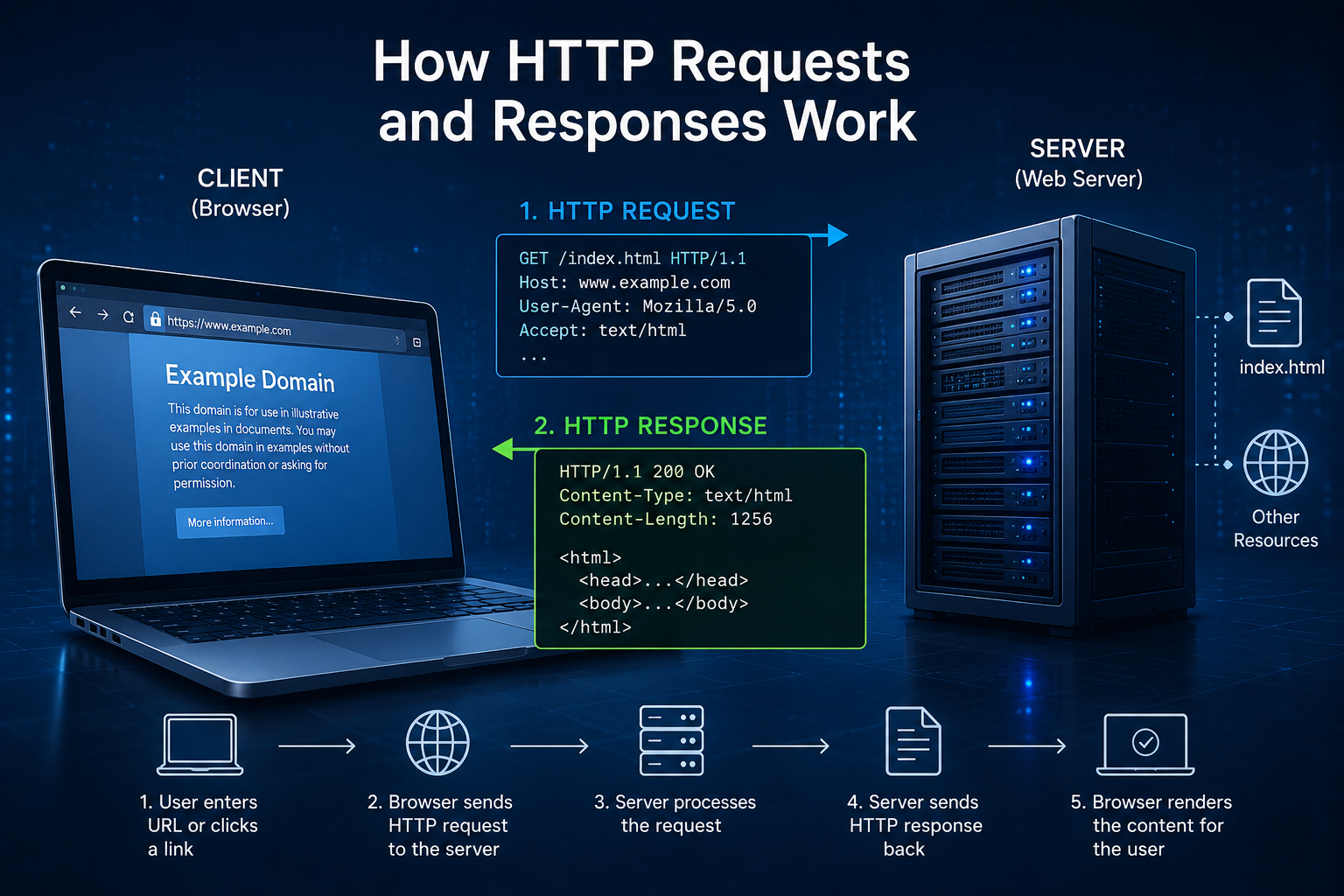
Every time you open a website, click a link, submit a form, watch a video, or shop online, something remarkable happens in the background. Within milliseconds, your device and a remote server exchange information in a carefully organized conversation. This silent exchange happens so quickly that most people never notice it, yet it powers nearly every experience on the modern web.
The language of this conversation is called the Hypertext Transfer Protocol, better known as HTTP. It is one of the foundational technologies of the internet, allowing web browsers, servers, and countless online applications to communicate reliably and efficiently.
Understanding how HTTP requests and responses work is like learning what happens behind the curtain of the web. Once you understand this process, websites become much less mysterious, and many aspects of web development, cybersecurity, networking, and performance suddenly make perfect sense.
What Is HTTP?
HTTP stands for Hypertext Transfer Protocol. It is an application-layer communication protocol that defines how clients and servers exchange information across the internet.
A client is usually a web browser such as Chrome, Firefox, Safari, or Edge, although mobile apps, APIs, smart TVs, and many other devices can also act as HTTP clients.
A server is a computer that stores websites, applications, images, videos, or other resources and sends them to users when requested.
HTTP establishes a standardized set of rules so that clients and servers understand one another regardless of their operating systems, programming languages, or physical locations.
Without HTTP, the World Wide Web as we know it would not exist.
Why HTTP Was Created
Before the World Wide Web became popular, computers could communicate using various networking protocols, but there was no simple universal method for sharing interconnected web pages.
In 1989, British computer scientist Tim Berners-Lee proposed the World Wide Web while working at CERN. Along with HTML and URLs, HTTP became one of the three core technologies that made the web possible.
HTTP provided a simple method for requesting documents and receiving them from remote computers.
Over time, HTTP evolved far beyond basic web pages. Today it transfers images, videos, software updates, online banking information, social media posts, cloud services, streaming content, and application programming interfaces (APIs).
The Client and the Server
Every HTTP communication involves two main participants.
The client initiates the conversation by asking for something.
The server listens for requests and responds with the requested resource or an explanation if it cannot fulfill the request.
Imagine walking into a library.
You ask the librarian for a specific book.
The librarian searches the shelves.
If the book is available, the librarian hands it to you.
If it is unavailable, the librarian explains why.
HTTP follows a very similar pattern.
The browser asks.
The server answers.
What Is an HTTP Request?
An HTTP request is a message sent from a client to a server asking for a specific resource.
That resource might be:
A webpage
An image
A video
A PDF document
A CSS file
A JavaScript file
A user profile
Search results
Weather information
API data
The request tells the server exactly what the client wants and provides additional information to help the server respond appropriately.
What Information Does an HTTP Request Contain?
Every HTTP request follows a structured format.
The first part identifies the request method, which describes the action the client wants to perform.
The request also specifies the URL, identifying the desired resource.
It includes the HTTP version being used.
Additional metadata appears in request headers.
Sometimes the request contains a message body, particularly when sending information to the server.
Each part has a specific purpose that helps the server understand exactly what the client needs.
The Journey Begins When You Type a Website Address
Suppose you type:
into your browser.
At first glance, this seems like a simple action.
Behind the scenes, however, numerous processes occur before the webpage appears.
Your browser first determines the website’s IP address using the Domain Name System (DNS).
It then establishes a network connection with the web server.
If HTTPS is being used, the browser and server perform a TLS handshake to create an encrypted connection.
Only after these steps does the browser send its first HTTP request.
The server receives the request, processes it, and sends an HTTP response.
Finally, the browser renders the webpage for you.
Although these steps sound lengthy, they usually happen within fractions of a second.
HTTP Methods Explain the Client’s Intent
Every HTTP request begins with a method.
The method tells the server what the client intends to do.
The most common method is GET.
A GET request asks the server to retrieve information without modifying anything.
When you visit a webpage, your browser usually sends a GET request.
Another common method is POST.
POST sends data to the server.
When you submit a login form, leave a comment, upload a file, or complete an online purchase, the browser often uses POST.
Other methods exist for different purposes.
PUT replaces existing resources.
PATCH updates part of an existing resource.
DELETE removes resources.
HEAD retrieves only response headers.
OPTIONS asks which communication methods are supported.
These methods help create predictable and standardized communication across the web.
Understanding URLs in HTTP Requests
Every request targets a specific URL.
A URL, or Uniform Resource Locator, acts as the address of an internet resource.
A typical URL contains several components.
The protocol indicates whether HTTP or HTTPS should be used.
The domain identifies the server.
The path specifies the exact resource.
Optional query parameters provide additional information.
For example, an online store may use query parameters to search for products or sort results.
The URL helps the server determine exactly what information the client is requesting.
Request Headers Provide Extra Information
HTTP headers carry additional information that helps servers respond correctly.
Headers describe the client, the requested content, supported formats, authentication credentials, cookies, caching preferences, and much more.
For example, your browser identifies itself through the User-Agent header.
The Accept header informs the server which content formats the browser understands.
The Accept-Language header indicates preferred languages.
Cookies stored in request headers help websites recognize returning users.
Although users rarely see these headers, they are essential to modern web communication.
What Is the Request Body?
Some HTTP requests include a message body.
The body contains data sent from the client to the server.
For example, when creating an online account, your name, email address, and password are transmitted within the request body.
When uploading photos or videos, the files themselves become part of the request body.
GET requests typically do not contain bodies because they only retrieve information.
POST, PUT, and PATCH requests commonly include them.
What Happens Inside the Server?
Once the server receives a request, several processes begin.
The server validates the request to ensure it follows HTTP rules.
It checks authentication if necessary.
It determines whether the requested resource exists.
It may query a database.
It might execute application code.
It may communicate with other servers.
Eventually, the server prepares an HTTP response.
For simple static websites, this process may take only a few milliseconds.
Complex web applications performing database searches, payment processing, or AI computations may require additional processing time.
What Is an HTTP Response?
The HTTP response is the server’s reply to the client’s request.
It contains everything the browser needs to understand the outcome.
Sometimes the response includes a complete webpage.
Other times it may contain an image, video, JSON data, or an error message.
Every response follows a standardized structure, making it understandable to browsers worldwide.
The Response Status Code
One of the most recognizable parts of an HTTP response is the status code.
The status code summarizes the result of the request.
A successful request usually returns 200 OK, indicating that everything worked correctly.
If the requested page has permanently moved, the server returns 301 Moved Permanently.
Temporary redirects often use 302 Found.
If the browser requests something that does not exist, the server returns 404 Not Found.
If authentication is required, the response may be 401 Unauthorized.
If access is forbidden despite authentication, the server returns 403 Forbidden.
When unexpected problems occur inside the server, users may encounter 500 Internal Server Error.
These numerical codes help browsers, developers, and automated systems quickly understand what happened.
Response Headers Explain the Content
Like requests, responses also contain headers.
These headers describe the returned resource.
The Content-Type header tells the browser whether the response is HTML, CSS, JavaScript, JSON, JPEG, PNG, PDF, or another format.
The Content-Length header indicates the size of the response.
Cache-Control instructs browsers how long resources may be stored locally.
Set-Cookie allows servers to save cookies in the user’s browser.
Security-related headers help protect websites against various attacks.
These headers are invisible during normal browsing but are critical for proper communication.
The Response Body Contains the Actual Resource
After the headers comes the response body.
This is usually the information users actually want.
For a webpage, the body contains HTML.
For an image request, it contains image data.
For a video request, it contains video data.
For an API request, it often contains JSON.
The browser interprets the response body according to the Content-Type header and displays the content appropriately.
A Single Webpage Requires Many HTTP Requests
Many people imagine that loading a webpage requires only one request.
In reality, modern websites often generate dozens or even hundreds of HTTP requests.
The browser first requests the HTML document.
After reading the HTML, it discovers references to CSS files.
It requests those.
It then requests JavaScript files.
Next come images.
Fonts follow.
Videos, advertisements, analytics scripts, icons, and API calls generate additional requests.
Each resource usually requires its own HTTP request and response.
This explains why optimizing websites often focuses on reducing unnecessary requests.
What Makes HTTPS Different?
HTTP itself does not encrypt data.
Information travels across networks in readable form.
This presents security risks, especially when transmitting passwords, payment information, or personal data.
HTTPS solves this problem.
HTTPS combines HTTP with Transport Layer Security (TLS).
The browser and server establish an encrypted connection before exchanging HTTP messages.
Encryption ensures that intercepted data cannot easily be read by attackers.
Today, nearly all major websites use HTTPS because it provides confidentiality, integrity, and authentication.
HTTP Is Stateless
One of HTTP’s defining characteristics is that it is stateless.
Each request is independent.
The server does not automatically remember previous requests.
If you visit a webpage, then refresh it, the server treats each request separately.
To create continuous user experiences, websites rely on cookies, sessions, tokens, and databases.
These technologies allow users to remain logged in, preserve shopping carts, and maintain personalized settings across multiple requests.
Cookies Help Websites Remember You
Cookies are small pieces of information stored by browsers.
When the browser makes future requests, it sends relevant cookies back to the server.
This allows websites to recognize returning visitors.
Cookies help maintain login sessions.
They remember language preferences.
They preserve shopping carts.
They support personalization.
Without cookies or similar technologies, users would need to log in again after every page request.
APIs Depend on HTTP
Modern applications increasingly communicate through APIs.
An API, or Application Programming Interface, allows software systems to exchange information.
Most web APIs use HTTP as their communication protocol.
A weather application requests forecast data.
A banking app retrieves account information.
A social media app downloads posts.
An online map loads nearby locations.
Each interaction usually consists of HTTP requests and responses.
Instead of returning HTML, API responses commonly use JSON, a lightweight format that computers can easily process.
Caching Makes Websites Faster
Repeatedly downloading identical resources wastes time and bandwidth.
HTTP includes mechanisms that allow browsers and servers to cache content.
When a browser stores previously downloaded images, stylesheets, or scripts, it can reuse them during future visits.
This reduces loading times.
It lowers server workload.
It decreases internet traffic.
Caching is one of the most important techniques for improving website performance.
HTTP Has Continued to Evolve
HTTP has changed significantly since its original version.
HTTP/1.0 introduced the basic request-response model.
HTTP/1.1 improved efficiency through persistent connections and additional features.
HTTP/2 introduced multiplexing, allowing multiple requests to share a single connection simultaneously.
This greatly reduced delays.
HTTP/3 builds upon these improvements by using the QUIC transport protocol instead of TCP.
It offers lower latency, faster connection establishment, and improved performance under challenging network conditions.
Although newer versions operate differently behind the scenes, the basic concept of requests and responses remains unchanged.
Common HTTP Errors
Sometimes communication does not proceed as expected.
A missing webpage results in a 404 error.
Server software failures may generate 500 errors.
Incorrect permissions can produce 403 responses.
Expired login sessions sometimes trigger 401 responses.
Temporary server overloads may generate 503 Service Unavailable responses.
These standardized responses allow browsers and developers to diagnose problems consistently across different systems.
Why Developers Need to Understand HTTP
Whether building websites, mobile applications, cloud services, or APIs, developers rely heavily on HTTP.
Understanding requests and responses helps diagnose bugs.
It improves website performance.
It strengthens security.
It simplifies API development.
It enables better communication between frontend and backend systems.
Even professionals working in cybersecurity, digital marketing, data science, and cloud computing frequently interact with HTTP-based technologies.
How HTTP Powers Everyday Internet Experiences
Almost every online activity involves HTTP requests and responses.
Searching Google begins with an HTTP request.
Watching videos requires many requests for video segments.
Shopping online involves requests for product pages, prices, payment processing, and order confirmation.
Sending messages through web applications depends on HTTP APIs.
Reading news, checking weather forecasts, booking flights, streaming music, accessing cloud storage, and using artificial intelligence services all rely on the same fundamental communication model.
Although the content differs, the underlying conversation remains remarkably similar.
The Invisible Language of the Web
Every website visit begins with a simple question from your device and ends with an answer from a server. This elegant request-and-response model is the foundation of the modern internet, enabling billions of devices to communicate seamlessly every day.
Despite powering some of the world’s most advanced technologies, HTTP remains built on a surprisingly straightforward idea: a client asks for a resource, and a server responds. Over the decades, this simple protocol has evolved to become faster, more secure, and more efficient, supporting everything from personal blogs to global cloud platforms and real-time online services.
Understanding how HTTP requests and responses work reveals that the web is not magic but a carefully designed system of standardized communication. Every click, search, upload, and download is part of an ongoing dialogue—an invisible conversation that connects people, computers, and information across the globe in just milliseconds.