Every time you open a website, click a link, submit a form, stream a video, or download a file, a silent conversation takes place behind the scenes. Within milliseconds, your web browser sends a request to a web server, asking for a specific webpage or resource. The server receives that request, processes it, and sends back a response.
One of the most important parts of that response is something most people never notice: the HTTP status code.
These three-digit numbers are the internet’s way of communicating what happened after your browser made a request. They tell your browser whether everything worked perfectly, whether the requested content has moved, whether something went wrong, or whether access is restricted.
Although users usually see only the final webpage, developers, website owners, and search engines rely heavily on HTTP status codes to understand how websites function. Learning what these codes mean provides valuable insight into how the web works and why certain errors appear.
What Are HTTP Status Codes?
HTTP status codes are standardized three-digit numbers returned by a web server in response to an HTTP request from a client, such as a web browser, mobile app, or search engine crawler.
HTTP stands for Hypertext Transfer Protocol, the communication protocol that allows web browsers and servers to exchange information across the internet.
When your browser requests a webpage, the server always responds with a status code. This code tells the browser whether the request succeeded, failed, requires authentication, should be redirected elsewhere, or encountered another condition.
These status codes are defined by the HTTP standard, ensuring that browsers, servers, APIs, and software around the world interpret them consistently.
Why HTTP Status Codes Matter
Without HTTP status codes, browsers would have no standardized way to understand a server’s response.
Imagine requesting a webpage without receiving any indication of whether the page exists, has moved, or failed to load. Your browser would struggle to know what action to take.
Status codes help browsers decide whether to display a webpage, redirect users automatically, request authentication credentials, retry a request, or show an error message.
Search engines also depend on status codes when crawling websites. A successful response tells search engines that a page exists and can be indexed. Permanent redirects inform search engines that content has moved, while “Not Found” responses indicate that a page no longer exists.
For website administrators, status codes are essential diagnostic tools that reveal technical problems affecting users and search engine visibility.
How HTTP Requests and Responses Work
To understand status codes, it helps to know how web communication works.
When you type a website address into your browser, several steps occur almost instantly.
First, the browser finds the server associated with the domain name.
Next, it sends an HTTP request asking for a specific resource, such as a webpage, image, video, or document.
The server receives the request and determines whether it can fulfill it.
Finally, the server sends an HTTP response containing the requested content along with a status code describing the outcome.
The status code appears at the beginning of every HTTP response and acts as a concise summary of what happened.
The Five Categories of HTTP Status Codes
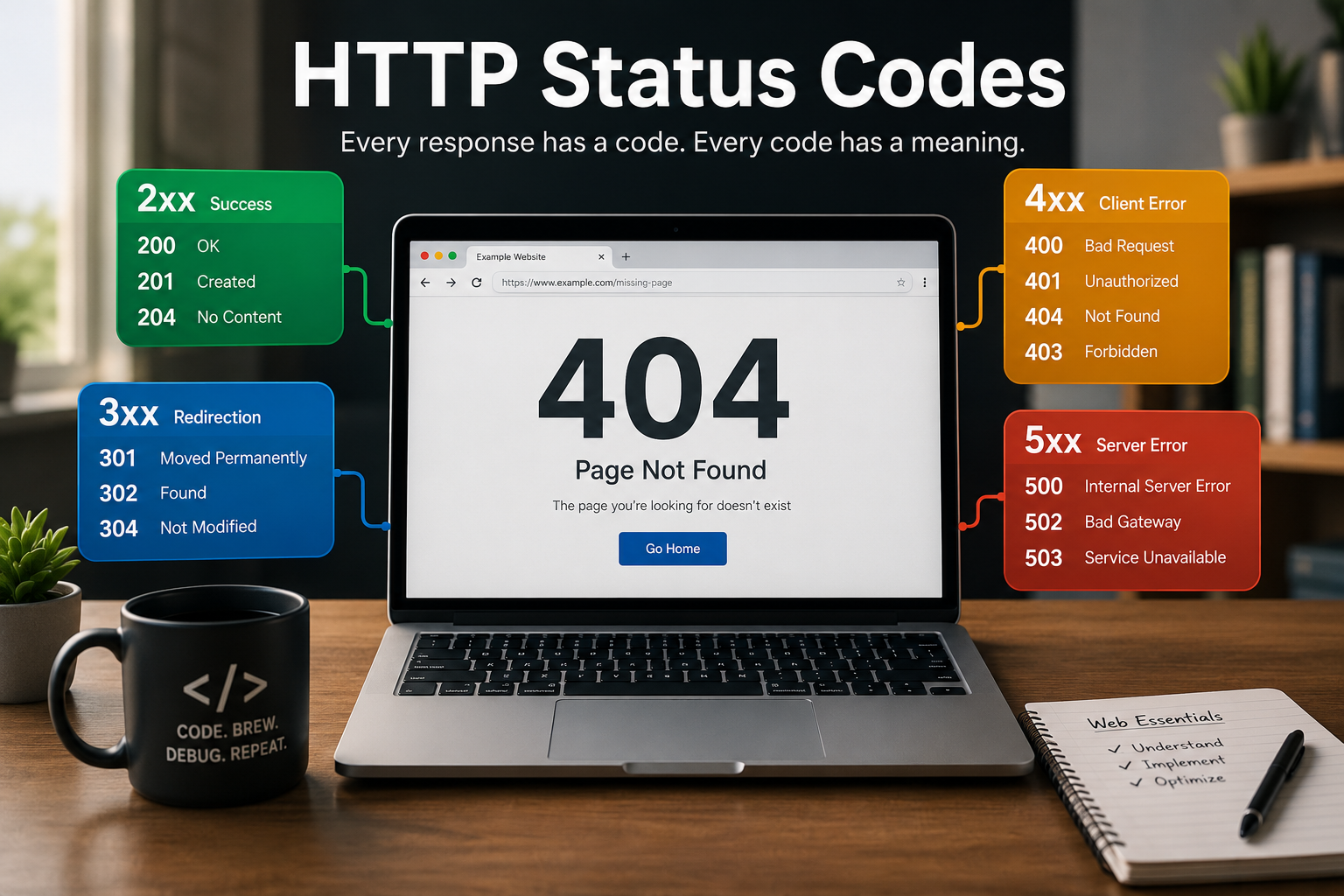
HTTP status codes are grouped into five categories based on the first digit.
Codes beginning with 1 indicate informational responses.
Codes beginning with 2 indicate successful requests.
Codes beginning with 3 indicate redirection.
Codes beginning with 4 indicate client-side errors.
Codes beginning with 5 indicate server-side errors.
Understanding these categories makes it much easier to interpret individual status codes.
1xx Status Codes: Informational Responses
Status codes in the 100 range indicate that the server has received the request and the communication process is continuing.
These responses are temporary and usually occur during more complex interactions between clients and servers.
Most ordinary web users never notice them because browsers handle them automatically.
One example is 100 Continue, which tells the client that it may continue sending the remainder of its request.
Another is 101 Switching Protocols, used when changing communication protocols, such as upgrading an HTTP connection to a WebSocket connection.
Although these codes are important for network communication, they rarely affect everyday browsing.
2xx Status Codes: Successful Responses
The 200 range represents successful communication between the browser and the server.
These are the responses website owners hope to see because they indicate everything worked correctly.
The most common example is 200 OK.
When you open a webpage and everything loads normally, the server typically returns a 200 status code.
This means the request was successful, the server found the requested resource, and it is sending the content to the browser.
Another important success code is 201 Created.
This response is commonly used by web applications and APIs after successfully creating a new resource, such as a user account, uploaded image, or database record.
202 Accepted indicates that the server accepted the request but has not finished processing it yet.
This often occurs when tasks require additional background processing.
204 No Content tells the browser that the request succeeded but there is no content to return.
This is frequently used in web applications after deleting or updating information without requiring the page to reload.
3xx Status Codes: Redirection Responses
Sometimes the requested resource is no longer located at its original address.
Instead of failing, the server instructs the browser to retrieve the content from another location.
These are known as redirection responses.
The most important redirect is 301 Moved Permanently.
A 301 response tells browsers and search engines that the requested page has permanently moved to a new URL.
Search engines generally transfer ranking signals from the old page to the new one, making 301 redirects essential during website migrations or URL restructuring.
Another widely used redirect is 302 Found, which indicates that the move is temporary.
Unlike a 301 redirect, the original URL is expected to remain valid for future requests.
Modern web applications also use 303 See Other, which directs clients to retrieve another resource after completing certain operations.
304 Not Modified is especially important for website performance.
When a browser already has a cached copy of a webpage or image, it asks the server whether the resource has changed.
If nothing has changed, the server responds with 304 Not Modified, allowing the browser to use its cached copy instead of downloading the file again.
This saves bandwidth and significantly improves loading speed.
4xx Status Codes: Client Errors
The 400 range indicates that something about the client’s request prevented successful completion.
In these situations, the problem generally originates from the request rather than the server itself.
Perhaps the most famous HTTP status code is 404 Not Found.
Nearly every internet user has encountered a 404 error at some point.
A 404 response means the server cannot find the requested page.
The page may have been deleted, moved without a redirect, or the URL may have been typed incorrectly.
Another common response is 400 Bad Request.
This indicates that the server cannot understand the request because it contains invalid syntax or malformed data.
401 Unauthorized means authentication is required before access is granted.
This does not necessarily mean permission has been denied—it simply means the client must first provide valid login credentials.
403 Forbidden is different.
In this case, the server understands the request but refuses to authorize access, even if the client is authenticated.
Website administrators often use this response to protect sensitive resources.
405 Method Not Allowed occurs when the requested HTTP method cannot be used with the targeted resource.
For example, attempting to delete data using an unsupported request method may trigger this response.
408 Request Timeout indicates that the client took too long to complete the request.
This may occur during slow internet connections or interrupted communications.
410 Gone tells clients that a resource has been permanently removed and will not return.
Unlike 404, which leaves open the possibility that the page may exist elsewhere, 410 clearly indicates permanent removal.
429 Too Many Requests has become increasingly common as websites protect themselves against excessive traffic.
This response tells clients they have exceeded allowed request limits and should wait before trying again.
It is frequently used to prevent abuse, automated attacks, or excessive API usage.
5xx Status Codes: Server Errors
Unlike 4xx responses, 5xx status codes indicate problems occurring on the server itself.
The client’s request may be perfectly valid, but the server cannot successfully complete it.
The best-known example is 500 Internal Server Error.
This generic response means something unexpected occurred while processing the request.
Possible causes include software bugs, configuration problems, database failures, or programming errors.
Another common response is 502 Bad Gateway.
This occurs when one server receives an invalid response from another server while acting as an intermediary.
Large websites often use multiple servers, making gateway errors relatively common.
503 Service Unavailable indicates that the server is temporarily unable to handle requests.
Maintenance, heavy traffic, or temporary overload commonly trigger this response.
Unlike permanent failures, a 503 error often resolves once the server becomes available again.
504 Gateway Timeout occurs when one server waits too long for another server to respond.
The request times out before completion, resulting in a failed response.
The Most Common HTTP Status Codes You Will Encounter
Although the HTTP standard defines many status codes, only a relatively small number appear frequently during everyday browsing.
A normal webpage usually returns 200 OK.
A permanently moved webpage returns 301 Moved Permanently.
A missing webpage returns 404 Not Found.
Restricted content often returns 403 Forbidden.
Pages requiring login may return 401 Unauthorized.
Unexpected server failures commonly generate 500 Internal Server Error.
These codes account for much of the visible communication between browsers and servers.
HTTP Status Codes and Search Engine Optimization
Search engines constantly crawl billions of webpages.
HTTP status codes tell search engine crawlers how each page should be handled.
A 200 response signals that the page is available for indexing.
A 301 redirect tells search engines that the page has permanently moved, allowing ranking signals to transfer to the new location.
A 404 response indicates missing content.
Occasional 404 pages are normal, but large numbers of broken links can negatively affect user experience and waste crawling resources.
A 410 response tells search engines that removed content should be dropped from their indexes more quickly.
Frequent 500-series errors can prevent search engines from crawling a website efficiently, potentially reducing visibility if server issues persist.
For these reasons, monitoring HTTP status codes is an important part of technical SEO.
HTTP Status Codes in APIs
Modern websites increasingly communicate through Application Programming Interfaces (APIs).
APIs also rely heavily on HTTP status codes.
When an application successfully retrieves information, it typically receives a 200 response.
Creating new data often returns 201 Created.
Submitting invalid information may trigger 400 Bad Request.
Missing authentication usually results in 401 Unauthorized.
Requesting nonexistent resources often returns 404 Not Found.
Server-side failures generate 500-level responses.
Developers use these standardized responses to build reliable applications that understand exactly what happened during each request.
How Browsers Use HTTP Status Codes
Most users never see status codes because browsers interpret them automatically.
If the server returns 200 OK, the browser displays the webpage.
If it receives 301 Moved Permanently, it automatically loads the new address.
If it receives 304 Not Modified, it retrieves the cached copy instead of downloading the resource again.
If the server returns 404 or 500, the browser usually displays an error page explaining the problem.
This automation makes web browsing smooth while hiding the underlying communication.
HTTP Status Codes and Website Performance
Status codes influence website speed in several ways.
Proper use of 304 Not Modified reduces unnecessary downloads.
Correct redirects ensure users reach the intended destination efficiently.
Minimizing redirect chains improves loading performance because each redirect requires an additional HTTP request.
Avoiding unnecessary server errors prevents failed requests that waste time and computing resources.
Performance optimization therefore involves not only faster servers but also correct use of HTTP responses.
HTTP Status Codes and Website Security
Status codes also contribute to website security.
Authentication systems rely on responses such as 401 Unauthorized and 403 Forbidden to control access.
Rate-limiting systems use 429 Too Many Requests to reduce automated attacks.
Servers may intentionally return certain responses to protect sensitive information or prevent unauthorized access.
Although status codes alone do not provide security, they are an important part of secure web communication.
Can Users Fix HTTP Status Code Errors?
Sometimes yes, but not always.
If a webpage returns 404 Not Found because of a typing mistake, correcting the URL may solve the problem.
If 401 Unauthorized appears, logging in with valid credentials may provide access.
Refreshing the page after a temporary network interruption may resolve some issues.
However, server-side errors such as 500 Internal Server Error or 503 Service Unavailable usually require the website owner to fix the underlying problem.
Understanding whether an error originates from the client or the server helps users know what actions are possible.
The Evolution of HTTP Status Codes
As the web has evolved, new HTTP status codes have been introduced to support emerging technologies.
Modern web applications, cloud services, streaming platforms, APIs, and content delivery networks all rely on these standardized responses.
Although new codes occasionally appear, the fundamental structure established decades ago remains remarkably stable.
This consistency allows browsers, servers, and software developed by different organizations to communicate reliably across the global internet.
Why HTTP Status Codes Are Essential to the Internet
HTTP status codes may seem like simple three-digit numbers, but they are one of the internet’s most important communication tools. Every webpage you visit, every image you load, every online purchase you make, and every search result you click depends on these standardized responses.
They enable browsers to understand servers, guide search engines during website indexing, help developers diagnose problems, improve website performance, support secure communication, and ensure billions of devices around the world can exchange information consistently.
Although most users rarely notice them, HTTP status codes quietly keep the web organized, efficient, and reliable. They are the internet’s universal language for describing what happened after every request—making modern web browsing possible one response at a time.