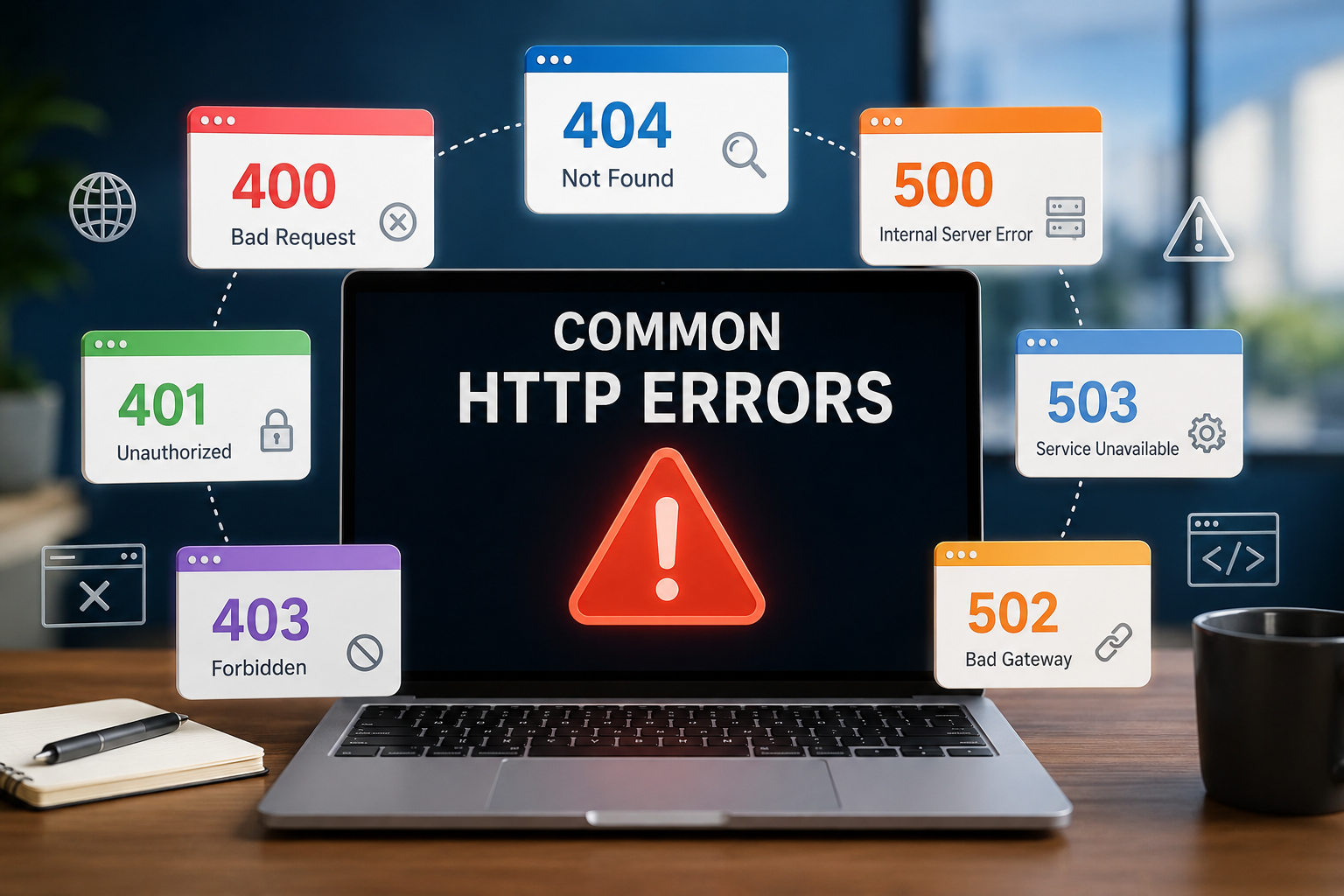
Have you ever clicked on a website only to be greeted by a message like 404 Not Found, 403 Forbidden, or 500 Internal Server Error? These messages can be confusing, especially if you’re not a web developer. They often appear without much explanation, leaving visitors wondering whether the website is broken, their internet connection has failed, or something else has gone wrong.
In reality, these messages are called HTTP status codes. They are part of the language that web browsers and web servers use to communicate with each other. Every time you visit a webpage, your browser sends a request to a server, and the server replies with an HTTP status code that indicates whether the request succeeded, failed, or requires additional action.
Understanding common HTTP errors can help website owners diagnose problems, improve user experience, and even boost search engine optimization (SEO). It also helps everyday internet users better understand what is happening behind the scenes when something goes wrong online.
What Is HTTP?
HTTP stands for Hypertext Transfer Protocol. It is the standard communication protocol that allows web browsers, web servers, and other internet-connected applications to exchange information.
Whenever you enter a website address into your browser, the browser sends an HTTP request to the server hosting that website. The server processes the request and responds with the requested webpage, image, video, or other content.
Along with the requested content, the server sends an HTTP status code. This code tells the browser whether everything worked correctly or if a problem occurred.
Without HTTP, the modern web as we know it would not exist.
What Are HTTP Status Codes?
HTTP status codes are three-digit numbers that describe the outcome of a browser’s request.
Although hundreds of status codes exist, most websites regularly encounter only a relatively small number of them.
The first digit of every status code indicates its general category.
Codes beginning with 1 represent informational responses.
Codes beginning with 2 indicate successful requests.
Codes beginning with 3 involve redirection.
Codes beginning with 4 indicate problems caused by the client’s request, such as requesting a page that does not exist.
Codes beginning with 5 represent server-side problems, meaning the website’s server failed while processing an otherwise valid request.
Understanding these categories makes it much easier to interpret individual error messages.
Why HTTP Errors Occur
HTTP errors can happen for many reasons.
Sometimes the webpage has been deleted or moved. Other times, visitors lack permission to access certain files. In some situations, the web server experiences software failures, configuration mistakes, overloaded resources, or communication problems with databases and other services.
Not every HTTP error means the website is permanently broken. Many errors are temporary and disappear once the underlying issue is resolved.
400 Bad Request
The 400 Bad Request error means the server could not understand the browser’s request because it was malformed or invalid.
This can happen if the URL contains incorrect characters, the browser sends corrupted cookies, the request exceeds acceptable limits, or invalid data is submitted through a form.
From the server’s perspective, the request simply cannot be processed safely.
Refreshing the page, clearing browser cookies, correcting the web address, or trying another browser often resolves this issue.
For website administrators, improperly configured applications or coding errors may also trigger this response.
401 Unauthorized
A 401 Unauthorized response means the requested resource requires authentication.
Contrary to what the name might suggest, this error does not necessarily mean access is permanently denied. Instead, the server is asking the user to identify themselves by providing valid login credentials.
Users typically encounter this error when attempting to access password-protected pages without signing in or when their login session has expired.
Entering valid credentials usually solves the problem.
403 Forbidden
The 403 Forbidden error means the server understood the request but refuses to fulfill it.
Unlike a 401 error, authentication may not help because the server has already decided the client lacks permission to access the requested resource.
This error commonly appears when directory permissions are incorrectly configured, sensitive files are protected, or access restrictions have been intentionally applied.
Website owners often encounter 403 errors after changing file permissions, modifying server settings, or installing security software.
404 Not Found
Among all HTTP errors, 404 Not Found is probably the most familiar.
It indicates that the server could not locate the requested resource.
The server itself is functioning correctly, but the specific webpage, image, document, or file requested does not exist at the provided address.
A 404 error often appears when:
A webpage has been deleted.
The URL was typed incorrectly.
A link points to an outdated page.
Website content has been moved without creating a redirect.
Although frustrating, 404 errors are generally harmless. They simply indicate that the requested resource cannot be found.
For website owners, however, excessive 404 errors can create poor user experiences and may negatively affect search engine crawling if left unresolved.
405 Method Not Allowed
Every HTTP request uses a specific method, such as GET or POST.
A 405 Method Not Allowed response means the requested method is not permitted for the targeted resource.
For example, a webpage may allow viewing with a GET request but reject POST requests intended to submit data.
This error usually results from application configuration or programming mistakes rather than problems with the visitor’s computer.
408 Request Timeout
The 408 Request Timeout error occurs when the server waits too long for the client to complete its request.
Slow internet connections, interrupted network communication, or incomplete browser requests may trigger this response.
In many cases, refreshing the page after ensuring a stable internet connection resolves the issue.
409 Conflict
A 409 Conflict response indicates that the request conflicts with the current state of the resource.
This often happens when multiple users attempt to edit the same file simultaneously or when data synchronization conflicts occur.
Modern cloud storage services and collaborative editing platforms sometimes generate this error to prevent accidental overwriting of information.
410 Gone
The 410 Gone status resembles a 404 error but carries a more specific meaning.
It tells browsers and search engines that the requested resource has been permanently removed and is not expected to return.
Website owners intentionally use this response when permanently retiring pages.
Search engines generally remove 410 pages from their indexes more quickly than ordinary 404 pages.
413 Content Too Large
The 413 Content Too Large status—previously called “Payload Too Large”—means the uploaded file or submitted data exceeds the server’s permitted size.
Users often encounter this error while uploading videos, images, backups, or large documents.
Website administrators can usually adjust upload size limits through server or application settings.
429 Too Many Requests
The 429 Too Many Requests error occurs when a client sends requests more rapidly than the server allows.
Many websites implement rate limiting to prevent abuse, spam, automated attacks, or excessive traffic from overwhelming servers.
Visitors may see this response after repeatedly refreshing pages, making frequent API requests, or using automated software.
Waiting a short period before trying again usually solves the problem.
500 Internal Server Error
The 500 Internal Server Error is one of the most common server-side problems.
It indicates that something unexpected went wrong while the server attempted to process the request.
Unlike client-side errors, this response rarely identifies the exact cause.
Possible reasons include:
Programming bugs
Server misconfigurations
Database failures
Plugin conflicts
Permission problems
Memory exhaustion
Unexpected software crashes
For visitors, there is often little to do besides refreshing the page or returning later.
Website administrators typically examine server logs to identify the underlying issue.
501 Not Implemented
The 501 Not Implemented status means the server does not support the functionality required to complete the request.
Unlike a 500 error, which represents an unexpected failure, a 501 response indicates that the server simply lacks the capability to process the requested feature or HTTP method.
This error is relatively uncommon on ordinary websites.
502 Bad Gateway
A 502 Bad Gateway error occurs when one server receives an invalid response from another server while acting as a gateway or proxy.
Modern websites frequently rely on multiple interconnected servers, including application servers, databases, caching systems, and content delivery networks.
If communication between these systems fails, a 502 error may appear.
Temporary network disruptions, overloaded backend servers, or software crashes commonly cause this response.
503 Service Unavailable
The 503 Service Unavailable error indicates that the server is temporarily unable to handle requests.
Unlike permanent failures, this error often appears during scheduled maintenance or periods of unusually high traffic.
Many websites intentionally display a 503 response while performing upgrades because it informs search engines that the downtime is temporary.
Visitors usually need only wait until the service becomes available again.
504 Gateway Timeout
A 504 Gateway Timeout error occurs when one server waits too long for another server to respond.
The gateway or proxy successfully contacted the upstream server, but the response took longer than the configured timeout period.
Heavy traffic, slow databases, overloaded application servers, or network issues often contribute to this error.
Large websites with complex infrastructures occasionally experience 504 responses during traffic spikes.
505 HTTP Version Not Supported
The 505 HTTP Version Not Supported status indicates that the server does not support the HTTP protocol version used in the request.
Modern browsers rarely encounter this error because they automatically negotiate compatible protocol versions.
It is more likely to appear in specialized software or outdated systems.
How Browsers Handle HTTP Errors
Modern browsers are designed to interpret HTTP status codes automatically.
Instead of displaying only numerical codes, browsers typically present user-friendly error pages that explain the problem in plain language.
Some browsers also provide suggestions such as checking the internet connection, refreshing the page, or verifying the URL.
Many websites replace the browser’s default error pages with custom-designed versions that include helpful navigation links, search boxes, and contact information.
How Search Engines View HTTP Errors
Search engines regularly crawl websites and pay close attention to HTTP status codes.
Successful pages returning 200 OK are generally eligible for indexing.
A properly configured 301 Moved Permanently redirect tells search engines that content has permanently changed locations.
Persistent 404 or 410 responses eventually cause pages to disappear from search results.
Frequent 500, 502, 503, or 504 errors may prevent search engines from crawling important content effectively if they continue for extended periods.
For this reason, maintaining healthy server responses is an important part of technical SEO.
How Website Owners Can Reduce HTTP Errors
Although some HTTP errors are unavoidable, many can be minimized through good website maintenance.
Keeping software updated reduces compatibility problems and security vulnerabilities. Monitoring server performance helps identify resource shortages before they become serious. Properly configuring redirects prevents broken links after moving content. Regularly checking website logs allows administrators to detect recurring issues early.
Reliable hosting, efficient caching, optimized databases, and careful testing before deploying updates also contribute to a more stable website.
The Difference Between Client Errors and Server Errors
One of the most important distinctions in HTTP status codes is whether the problem originates with the client or the server.
Errors beginning with 4 generally indicate that the browser’s request cannot be fulfilled because of incorrect URLs, missing permissions, invalid requests, or similar client-related issues.
Errors beginning with 5 indicate that the server accepted a valid request but encountered a problem while attempting to process it.
Understanding this distinction helps both users and website administrators determine where troubleshooting should begin.
Why HTTP Errors Are an Essential Part of the Web
Although HTTP errors may seem frustrating, they serve an important purpose. They provide clear, standardized communication between browsers and servers, allowing software to understand exactly what happened during every request.
Without these status codes, browsers would struggle to distinguish between missing pages, permission problems, temporary server failures, and successful responses. Developers would find debugging far more difficult, search engines would have trouble crawling websites accurately, and users would receive far less useful feedback when something went wrong.
HTTP errors are not signs that the internet is failing—they are evidence that the web is communicating precisely. By understanding what these codes mean, both everyday users and website owners can navigate online problems with greater confidence and make better decisions when maintaining, troubleshooting, or simply browsing the modern web.