Artificial intelligence is rapidly transforming the way we use computers. Tasks that once required powerful cloud servers can now happen directly on a laptop sitting on your desk. Your computer can remove background noise during a video call, translate speech in real time, generate images from text, summarize long documents, and even help write code—all within seconds. Behind many of these capabilities is a specialized chip that most people had never heard of until recently: the Neural Processing Unit, or NPU.
As AI becomes a core part of modern computing, computer manufacturers are redesigning PCs to handle these intelligent workloads more efficiently. Instead of relying only on the traditional Central Processing Unit (CPU) or Graphics Processing Unit (GPU), today’s AI PCs include an NPU that is specifically designed to run artificial intelligence models.
But what exactly is an NPU? Why can’t a CPU or GPU do the same job? And why are companies like Intel, AMD, Qualcomm, Microsoft, and Apple placing so much importance on this new processor?
The answer lies in the growing demand for faster, smarter, more energy-efficient AI experiences. The NPU is not replacing existing processors—it is adding a new level of intelligence that allows computers to perform AI tasks better than ever before.
What Is an NPU?
A Neural Processing Unit is a specialized processor designed to accelerate artificial intelligence and machine learning workloads. Unlike general-purpose processors, an NPU is built specifically to perform the mathematical operations required by neural networks—the computer systems that power modern AI.
Neural networks are inspired by the way biological neurons are connected in the brain, although they are much simpler. They process enormous amounts of data by performing millions or even billions of mathematical calculations involving matrices and vectors. These calculations are repeated continuously during AI inference, which is the process of using a trained AI model to make predictions or generate results.
An NPU is optimized for these repetitive operations. Instead of being flexible enough to run every kind of software, it focuses on executing AI computations as quickly and efficiently as possible.
Why Traditional CPUs Are Not Enough
For decades, the CPU has been the brain of every personal computer. It excels at handling a wide variety of tasks, including running operating systems, opening applications, browsing the internet, and managing files.
CPUs are incredibly versatile, but versatility comes with trade-offs. AI models often require thousands or millions of identical mathematical operations to happen simultaneously. CPUs typically have only a limited number of powerful cores, making them less efficient for these highly parallel workloads.
Imagine asking a single skilled chef to prepare hundreds of identical meals at once. The chef can certainly do the work, but it will take time because only a few dishes can be prepared simultaneously.
This is similar to how CPUs handle AI workloads. They can perform AI tasks, but they are not optimized for processing enormous numbers of repetitive calculations in parallel.
How GPUs Improved AI Processing
Graphics Processing Units were originally created to render video games and computer graphics.
Unlike CPUs, GPUs contain hundreds or even thousands of smaller processing cores that can perform many calculations simultaneously. This architecture makes GPUs extremely effective for both graphics rendering and AI workloads.
In fact, the rapid progress of modern deep learning during the past decade owes much to GPUs. Training large AI models such as image recognition systems, language models, and scientific simulations became practical because GPUs dramatically accelerated the necessary computations.
However, GPUs are designed to deliver maximum performance, often at the cost of higher power consumption. Running AI continuously on a GPU can quickly drain a laptop battery and generate significant heat.
This creates challenges for portable computers, where energy efficiency is just as important as raw speed.
Why AI Needs a Different Kind of Processor
Modern AI applications are becoming part of everyday computing.
People now expect their computers to blur video backgrounds instantly, improve webcam quality, recognize speech, summarize meetings, generate subtitles, enhance photographs, remove unwanted objects from images, and assist with writing—all while keeping battery life long and fan noise low.
These tasks often run continuously in the background.
A CPU can perform them.
A GPU can perform them even faster.
But neither is designed to do these specific AI jobs with minimal energy consumption.
This is exactly where the NPU excels.
The Real Purpose of an NPU
An NPU is designed to perform AI inference efficiently.
Unlike training an AI model—which requires enormous computing resources—inference simply means using an already trained model to generate outputs from new data.
For example, when your computer recognizes your face to unlock the screen, it is performing inference.
When an AI assistant summarizes a document, it performs inference.
When your webcam keeps you centered during a video call, it performs inference.
When software removes background noise from your microphone, inference is taking place.
These are precisely the kinds of workloads NPUs are built to accelerate.
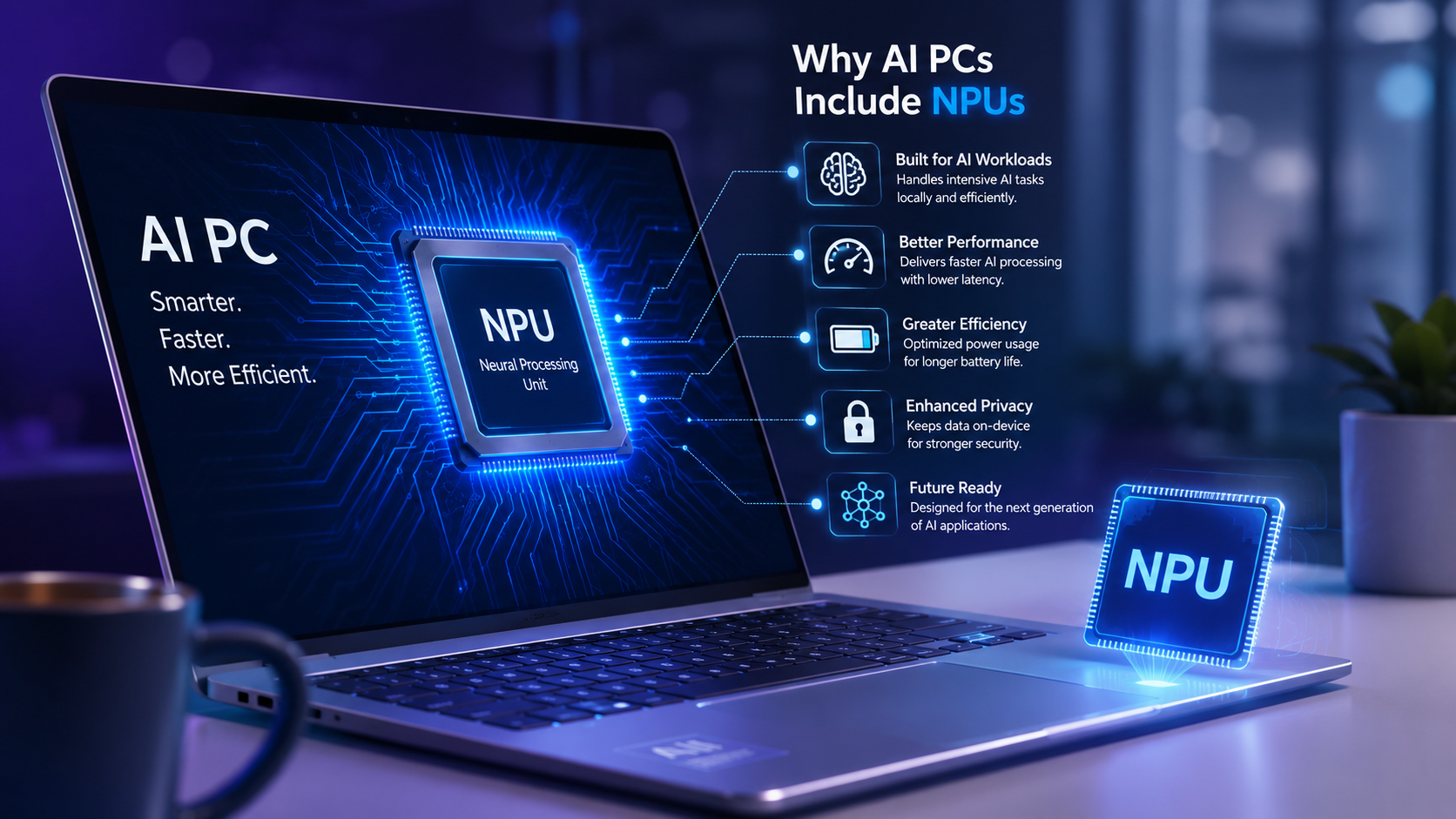
Why AI PCs Include NPUs
AI PCs are designed around the idea that artificial intelligence should become a normal part of everyday computing rather than an occasional cloud-based service.
Including an NPU allows these computers to perform many AI features locally without constantly relying on internet servers.
This offers several important advantages.
AI tasks become faster because information does not need to travel across the internet.
Battery life improves because NPUs consume far less power than GPUs for many AI operations.
Privacy is enhanced because sensitive information such as voice recordings, personal photos, or business documents can remain on the user’s device instead of being uploaded to cloud servers.
Computers also become more responsive because AI features continue working even without an internet connection.
How an NPU Saves Battery Power
One of the greatest strengths of an NPU is its energy efficiency.
AI calculations involve enormous numbers of multiply-and-accumulate operations. NPUs contain hardware specifically optimized for these mathematical tasks.
Instead of using large, power-hungry general-purpose circuits, NPUs perform these operations using specialized architectures that require much less electricity.
As a result, an NPU can often complete certain AI workloads while consuming only a fraction of the power needed by a CPU or GPU.
This is especially valuable for laptops, where battery life is a major concern.
Users can enjoy AI-powered features throughout the day without significantly reducing operating time.
Why AI Runs Faster on an NPU
Speed is not only about having more computing power.
It is also about having hardware designed specifically for the task.
NPUs contain dedicated circuitry optimized for neural network operations.
Many modern AI models repeatedly perform similar matrix multiplications and tensor calculations. NPUs execute these operations with very high efficiency, reducing delays and improving responsiveness.
The result is smoother AI experiences that feel almost instantaneous.
Video effects update in real time.
Speech recognition becomes more accurate and responsive.
AI image editing finishes more quickly.
Translation occurs with minimal delay.
Better Privacy Through On-Device AI
Cloud-based AI services require sending information to remote data centers.
Although reputable providers often encrypt data and follow privacy policies, transmitting personal information over the internet may not be desirable for every task.
An NPU enables more AI processing to occur directly on the device.
Personal documents, voice recordings, photos, and confidential business files can often remain on the computer while AI analyzes them locally.
This approach reduces internet dependence and can provide stronger privacy for many applications.
Why Microsoft Is Promoting AI PCs
Microsoft has introduced new AI experiences in Windows that are designed to take advantage of NPUs.
Features such as live captions, language translation, background effects during video calls, image generation, and various productivity tools can benefit from dedicated AI hardware.
Rather than overloading the CPU or GPU, Windows can direct suitable AI workloads to the NPU.
This division of labor helps maintain system responsiveness while improving battery efficiency.
How CPUs, GPUs, and NPUs Work Together
An AI PC does not replace one processor with another.
Instead, modern computers use multiple specialized processors working together.
The CPU manages the operating system, applications, and general computing tasks.
The GPU handles graphics rendering, gaming, video editing, and large-scale parallel computing.
The NPU accelerates AI inference and machine learning workloads while using minimal power.
The operating system intelligently assigns tasks to the processor best suited for each job.
This cooperative design allows computers to become faster and more efficient overall.
Real-World Examples of NPU Features
Many AI features available today already benefit from dedicated neural processing hardware.
During video conferences, AI can blur backgrounds, maintain eye contact, improve lighting, suppress keyboard sounds, and remove unwanted noise from microphones.
Photo editing software can intelligently remove objects, sharpen blurry images, restore old photographs, and separate subjects from backgrounds.
Language tools can translate conversations in real time, generate subtitles automatically, summarize lengthy documents, and assist with writing.
Accessibility features can recognize speech, convert spoken words into text, describe images for visually impaired users, and improve communication for people with hearing loss.
As AI models become more capable, the range of applications supported by NPUs will continue expanding.
AI PCs Are Designed for the Future
Today’s AI applications represent only the beginning.
Researchers are developing increasingly capable AI models that can understand language, generate realistic images and videos, analyze scientific data, assist with education, improve programming, accelerate medical research, and support creative work.
Many of these future applications will require continuous AI processing directly on personal devices.
Without dedicated AI hardware, these workloads could overwhelm traditional processors or consume excessive battery power.
NPUs provide a practical path toward making advanced AI an everyday part of computing.
Will Every Computer Eventually Have an NPU?
Industry trends strongly suggest that dedicated AI processors will become increasingly common.
Just as graphics processors evolved from optional components into standard features in many computers, NPUs are becoming a normal part of modern PC architecture.
Laptop manufacturers are integrating them into new processors from Intel, AMD, Qualcomm, and Apple, while software developers are designing applications that automatically take advantage of them.
As AI becomes more deeply integrated into operating systems and everyday software, dedicated neural processing hardware is likely to become as essential as CPUs and GPUs.
Are NPUs Replacing CPUs or GPUs?
The answer is no.
Each processor has a different purpose.
The CPU remains the central processor responsible for general computing.
The GPU continues to dominate graphics rendering, scientific simulations, gaming, and training many large AI models.
The NPU specializes in efficient AI inference.
Rather than competing, these processors complement one another.
Future computers will increasingly rely on this combination of specialized hardware to deliver the best balance of performance, efficiency, and intelligence.
Challenges and Limitations of NPUs
Although NPUs offer impressive advantages, they are not a universal solution for every AI task.
Training very large AI models still typically requires powerful GPUs in data centers because the computational demands are enormous. NPUs in consumer devices are generally optimized for inference rather than training.
In addition, software developers must design or adapt their applications to use NPU hardware effectively. If an application has not been optimized for an NPU, it may continue to rely primarily on the CPU or GPU.
The capabilities of NPUs also vary between manufacturers, with differences in supported AI operations, performance, and software ecosystems.
The Future of Intelligent Computing
The inclusion of NPUs in AI PCs marks one of the most significant changes in personal computer architecture since the widespread adoption of multi-core processors. Instead of treating artificial intelligence as an external service that depends on remote servers, computers are becoming capable of performing many AI tasks locally, efficiently, and securely.
As AI models continue to evolve, NPUs will likely become more powerful, enabling richer real-time experiences, smarter software, and new applications that are difficult to imagine today. Future computers may continuously assist users by understanding context, anticipating needs, improving accessibility, enhancing creativity, and automating routine tasks—all while operating quietly in the background.
The Neural Processing Unit may not receive as much attention as the CPU or GPU, but it is quickly becoming one of the most important components inside modern computers. By delivering fast, energy-efficient, and privacy-conscious AI processing, NPUs are helping transform the personal computer into a truly intelligent device. As artificial intelligence becomes woven into everyday life, the NPU will play a central role in shaping the next generation of computing.