Have you ever walked from one room to another while watching a video, only to see it suddenly buffer or disconnect? Maybe your bedroom has excellent Wi-Fi, but your kitchen, basement, or backyard barely gets a signal. If this sounds familiar, you’re not alone. Weak Wi-Fi coverage is one of the most common technology frustrations in homes and offices around the world.
For years, people tried to solve this problem by moving their router, buying Wi-Fi extenders, or simply living with dead zones where the internet barely worked. Today, however, there is a better solution: Mesh Wi-Fi.
Mesh Wi-Fi is designed to eliminate weak signal areas by creating a network of multiple wireless devices that work together as one intelligent system. Instead of relying on a single router to cover an entire building, Mesh Wi-Fi spreads the connection across several devices, providing more consistent coverage and smoother performance.
Whether you’re streaming movies in 4K, attending video meetings, gaming online, or connecting dozens of smart home devices, Mesh Wi-Fi offers a modern way to keep your internet fast and reliable throughout your home.
What Is Mesh Wi-Fi?
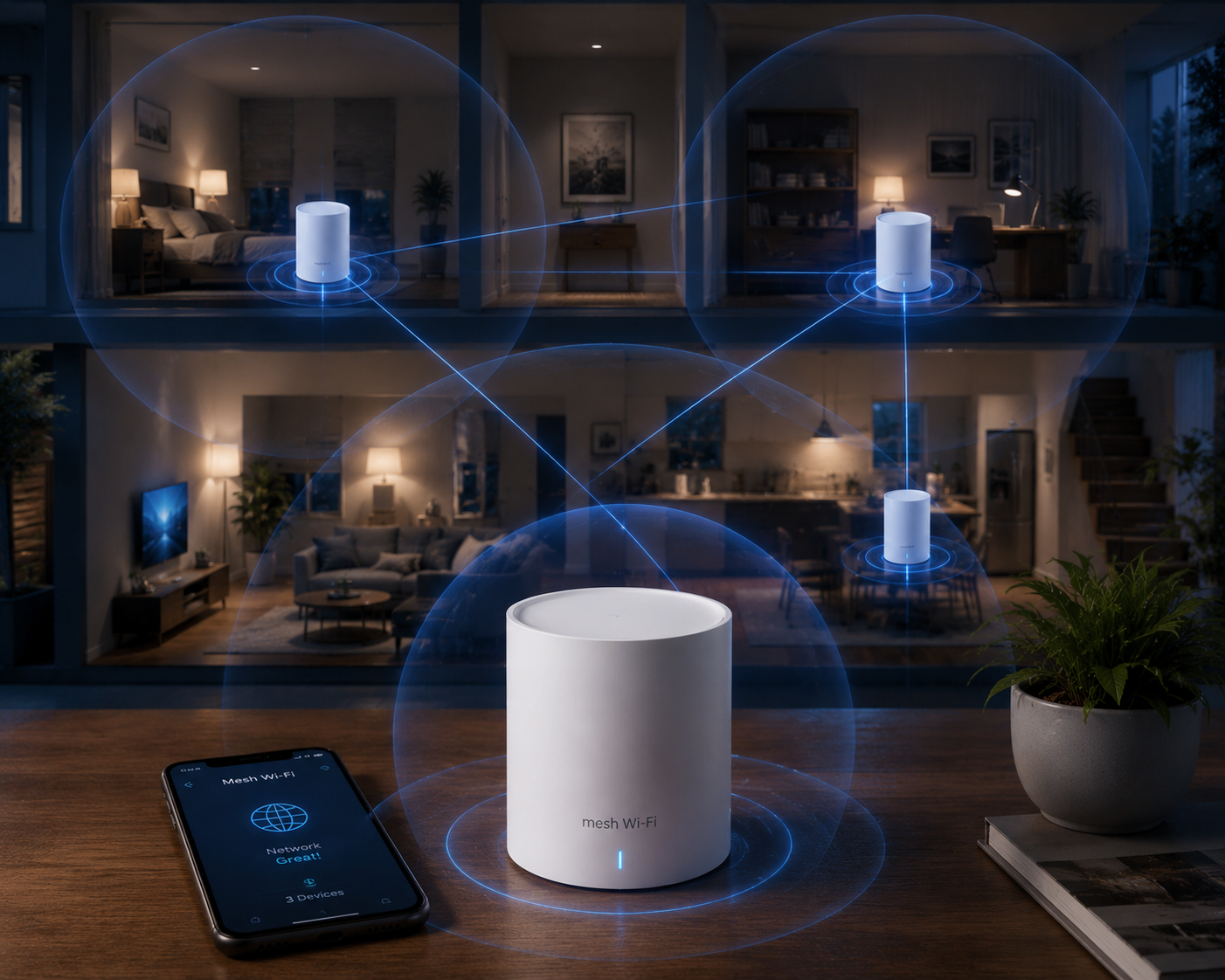
Mesh Wi-Fi is a wireless networking system that uses multiple interconnected devices—often called mesh nodes, satellites, or access points—to provide seamless Wi-Fi coverage over a larger area than a traditional single router.
Unlike a standard router that broadcasts Wi-Fi from one location, a mesh system places several nodes around your home or office. These nodes communicate with one another and create a single, unified wireless network.
To your phone, laptop, tablet, or smart TV, it appears as just one Wi-Fi network with one network name and one password. Behind the scenes, however, your devices automatically connect to whichever mesh node provides the strongest and fastest signal as you move around.
The result is smoother internet connectivity with fewer interruptions and significantly fewer dead zones.
How Does Mesh Wi-Fi Work?
At the heart of a Mesh Wi-Fi system is teamwork.
One device connects directly to your modem or internet service. This is usually called the main router or gateway node.
The remaining nodes are placed throughout your home. Rather than acting independently, they constantly communicate with one another.
Imagine several people passing a message across a room instead of one person shouting from one corner. Each person helps carry the message farther without weakening it. Mesh Wi-Fi works in much the same way.
If one node becomes busy or experiences interference, the system can automatically send data through another path. This intelligent routing helps maintain strong performance even as conditions change.
Many modern mesh systems continually monitor network quality and adjust data paths in real time without the user noticing.
Why Traditional Routers Have Dead Zones
A traditional Wi-Fi router sends radio waves outward in all directions.
The farther these signals travel, the weaker they become.
Walls, floors, ceilings, furniture, mirrors, metal objects, and household appliances can all reduce signal strength. Concrete and brick walls are particularly effective at blocking Wi-Fi signals.
In large homes, the signal may become too weak before reaching distant rooms.
Even in smaller homes, interference from neighboring Wi-Fi networks or electronic devices can reduce performance.
Because a traditional router relies on one location to serve the entire building, coverage often becomes uneven.
How Mesh Wi-Fi Solves This Problem
Mesh Wi-Fi places multiple nodes throughout the building instead of relying on one router.
Each node creates its own local Wi-Fi coverage while remaining connected to the rest of the system.
Rather than forcing your phone to communicate with a distant router through several walls, your device connects to the nearest node.
Since the signal doesn’t need to travel as far, speeds often remain stronger across much larger areas.
The system continuously coordinates all nodes so they function as one intelligent wireless network.
The Science Behind Mesh Wi-Fi
Mesh Wi-Fi relies on radio waves, just like traditional Wi-Fi.
Most modern systems operate on the 2.4 GHz and 5 GHz frequency bands, while newer Wi-Fi 6E and Wi-Fi 7 systems may also use the 6 GHz band where supported by local regulations and compatible devices.
The nodes communicate using these wireless frequencies to exchange data and coordinate traffic.
Some mesh systems dedicate one wireless channel specifically for communication between nodes. This is called a wireless backhaul.
Others allow the nodes to communicate through Ethernet cables, known as a wired backhaul, which can provide even greater performance because the wireless bandwidth is reserved for user devices.
Advanced software constantly analyzes signal quality, congestion, and traffic patterns to determine the most efficient way to deliver data.
What Is Seamless Roaming?
One of the biggest advantages of Mesh Wi-Fi is seamless roaming.
Imagine you’re on a video call while walking from your living room to your bedroom.
With older Wi-Fi systems, your phone might stay connected to the weaker router signal for too long before switching, causing interruptions or dropped connections.
Mesh Wi-Fi handles this much more intelligently.
As you move, the system automatically transfers your device to the nearest node with the strongest signal.
The transition usually happens so quickly that you never notice it.
This is especially valuable for video streaming, online gaming, voice calls, and smart home devices that require stable connections.
Mesh Wi-Fi vs Traditional Wi-Fi Router
A traditional router is a single device responsible for covering your entire home.
This works well in smaller apartments or homes where every room is relatively close to the router.
Mesh Wi-Fi, however, is designed for larger spaces or buildings with many walls and obstacles.
Instead of one powerful signal that gradually weakens with distance, Mesh Wi-Fi creates several overlapping coverage areas.
The experience feels much more consistent because your device is almost always close to a mesh node.
While traditional routers often require users to manually switch between different networks when using extenders, Mesh Wi-Fi presents one unified network.
Mesh Wi-Fi vs Wi-Fi Extenders
People often confuse Mesh Wi-Fi with Wi-Fi extenders, but they are not the same.
A Wi-Fi extender simply receives the existing Wi-Fi signal and rebroadcasts it farther away.
Because the extender depends on the original signal, its performance can be limited if the incoming connection is already weak.
Many extenders also create a separate Wi-Fi network, requiring devices to disconnect from one network and reconnect to another as you move.
Mesh Wi-Fi is designed differently.
Every node works together as part of one coordinated system.
Devices automatically connect to the best available node without requiring manual intervention.
This usually results in a smoother and more reliable experience.
Benefits of Mesh Wi-Fi
One of the greatest strengths of Mesh Wi-Fi is its ability to provide consistent internet coverage throughout an entire home.
Dead zones become much less common because multiple nodes distribute the signal more evenly.
Performance also tends to remain more stable as users move between rooms.
Modern mesh systems are generally easy to install using smartphone apps that guide users through setup step by step.
Many systems also include automatic software updates, parental controls, guest networks, device prioritization, and security monitoring.
For households with many connected devices, Mesh Wi-Fi often handles network traffic more efficiently than older routers.
As smart homes continue to grow, these advantages become increasingly important.
Does Mesh Wi-Fi Make Internet Faster?
This is one of the most common questions.
The answer is both yes and no.
Mesh Wi-Fi cannot increase the speed provided by your internet service provider.
For example, if your broadband connection delivers 300 Mbps, a mesh system cannot magically turn it into 1 Gbps.
However, it can help more areas of your home receive speeds closer to what your internet service actually provides.
If distant rooms previously received only a small fraction of your available bandwidth because of weak signal strength, Mesh Wi-Fi can often improve those speeds significantly by providing stronger local coverage.
In other words, Mesh Wi-Fi improves the quality of your wireless network rather than increasing the speed of your internet subscription.
Is Mesh Wi-Fi Good for Gaming?
Online gaming depends on stable connections and low latency.
A strong Mesh Wi-Fi system can improve gaming by reducing weak signal areas and minimizing unexpected disconnections.
However, for competitive gaming where the lowest possible latency is essential, a wired Ethernet connection remains the best option whenever practical.
If Ethernet is not available, placing a mesh node near the gaming device can often provide a better wireless experience than relying on a distant router.
Is Mesh Wi-Fi Good for Streaming?
Streaming high-definition and 4K video requires a reliable wireless connection.
Weak Wi-Fi signals often cause buffering, reduced picture quality, or interruptions.
Mesh Wi-Fi helps maintain stronger signal strength throughout the home, making streaming more consistent across multiple rooms.
Families where several people stream movies simultaneously often benefit from the broader coverage and improved reliability.
Mesh Wi-Fi for Smart Homes
Modern homes may contain dozens of internet-connected devices.
Smart lights, security cameras, thermostats, voice assistants, smart locks, televisions, speakers, and appliances all rely on dependable Wi-Fi.
As the number of connected devices grows, maintaining reliable wireless coverage becomes increasingly important.
Mesh Wi-Fi helps ensure that smart devices remain connected even if they are located far from the main router.
This can improve the overall reliability of home automation systems.
Wi-Fi Standards and Mesh Networks
Mesh Wi-Fi systems can support different generations of Wi-Fi technology.
Older systems may use Wi-Fi 5 (802.11ac).
Many newer systems support Wi-Fi 6 (802.11ax), which improves efficiency, capacity, and performance in busy networks.
Some advanced models support Wi-Fi 6E, adding access to the 6 GHz band where available.
The newest generation, Wi-Fi 7 (802.11be), introduces technologies designed to deliver higher throughput, lower latency, and improved performance for demanding applications, although real-world benefits depend on compatible devices and internet speeds.
Regardless of the Wi-Fi generation, the mesh concept itself remains the same: multiple coordinated nodes working together as one network.
Is Mesh Wi-Fi Secure?
Security is an essential part of any wireless network.
Most modern Mesh Wi-Fi systems support strong encryption standards such as WPA3, the latest widely adopted Wi-Fi security protocol, while maintaining compatibility with older devices when needed.
Many manufacturers also provide automatic firmware updates that fix security vulnerabilities over time.
Some systems include additional security features such as malware detection, network monitoring, and alerts when unfamiliar devices attempt to connect.
Using strong passwords and keeping firmware updated remain important for maintaining network security.
How Many Mesh Nodes Do You Need?
The number of nodes depends primarily on the size and layout of your building.
A small apartment may only need one or two devices.
A medium-sized house may require three nodes.
Larger homes with multiple floors, thick walls, or complex layouts may need additional nodes to achieve full coverage.
The goal is not simply to use more devices but to place them strategically so their coverage overlaps without being too far apart.
Where Should Mesh Nodes Be Placed?
Proper placement greatly affects performance.
Nodes should be positioned where they still receive a strong connection from neighboring nodes.
Placing them too far apart can reduce overall performance.
They should also be kept away from large metal objects, thick concrete walls when possible, and sources of strong electromagnetic interference.
Many setup apps help users determine whether node placement is optimal.
Are There Any Disadvantages?
Although Mesh Wi-Fi offers many benefits, it is not perfect.
A mesh system usually costs more than buying a single traditional router.
Very small apartments may not benefit enough to justify the additional expense because one router may already provide complete coverage.
Wireless communication between nodes can also reduce available bandwidth in some configurations if no dedicated wireless or wired backhaul is used.
Performance depends on good node placement and the quality of the hardware.
Nevertheless, for many homes, the improvements in coverage and convenience outweigh these limitations.
Who Should Consider Mesh Wi-Fi?
Mesh Wi-Fi is especially useful for people who experience weak Wi-Fi signals in certain rooms.
It is also a good choice for larger homes, multi-story houses, buildings with thick walls, families with many connected devices, remote workers who rely on stable video calls, and households with growing smart home systems.
People who frequently move around while using smartphones, tablets, or laptops often appreciate the seamless roaming experience that mesh networks provide.
The Future of Home Wi-Fi
As internet speeds continue to increase and more devices become connected, home networks face growing demands.
Emerging technologies such as Wi-Fi 7, faster fiber broadband, cloud gaming, virtual reality, augmented reality, and advanced smart home ecosystems require networks that are both fast and dependable.
Mesh Wi-Fi is well suited to this future because it is designed to expand easily as coverage needs grow. Additional nodes can often be added to extend the network without replacing the entire system, making mesh networking a flexible foundation for increasingly connected homes.
Final Thoughts
Mesh Wi-Fi represents a major step forward in home wireless networking. Instead of depending on a single router to reach every corner of a building, it creates a coordinated network of intelligent nodes that work together to deliver broader, more reliable coverage.
While it cannot increase the speed of your internet subscription, it can dramatically improve how effectively that speed reaches your devices. The result is fewer dead zones, smoother streaming, more stable video calls, better support for smart home devices, and a more consistent online experience as you move from room to room.
As homes become larger, internet usage becomes more demanding, and the number of connected devices continues to rise, Mesh Wi-Fi has become more than just a convenience. For many households, it is one of the most effective ways to build a fast, dependable, and future-ready wireless network.