Imagine standing next to a friend who wants to send you hundreds of vacation photos, a high-definition video, or an important document. Instead of attaching files to an email, waiting for a cloud upload, or hunting for a USB drive, they simply tap your name on their iPhone. Within seconds, the files begin appearing on your device. No internet connection is required, no cables are involved, and the transfer is often surprisingly fast.
This seamless experience is made possible by AirDrop, one of Apple’s most convenient wireless technologies. Since its introduction in 2011, AirDrop has changed how millions of people share files between Apple devices. Behind its simple interface lies an elegant combination of wireless communication technologies, encryption, and intelligent software working together almost invisibly.
Although AirDrop feels almost magical, its operation is grounded in well-established principles of computer networking, radio communication, and cryptography. Understanding how it works reveals just how much sophisticated engineering happens every time you tap the “Share” button.
What Is AirDrop?
AirDrop is Apple’s proprietary wireless file-sharing system that allows users to transfer files directly between nearby Apple devices. It works on iPhones, iPads, and Macs without requiring cables, cellular service, or a Wi-Fi internet connection.
Instead of sending files through a remote server, AirDrop creates a direct connection between two nearby devices. This approach is known as peer-to-peer communication, where devices communicate directly rather than through an intermediary.
AirDrop can transfer nearly any type of digital content. Users commonly send photos, videos, documents, websites, contacts, map locations, passwords, notes, and many other kinds of files.
Because everything happens locally, transfers are often much faster than uploading files to cloud storage before downloading them onto another device.
Why AirDrop Feels So Fast
One reason AirDrop feels nearly instantaneous is that it skips the internet entirely.
When people send files through email or cloud storage, the data usually travels from one device to distant servers somewhere in the world before returning to another nearby device.
AirDrop avoids this extra journey.
Instead, both devices communicate directly over a short wireless distance. Since the data only travels a few meters instead of thousands of kilometers, transfers usually begin almost immediately.
This direct communication also reduces network congestion and eliminates the need to wait for internet upload speeds.
The Two Wireless Technologies Behind AirDrop
AirDrop relies primarily on two wireless technologies working together: Bluetooth and Wi-Fi.
Each performs a different job.
Bluetooth helps nearby devices discover one another while using very little power.
Wi-Fi handles the actual file transfer because it can move much larger amounts of data much more quickly than Bluetooth.
Together, they create a system that is both efficient and fast.
How Devices Find Each Other
The first step in AirDrop is discovery.
When AirDrop is enabled, compatible Apple devices periodically broadcast small encrypted signals using Bluetooth Low Energy (BLE).
These signals contain enough information for nearby Apple devices to know that another AirDrop-capable device is available without revealing unnecessary personal information.
When you open the Share menu and choose AirDrop, your device begins actively searching for nearby devices that are ready to receive files.
Within a few seconds, available devices appear on your screen as icons.
This discovery process happens automatically and usually feels effortless.
What Bluetooth Low Energy Does
Bluetooth Low Energy is different from traditional Bluetooth.
It was designed to consume far less battery power while continuously sending or receiving small amounts of information.
Instead of transferring large files, BLE excels at broadcasting tiny packets of data over short distances.
This makes it ideal for helping nearby devices discover each other.
Once discovery is complete, Bluetooth’s job is largely finished.
The heavy lifting is handed over to Wi-Fi.
Creating a Direct Wi-Fi Connection
After the sender selects a nearby device, AirDrop establishes a direct Wi-Fi connection between both devices.
Importantly, this is not necessarily the same as connecting both devices to a home or office Wi-Fi network.
Instead, the devices create a secure peer-to-peer wireless link specifically for the file transfer.
This direct connection provides much higher data speeds than Bluetooth alone could achieve.
Modern Wi-Fi technology can transfer hundreds of megabits—or even more under ideal conditions—allowing large videos and photo collections to move quickly.
Does AirDrop Need the Internet?
One of the most common misconceptions is that AirDrop requires internet access.
It does not.
Even if there is no internet connection available, AirDrop can still function as long as Wi-Fi and Bluetooth are enabled on both compatible devices and they are close enough to each other.
The Wi-Fi hardware is used to create the direct connection, but internet access is unnecessary.
This makes AirDrop particularly useful while traveling, camping, flying, or working in locations with limited connectivity.
How AirDrop Protects Your Privacy
Wireless communication naturally raises questions about security.
Apple designed AirDrop with multiple layers of protection to prevent unauthorized access.
Every AirDrop transfer is encrypted.
Encryption converts readable information into coded data that can only be understood by the intended receiving device.
If someone intercepted the wireless signal, they would not be able to read the contents without the proper cryptographic keys.
This helps protect sensitive documents, personal photos, and private information during transmission.
Identity Verification
Security involves more than encryption.
AirDrop also attempts to verify the identity of nearby users.
When AirDrop is set to receive files from “Contacts Only,” devices compare encrypted information associated with the sender and receiver, such as contact details stored on each device.
This process helps determine whether the sender is someone already saved in your contacts.
Importantly, this comparison is designed to preserve privacy by using cryptographic techniques rather than openly exchanging personal information.
If verification succeeds, the device appears as a trusted contact.
Otherwise, it may not appear unless broader receiving settings are enabled.
What Happens When You Tap Accept?
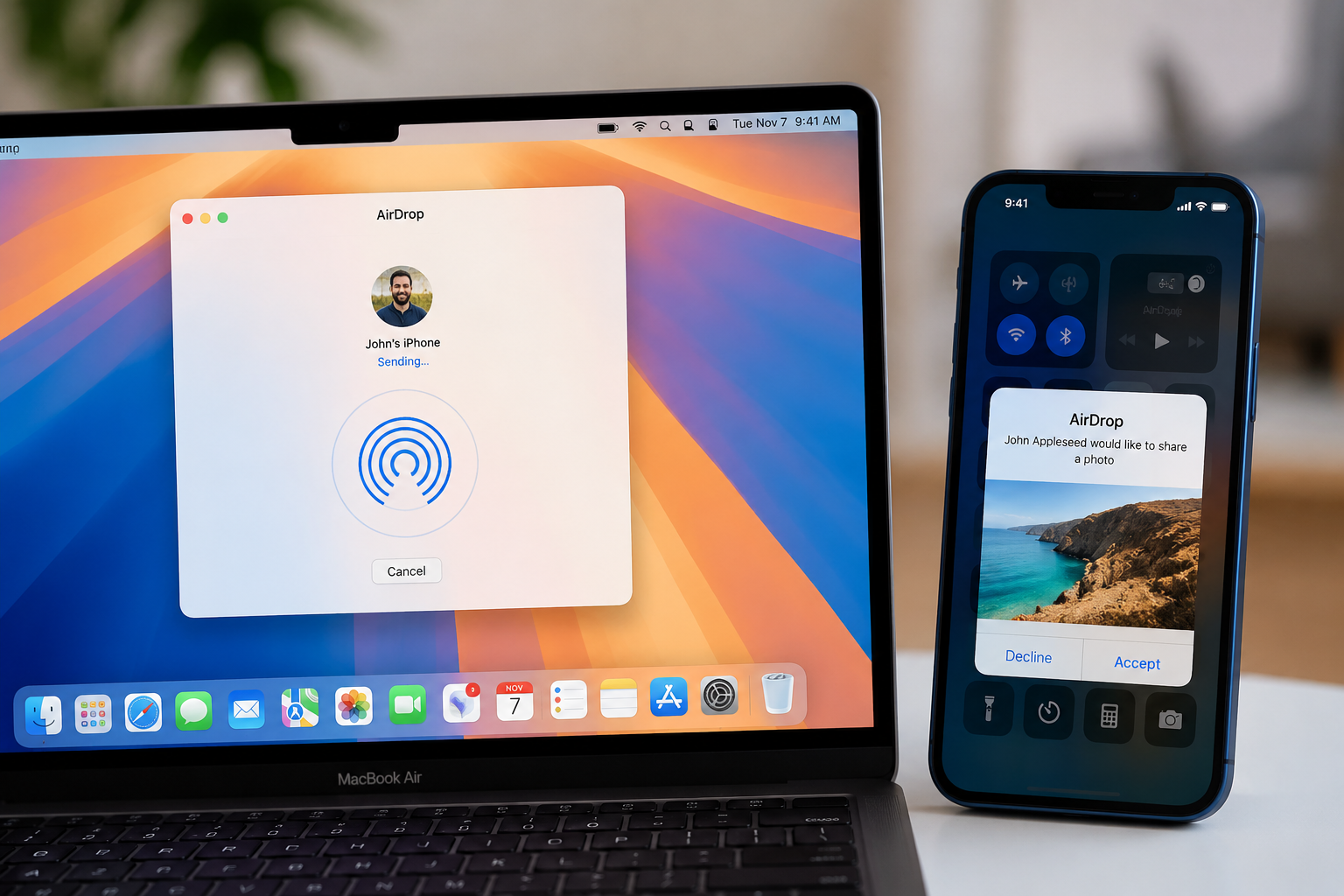
When someone sends you a file, your device displays a notification asking whether you want to accept it.
Nothing is transferred until you approve the request.
Once you tap “Accept,” the receiving device confirms the secure connection, and the sender begins transmitting the encrypted file over the peer-to-peer Wi-Fi link.
The received file is then automatically placed in the appropriate application.
Photos appear in the Photos app.
Documents can open in Files or another compatible application.
Websites launch in Safari.
Contacts open in the Contacts app.
This automatic organization makes AirDrop feel remarkably seamless.
Why AirDrop Is Usually Faster Than Bluetooth
Many people assume AirDrop uses Bluetooth for the entire transfer.
In reality, Bluetooth is mainly responsible for discovery.
If AirDrop relied entirely on Bluetooth, transferring a large 4K video could take a very long time because Bluetooth offers relatively limited bandwidth.
Wi-Fi provides dramatically higher data transfer rates.
This allows AirDrop to send gigabytes of data much more efficiently.
The combination of Bluetooth for discovery and Wi-Fi for speed is one of AirDrop’s greatest design strengths.
How Distance Affects AirDrop
Because AirDrop depends on short-range wireless communication, distance matters.
Most successful transfers occur when devices are within several meters of one another.
Walls, furniture, metal objects, and other sources of radio interference can reduce signal quality.
As the distance increases, both Bluetooth discovery and Wi-Fi communication become less reliable.
Keeping devices relatively close usually produces the fastest and most stable transfers.
What Types of Files Can AirDrop Transfer?
AirDrop is remarkably versatile.
It can transfer photographs, videos, audio recordings, PDF files, presentations, spreadsheets, websites, contacts, calendar events, notes, map locations, passwords shared through Apple’s Passwords system, and many other file types.
The receiving application depends on the type of content being shared.
Because AirDrop integrates deeply into Apple’s operating systems, users rarely need to think about file formats or destination folders.
AirDrop and Apple Ecosystem Integration
One reason AirDrop feels so polished is its deep integration into Apple’s ecosystem.
Every compatible Apple device follows similar communication standards and security protocols.
This consistency allows iPhones, iPads, and Macs to communicate with minimal configuration.
Unlike many third-party file-sharing applications, users generally do not need to create accounts, exchange codes, or install additional software.
Everything is built directly into the operating system.
How AirDrop Avoids Draining Battery Life
Maintaining continuous wireless communication could consume significant battery power.
Apple minimizes this problem by relying heavily on Bluetooth Low Energy during device discovery.
BLE uses only a small amount of electricity compared with continuously maintaining high-speed Wi-Fi connections.
The more energy-intensive Wi-Fi radio becomes fully active only during actual file transfers.
This intelligent switching helps preserve battery life while keeping AirDrop ready whenever it is needed.
What Happens Behind the Scenes During a Transfer
Although the process appears simple, several complex steps occur almost simultaneously.
Your device discovers nearby Apple devices using Bluetooth Low Energy.
A secure communication channel is established.
The receiving device confirms whether it is willing to accept the transfer.
A direct peer-to-peer Wi-Fi connection is created.
Encryption keys secure the communication.
The file is transmitted at high speed.
The receiving device verifies the data to ensure it arrived correctly.
Finally, the file is opened in the appropriate application.
All of these operations usually happen within seconds.
Why AirDrop Sometimes Doesn’t Work
Even well-designed technology occasionally encounters problems.
If Bluetooth or Wi-Fi is disabled, AirDrop cannot establish the necessary connections.
Devices that are too far apart may fail to discover each other.
Receiving settings may prevent unknown users from appearing.
Temporary software glitches, outdated operating systems, or wireless interference can also interrupt discovery or transfers.
Fortunately, most AirDrop issues can be resolved by ensuring Bluetooth and Wi-Fi are enabled, bringing devices closer together, and confirming that AirDrop receiving permissions are configured appropriately.
Can Android or Windows Use AirDrop?
AirDrop is exclusive to Apple devices.
Android smartphones, Windows PCs, and most other operating systems cannot use Apple’s AirDrop protocol because it is proprietary.
Instead, those platforms often rely on their own file-sharing technologies.
For example, Android devices commonly use Google’s Quick Share, while Windows supports several different local sharing methods.
Although these technologies serve similar purposes, they are generally not directly compatible with AirDrop.
The Science Behind Wireless File Sharing
At its heart, AirDrop demonstrates several important scientific principles.
Electromagnetic radio waves carry information through the air.
Digital data is encoded into electrical signals that travel between wireless antennas.
Cryptographic algorithms mathematically protect information from unauthorized access.
Computer networking protocols coordinate communication between devices.
Error detection mechanisms ensure files arrive accurately without corruption.
What appears to be a simple tap on a screen is actually the result of decades of advances in physics, computer science, electrical engineering, and cybersecurity.
The Future of AirDrop
As wireless technology continues to evolve, AirDrop is likely to become even faster, more reliable, and more intelligent.
New generations of Wi-Fi offer higher speeds and lower latency, making large file transfers increasingly seamless. Improvements in Bluetooth technology enhance device discovery while reducing power consumption. Apple also continues refining its software to improve reliability, privacy, and integration across its ecosystem.
Future developments may enable even smoother collaboration between devices, smarter sharing suggestions, and more efficient handling of large files, all while maintaining the strong privacy protections that have become a hallmark of AirDrop.
A Simple Tap Powered by Sophisticated Science
AirDrop is an excellent example of how advanced technology can disappear into the background of everyday life. By combining Bluetooth Low Energy for discovery, high-speed peer-to-peer Wi-Fi for data transfer, and robust encryption for security, Apple created a system that makes sharing files feel almost effortless.
What seems like a simple tap on an iPhone or Mac is actually the result of complex engineering, precise wireless communication, and carefully designed security protocols working together in perfect harmony. AirDrop reminds us that some of the most impressive scientific achievements are not always the ones we see—they are the ones that quietly make our daily lives faster, easier, and more connected.