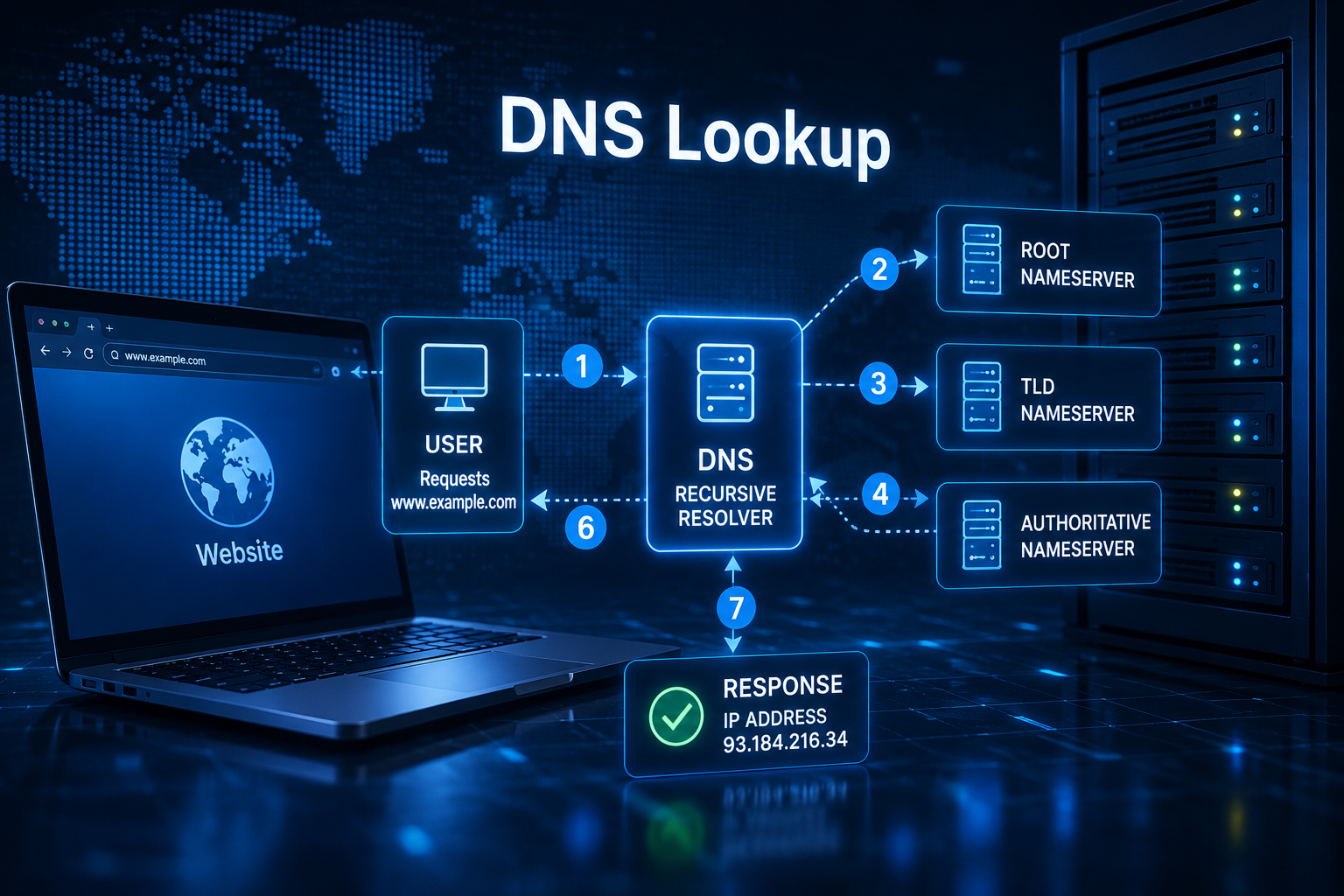
Every time you type a website address into your browser and press Enter, something remarkable happens behind the scenes. Within a fraction of a second, your device communicates with multiple computers scattered across the internet to discover the correct destination for your request. This process is so fast that most people never realize it is happening.
Imagine trying to call a friend using only their name, without knowing their phone number. You would first need to look up the number before making the call. The internet works in a similar way. Humans prefer easy-to-remember names like example.com, while computers communicate using numerical Internet Protocol (IP) addresses such as 93.184.216.34 or 2606:2800:220:1:248:1893:25c8:1946.
The system that translates human-friendly domain names into machine-readable IP addresses is called the Domain Name System (DNS). This translation process is known as a DNS lookup, and it is one of the most fundamental operations on the internet.
Although a DNS lookup usually takes only a few milliseconds, it involves a carefully organized sequence of events that spans your device, your internet provider, and multiple DNS servers around the world. Understanding this journey reveals why the internet is able to connect billions of devices efficiently every day.
What Is a DNS Lookup?
A DNS lookup is the process of finding the IP address associated with a domain name.
When you type a web address into your browser, your computer does not automatically know where that website is located. Instead, it asks the Domain Name System to find the correct IP address.
Once the IP address is discovered, your browser can establish a connection with the web server hosting the website and begin downloading the page.
Without DNS lookups, every internet user would have to remember long numerical IP addresses instead of simple domain names.
Why Computers Need IP Addresses
Every device connected to the internet has an IP address.
An IP address functions much like a street address. It tells internet routers exactly where data should be delivered.
While humans recognize names such as:
google.com
wikipedia.org
openai.com
Computers only understand addresses like:
142.250.xxx.xxx
208.80.xxx.xxx
104.18.xxx.xxx
DNS acts as the internet’s enormous directory, matching names with addresses.
The Journey Begins When You Enter a Website Address
Suppose you type:
into your browser.
At that moment, your browser starts a DNS lookup before it even attempts to load the webpage.
This lookup happens automatically and usually finishes in less than one-tenth of a second.
Let’s follow the complete journey.
Step One: The Browser Checks Its Own DNS Cache
The first place your browser looks is its internal DNS cache.
Modern browsers temporarily remember recently visited websites.
If you opened the same website only a few minutes ago, your browser may already know its IP address.
In that case, there is no need to contact any DNS server.
The browser immediately uses the stored address and connects directly to the website.
This is the fastest possible DNS lookup because no network communication is required.
Step Two: The Operating System Checks Its DNS Cache
If the browser does not have the answer, it asks the operating system.
Windows, macOS, Linux, Android, and iOS all maintain their own DNS caches.
These operating systems store recently resolved domain names so they do not need to repeat the lookup every time an application requests the same website.
If the operating system finds the correct IP address, it sends it back to the browser, and the lookup ends here.
Again, no internet communication is needed.
Step Three: The Computer Checks the Local Network
If the operating system also cannot find the answer, the request moves beyond the computer.
The DNS query is sent to the local network.
In many homes and offices, the Wi-Fi router acts as a DNS forwarder or maintains a small DNS cache.
If another device on the same network recently visited the website, the router may already know the answer.
If it does, it immediately returns the IP address.
Otherwise, the router forwards the request to a recursive DNS resolver.
Step Four: The Recursive DNS Resolver Takes Over
The recursive DNS resolver performs most of the hard work.
This resolver is usually operated by:
Your internet service provider (ISP)
A public DNS provider
A corporate network
Examples include Google Public DNS, Cloudflare DNS, Quad9, and many ISP-operated DNS servers.
The recursive resolver’s job is simple:
Find the correct IP address, no matter how many servers must be contacted.
If the resolver already has a recent cached copy of the answer, it immediately returns the IP address.
Millions of users often request the same websites every minute, so caching dramatically reduces internet traffic.
If the resolver does not know the answer, the real journey begins.
Step Five: Contacting a Root DNS Server
The recursive resolver first contacts a root DNS server.
Contrary to popular belief, the root server does not know every website’s IP address.
Instead, it knows where to find the next level of DNS information.
Think of the root server as the receptionist in a massive office building.
It cannot answer every question, but it knows which department to direct you to.
When asked about:
the root server replies with information about the .com top-level domain servers.
It essentially says:
“I don’t know the website’s IP address, but the .com servers do.”
The resolver then continues its search.
Understanding the DNS Root Zone
The root zone sits at the very top of the DNS hierarchy.
Every internet domain ultimately traces back to this root.
There are only thirteen logical root server identities, labeled from A through M.
However, thanks to Anycast routing, these identities are actually delivered by hundreds of physical server locations distributed across the globe.
This design improves reliability, speed, and resistance to network failures.
Step Six: Contacting the Top-Level Domain Server
Next, the recursive resolver contacts the appropriate Top-Level Domain (TLD) server.
Since our example uses:
example.com
the resolver asks one of the .com TLD servers.
Again, the TLD server does not know the website’s IP address.
Instead, it knows which authoritative DNS server manages the specific domain.
The TLD server responds with something like:
“The authoritative DNS server for example.com is located here.”
The resolver now has another destination.
What Are Top-Level Domains?
Top-Level Domains are the last portion of a domain name.
Examples include:
.com
.org
.net
.edu
.gov
.io
.ai
.uk
.jp
.bd
Each TLD has its own authoritative registry that maintains information about domains registered under it.
The DNS hierarchy remains highly organized because each level is responsible only for its own section.
Step Seven: Contacting the Authoritative DNS Server
The recursive resolver now contacts the authoritative DNS server for the domain.
This server contains the official DNS records created by the website owner or hosting provider.
Unlike the previous servers, the authoritative server knows the actual answer.
It searches its DNS database and finds the requested record.
For example:
www.example.com → 93.184.216.34
It sends the IP address back to the recursive resolver.
The resolver’s search is complete.
What Makes an Authoritative DNS Server Special?
An authoritative DNS server stores the original DNS records for a domain.
It does not rely on cached information from elsewhere.
Instead, it provides the definitive answer for that domain.
If a website owner changes their DNS settings, those changes are first stored on the authoritative server before gradually spreading across the internet through caching.
Step Eight: The Recursive Resolver Stores the Answer
Before sending the answer back, the recursive resolver saves it in its cache.
This is one of DNS’s most important performance optimizations.
The next time someone requests the same website, the resolver can answer immediately without repeating the entire lookup.
This significantly reduces internet traffic while making websites load faster.
Understanding DNS Caching
Caching means temporarily storing information for future use.
Nearly every stage of DNS uses caching.
Browsers cache DNS records.
Operating systems cache them.
Routers may cache them.
Recursive resolvers maintain enormous DNS caches.
This layered approach dramatically improves internet performance.
Without caching, every website visit would require multiple DNS server communications.
The internet would become much slower.
Time to Live (TTL)
DNS records are not cached forever.
Each record includes a value called Time to Live, commonly abbreviated as TTL.
TTL tells computers how long they may keep the record before asking again.
Some records remain valid for only a few minutes.
Others may be cached for several hours or even days.
Short TTL values allow website owners to update DNS records more quickly.
Long TTL values reduce server load and improve performance.
Finding the right balance depends on the website’s needs.
Step Nine: The Browser Receives the IP Address
The recursive resolver finally returns the IP address to your computer.
The operating system stores it in its cache.
The browser also stores it.
Now your browser knows exactly where the website is located.
Only now does it begin establishing a connection with the web server.
The DNS lookup has successfully completed.
Step Ten: Loading the Website
With the IP address available, the browser begins communicating directly with the web server.
Modern websites usually establish secure HTTPS connections using Transport Layer Security (TLS).
After the secure connection is created, the browser requests:
HTML
CSS
JavaScript
Images
Videos
Fonts
Other resources
The webpage then appears on your screen.
Although the DNS lookup occupies only a tiny fraction of this process, none of the remaining steps could happen without it.
What Happens If DNS Cannot Find the Website?
Sometimes a DNS lookup fails.
Your browser may display messages such as:
“DNS address could not be found.”
“Server not found.”
“This site can’t be reached.”
Several issues can cause these errors.
The domain name may not exist.
The authoritative DNS server may be offline.
The internet connection may have failed.
The recursive resolver may be unreachable.
A typing mistake in the website address can also prevent a successful lookup.
Because DNS sits at the beginning of almost every internet connection, DNS failures often make websites appear completely inaccessible.
DNS Record Types
DNS stores far more than IP addresses.
Different DNS record types provide different kinds of information.
The most common is the A record, which maps a domain to an IPv4 address.
The AAAA record performs the same function for IPv6 addresses.
The CNAME record points one domain name to another domain name rather than directly to an IP address.
The MX record identifies the mail servers responsible for receiving email for a domain.
The TXT record stores text-based information, often used for domain verification, email authentication, and security technologies.
The NS record specifies which authoritative name servers manage the domain.
Each record serves a specific purpose while working together to support websites, email, and many other internet services.
Recursive and Iterative Queries
A recursive query means the DNS resolver must find the complete answer on behalf of the client.
Your computer typically sends recursive queries.
The recursive resolver performs all remaining work.
An iterative query is different.
Each DNS server provides the best information it has, often referring the requester to another server rather than completing the lookup itself.
The communication between recursive resolvers and root, TLD, and authoritative servers usually involves iterative queries.
This design keeps DNS highly scalable.
Why DNS Is So Fast
Considering how many servers may be involved, DNS is remarkably efficient.
Several technologies contribute to this speed.
Extensive caching eliminates unnecessary lookups.
Globally distributed DNS servers reduce network distance.
Anycast routing directs requests to nearby server locations.
Optimized software allows DNS servers to process enormous numbers of requests every second.
As a result, most DNS lookups finish within only a few milliseconds.
Users rarely notice the process happening.
DNS Security
Because DNS is essential to internet communication, it is an attractive target for cyberattacks.
Attackers sometimes attempt to redirect users to fraudulent websites through techniques such as DNS spoofing or cache poisoning.
To improve trust, DNS Security Extensions (DNSSEC) add digital signatures that allow resolvers to verify that DNS responses have not been altered during transmission.
Encrypted protocols such as DNS over HTTPS (DoH) and DNS over TLS (DoT) also improve privacy by preventing others on the network from easily observing DNS requests.
These technologies help make internet browsing safer and more secure.
DNS Lookup in the Age of IPv6
The growing adoption of IPv6 has expanded the DNS system rather than replacing it.
Instead of using only A records for IPv4 addresses, DNS increasingly returns AAAA records containing 128-bit IPv6 addresses.
The lookup process itself remains almost identical.
Only the type of address returned changes.
This ensures that DNS continues functioning smoothly as the internet evolves.
Why Understanding DNS Lookup Matters
Although invisible to most users, DNS is one of the internet’s most important technologies. Every website visit, email delivery, cloud application, video stream, and online service depends on DNS translating human-friendly names into machine-readable addresses.
Understanding how a DNS lookup works helps explain why websites sometimes load instantly, why DNS changes may take time to propagate, and why internet connectivity problems often begin with DNS rather than the website itself.
The next time you type a familiar web address into your browser, remember that an extraordinary chain of events is unfolding in milliseconds. Your browser checks local caches, recursive resolvers consult the global DNS hierarchy, authoritative servers provide trusted answers, and only then does your request find its destination.
This elegant system quietly coordinates billions of lookups every day, making the modern internet feel effortless. Without DNS, the web would be a confusing collection of numerical addresses instead of the simple, human-friendly experience we use every day.