Every time you press the power button on your computer, a remarkable piece of software quietly comes to life. Within seconds, your desktop appears, your apps become available, and you’re ready to work, study, create, or simply relax. Most of this happens so naturally that we rarely stop to think about the technology making it possible.
If you’re using a modern PC, there’s a good chance that technology is Windows 11.
Windows 11 is much more than a colorful desktop or a collection of apps. It is the operating system that manages your computer’s hardware, runs your software, protects your files, and provides the environment where everything from web browsing to video editing takes place. Whether you’re writing a school assignment, attending an online meeting, playing games, editing photos, or exploring the internet, Windows 11 works behind the scenes to make every task possible.
Designed by Microsoft, Windows 11 introduces a cleaner appearance, smarter productivity features, stronger security, and better performance than many earlier versions of Windows. It represents Microsoft’s vision of what a modern computer should feel like—fast, intuitive, secure, and connected.
What Is Windows 11?
Windows 11 is Microsoft’s desktop operating system for personal computers. It is the software that allows users to interact with a computer’s hardware through a graphical interface, making it possible to launch applications, manage files, connect to the internet, and perform countless digital tasks.
An operating system serves as the bridge between people and a computer’s physical components. Without an operating system, even the most powerful processor, memory, and storage devices would be unable to perform useful work for everyday users.
Released publicly in October 2021, Windows 11 succeeded Windows 10 and introduced a refreshed design alongside numerous improvements in usability, security, multitasking, and performance.
Unlike an application such as Microsoft Word or Google Chrome, Windows 11 is the foundation upon which all other software runs.
Why an Operating System Is Essential
Imagine buying a brand-new computer that contains an advanced processor, large amounts of memory, and fast storage—but no operating system.
When you turn it on, nothing useful appears.
That’s because hardware alone cannot organize itself into a usable computer.
Windows 11 acts as the computer’s manager. It coordinates communication between the processor, memory, storage devices, graphics hardware, keyboard, mouse, speakers, printer, camera, and countless other components.
It decides which applications receive processing power, manages memory efficiently, stores files safely, and ensures different programs can run together without interfering with one another.
Without an operating system, modern computing simply would not exist.
The Evolution of Windows
Microsoft introduced the first version of Windows in 1985. Since then, each generation has reflected advances in computer technology and changing user expectations.
Earlier versions focused primarily on making computers easier to use. Later releases expanded multimedia capabilities, internet connectivity, wireless networking, security, gaming, and cloud services.
Windows XP became famous for its stability and ease of use.
Windows 7 refined performance and reliability.
Windows 10 introduced continuous updates and closer integration with cloud computing.
Windows 11 builds upon these foundations with a modern interface designed for today’s laptops, desktop computers, hybrid devices, and touch-enabled systems.
Its design reflects the way people increasingly work across multiple applications, attend video meetings, collaborate online, and access cloud-based services.
A Fresh and Modern Design
One of the first things users notice about Windows 11 is its appearance.
The desktop has been redesigned with softer colors, rounded window corners, updated icons, smoother animations, and a cleaner overall layout.
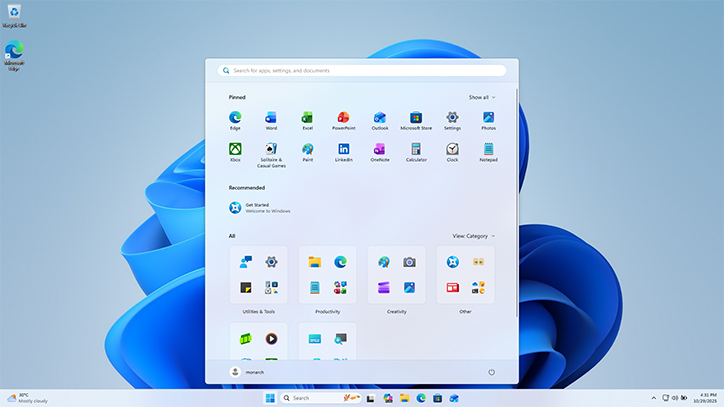
The Start menu now appears centered on the taskbar by default, creating a balanced and organized look. Users can still move it back to the left if they prefer the traditional Windows arrangement.
Menus are simpler, reducing visual clutter while making important options easier to find.
This redesign isn’t merely cosmetic.
Microsoft aimed to reduce distractions so users can focus more easily on their work, studies, or creative projects.
The Start Menu
For decades, the Start menu has served as the main gateway to Windows.
In Windows 11, the Start menu has been redesigned to provide quicker access to frequently used applications, recently opened files, and search features.
Instead of displaying numerous live tiles as seen in Windows 10, Windows 11 presents applications in a cleaner grid accompanied by personalized recommendations based on recent activity.
This simpler design helps users locate software more quickly while keeping the interface organized.
Better Multitasking
Modern work often involves switching constantly between documents, websites, emails, videos, and communication apps.
Windows 11 introduces features that make multitasking significantly easier.
Snap Layouts allow users to arrange multiple application windows into organized patterns across the screen.
Whether working with two, three, or several programs simultaneously, Windows automatically aligns each window neatly.
Snap Groups remember these arrangements, making it easy to return to an organized workspace after opening other applications.
Virtual desktops provide another layer of organization by allowing separate desktops for work, study, entertainment, or personal projects.
Instead of crowding everything onto one screen, users can dedicate different desktops to different activities.
Performance Improvements
A modern operating system should not only look attractive but also perform efficiently.
Windows 11 includes numerous under-the-hood improvements that help applications launch faster, resume more quickly after sleep mode, and manage memory more effectively.
The operating system prioritizes active applications while reducing unnecessary background activity.
Storage optimization also improves responsiveness, particularly on computers equipped with solid-state drives (SSDs), which are considerably faster than traditional hard disk drives.
Although actual performance depends on hardware, Windows 11 is designed to make better use of modern processors and memory technologies.
Stronger Security
Cybersecurity has become increasingly important as more personal information, financial transactions, and business activities move online.
Windows 11 introduces stronger built-in security protections than previous versions of Windows.
Many of these protections operate automatically without requiring user intervention.
Features such as hardware-based security, secure boot, virtualization-based security, and Trusted Platform Module (TPM) support help protect sensitive information against malware and sophisticated cyberattacks.
Microsoft also includes Microsoft Defender, which provides antivirus and threat protection for many common security risks.
Regular security updates help defend computers against newly discovered vulnerabilities.
These improvements make Windows 11 one of Microsoft’s most secure operating systems.
Windows Update
Technology evolves constantly, and new security threats emerge every day.
Windows Update keeps Windows 11 current by automatically downloading improvements, bug fixes, performance enhancements, and security patches.
Rather than requiring users to purchase entirely new software every few years, Microsoft continuously improves Windows through regular updates.
Keeping these updates installed is one of the simplest ways to maintain computer security and stability.
Microsoft Store
Windows 11 includes the Microsoft Store, an online marketplace where users can download applications, games, productivity software, entertainment services, and educational tools.
The Store simplifies software installation while helping reduce the risk of downloading unsafe programs from untrusted websites.
Developers continually add new applications, making it easier for users to discover software tailored to their interests and needs.
Gaming on Windows 11
Windows has long been one of the world’s most popular gaming platforms.
Windows 11 introduces several technologies designed to improve gaming experiences on compatible hardware.
DirectStorage can reduce loading times by allowing games to transfer data more efficiently from high-speed storage devices to graphics hardware.
Auto HDR enhances lighting and color in many supported games.
The operating system also integrates closely with Xbox services, allowing players to access cloud gaming, achievements, multiplayer features, and game libraries more easily.
Whether playing casual puzzle games or visually demanding modern titles, Windows 11 aims to deliver smoother gameplay and better graphics.
Productivity Features
Students, professionals, researchers, and creators all rely on computers for productivity.
Windows 11 includes numerous tools designed to improve focus and efficiency.
Microsoft Teams integration simplifies online communication and video meetings.
Widgets provide quick access to weather forecasts, calendars, news, reminders, and other personalized information.
File Explorer has been redesigned for improved navigation and cleaner organization.
Voice typing allows users to dictate text instead of typing manually, using speech recognition technology.
Focus features help reduce interruptions while working on important tasks.
Together, these improvements create an environment better suited for modern digital workflows.
Accessibility for Everyone
Microsoft has placed increasing emphasis on making Windows usable for people with diverse needs.
Windows 11 includes accessibility features designed to assist users with visual, hearing, mobility, and learning challenges.
Screen readers describe interface elements aloud.
Magnification tools enlarge text and images.
Voice access enables computer control through spoken commands.
Live captions automatically generate subtitles for supported audio, helping users follow conversations more easily.
These features make technology more inclusive while benefiting many users beyond those with disabilities.
Connecting to the Cloud
Modern computing extends far beyond a single device.
Windows 11 integrates closely with Microsoft’s cloud services, particularly OneDrive.
Files stored in the cloud can be synchronized across multiple devices, making them available from different computers and supported mobile devices.
Cloud storage also provides backup protection against hardware failure or accidental file deletion.
This integration enables users to continue working from different locations without manually transferring files.
Artificial Intelligence in Windows 11
As artificial intelligence becomes more capable, Windows 11 increasingly incorporates AI-powered features.
These technologies assist with writing, searching, organizing information, improving accessibility, enhancing image quality during video calls, reducing background noise, and streamlining everyday tasks.
Rather than replacing users, these tools are designed to improve productivity by automating repetitive activities and making computers more responsive to human needs.
As AI technology continues advancing, Windows 11 is expected to integrate even more intelligent capabilities through future updates.
File Management
One of the most important responsibilities of an operating system is organizing data.
Windows 11 stores information using a hierarchical file system consisting of folders and files.
Users can create documents, save photos, organize videos, download software, and manage projects within an intuitive folder structure.
The File Explorer application provides a visual interface for browsing, copying, moving, renaming, searching, and deleting files.
This organization allows users to locate information quickly even when storing thousands of documents.
Hardware Compatibility
Windows 11 is designed for modern computer hardware.
Compared with earlier versions of Windows, it has stricter minimum system requirements.
Compatible computers generally require a supported 64-bit processor, sufficient memory, adequate storage capacity, Secure Boot capability, and TPM 2.0 security hardware.
These requirements support stronger security, improved reliability, and better overall performance.
Although some older computers cannot officially run Windows 11, modern devices are designed specifically to take advantage of its capabilities.
Energy Efficiency
Battery life is especially important for laptops and portable devices.
Windows 11 includes power management technologies that optimize processor activity, display behavior, and background processes to reduce unnecessary energy consumption.
These improvements help many compatible laptops achieve longer battery life while maintaining responsive performance.
Efficient power management also reduces heat generation, contributing to quieter operation.
Windows 11 in Education
Schools around the world use Windows 11 for teaching, research, collaboration, programming, and creative learning.
Students use it to write assignments, conduct scientific research, analyze data, attend online classes, create presentations, and develop technical skills.
Educational software covering mathematics, science, engineering, languages, and digital art runs efficiently on Windows 11.
Its familiarity also helps prepare students for workplaces where Windows remains one of the most widely used operating systems.
Windows 11 in Business
Businesses rely on Windows 11 because it combines productivity with enterprise-grade security.
Organizations use it for communication, accounting, engineering, software development, healthcare, manufacturing, research, finance, and countless other industries.
Features supporting remote work, cloud collaboration, data protection, and centralized management help businesses operate efficiently while protecting sensitive information.
Its compatibility with a vast ecosystem of professional software makes Windows 11 suitable for organizations of nearly every size.
The Future of Windows 11
Unlike earlier generations that remained relatively unchanged for years, Windows 11 evolves continuously.
Microsoft regularly releases feature updates, security improvements, interface refinements, and support for emerging technologies.
Artificial intelligence, cloud computing, advanced cybersecurity, faster processors, and new forms of human-computer interaction will likely shape future versions of Windows 11.
Rather than remaining static software, Windows continues developing alongside advances in computing technology.
Conclusion
Windows 11 is far more than the screen you see after turning on your computer. It is the sophisticated operating system that coordinates hardware, runs applications, protects data, connects users to the internet, and provides the foundation for nearly every digital task. From students writing assignments and professionals managing businesses to gamers exploring virtual worlds and families staying connected through video calls, Windows 11 supports millions of people in their daily lives.
Its modern design, improved multitasking, stronger security, accessibility features, cloud integration, and growing use of artificial intelligence reflect the changing ways people use computers in the twenty-first century. As technology continues to evolve, Windows 11 will continue adapting, helping users work more efficiently, create more freely, learn more effectively, and connect more easily with the digital world.
At its core, Windows 11 is not simply software. It is the platform that transforms powerful computer hardware into a practical, accessible, and versatile tool—one that enables people everywhere to turn ideas into reality.