Imagine sitting down after a long day, picking up your remote, and instantly finding the perfect movie or TV show without jumping between dozens of streaming apps. Instead of spending more time searching than watching, everything you love is brought together in one place. That is the idea behind Google TV.
Today, millions of people stream entertainment from services like Netflix, YouTube, Disney+, Prime Video, and many others. While having so many choices is exciting, it can also become overwhelming. Google TV was created to simplify this experience by organizing your favorite content into a single, personalized interface.
But despite its growing popularity, many people still ask an important question: Is Google TV an operating system? Is it the same as Android TV? Do I need a special television to use it?
The answers are simpler than you might think. Understanding Google TV can help you choose the right smart TV or streaming device and get the most from your home entertainment.
What Is Google TV?
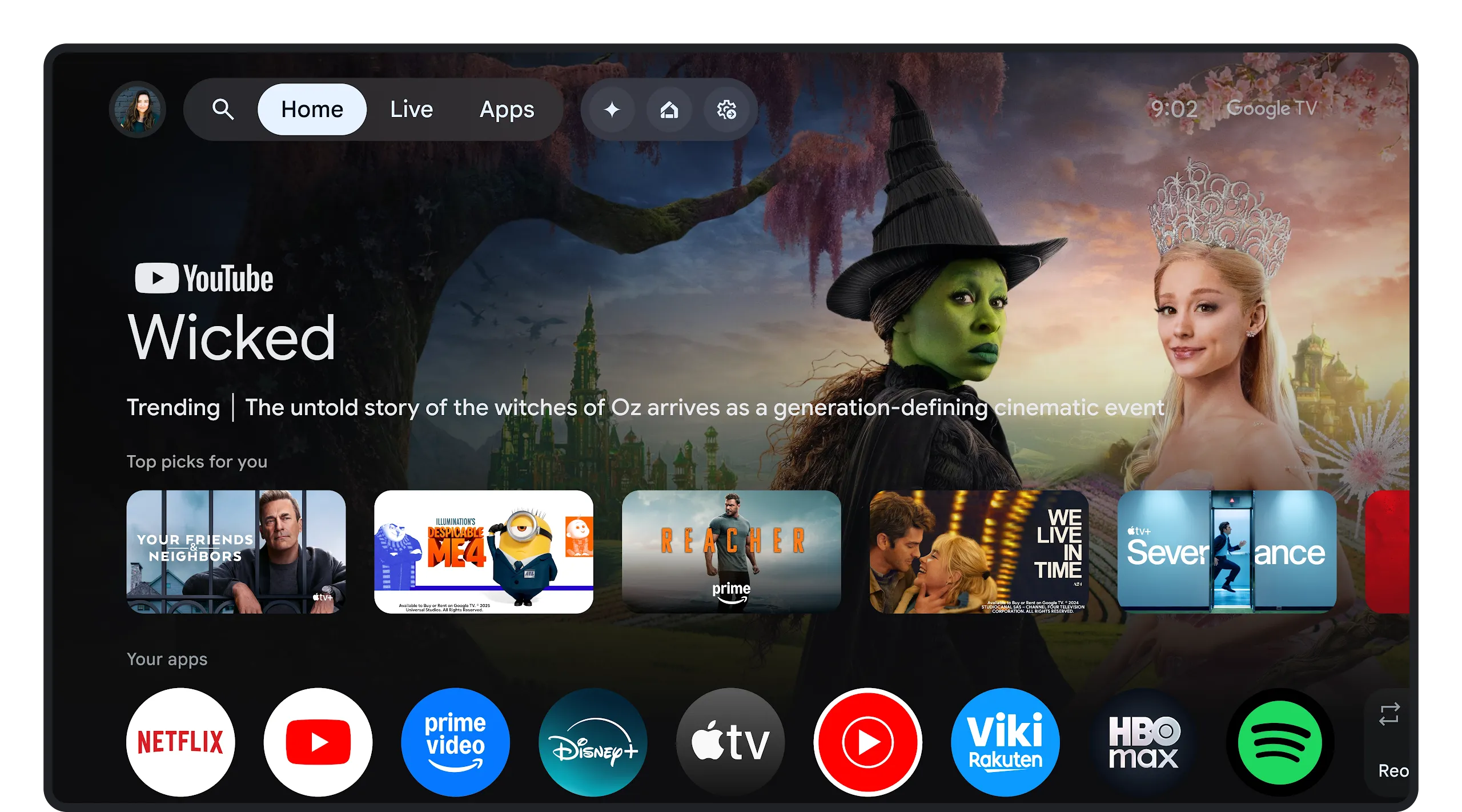
Google TV is Google’s smart TV platform that provides a personalized interface for discovering, organizing, and streaming movies, TV shows, live television, and other entertainment. Rather than functioning as a streaming service itself, Google TV acts as a central hub that brings together content from many supported streaming apps into one easy-to-use experience.
Instead of opening one app after another to search for something to watch, Google TV displays recommendations from multiple streaming services on a single home screen. This saves time and makes discovering new content much easier.
Google officially introduced Google TV in 2020 as a modern evolution of Android TV. Although it is built on the Android TV operating system, Google TV focuses much more on content discovery, personalization, and user experience.
Google TV Is Not a Streaming Service
One of the biggest misconceptions is that Google TV is another streaming platform like Netflix or Disney+.
It is not.
Google TV does not create movies or television shows, nor does it require a separate subscription to access its interface. Instead, it organizes content from compatible streaming services that you already subscribe to.
For example, if you have subscriptions to Netflix, Prime Video, Disney+, or other supported services, Google TV can recommend content from those apps and make it easier to find something interesting to watch.
Think of Google TV as a smart librarian who knows your preferences and helps you find the right movie without making you search every shelf yourself.
How Google TV Works
Google TV collects information from your installed streaming apps, your viewing habits, your watchlist, and your preferences to create a personalized entertainment experience.
When you turn on your television, instead of seeing rows of separate apps, you see recommended movies, TV series, documentaries, and live programming selected specifically for you.
If you begin watching a series on one device, Google TV can often help you continue where you left off on another compatible device, depending on the streaming service.
The interface is designed to reduce the amount of time spent searching and increase the time spent enjoying entertainment.
The Difference Between Google TV and Android TV
Because Google TV is built on Android TV, many people assume they are identical. While they share the same underlying operating system, their user experiences are different.
Android TV primarily organizes content around applications. Users typically open Netflix, YouTube, or another app first before browsing for content.
Google TV shifts the focus away from apps and toward the content itself. Movies and shows from multiple services appear together on the home screen, making recommendations more personalized and easier to explore.
You can think of Android TV as providing the foundation, while Google TV adds a smarter and more visually engaging interface on top of it.
Many newer televisions now come with Google TV pre-installed instead of the older Android TV interface.
Which Devices Use Google TV?
Google TV is available on a growing number of devices from various manufacturers.
Many smart televisions from companies such as Sony, TCL, Hisense, Philips, and others include Google TV as their built-in platform. Availability can vary depending on the model and region.
Google also offers dedicated streaming devices that can bring Google TV to televisions that do not already have smart features. These devices connect through an HDMI port and provide access to the Google TV interface without requiring a new television.
As the platform continues to expand, more television manufacturers are adopting Google TV for their latest smart TV models.
The Home Screen Experience
The first thing most users notice is the clean and personalized home screen.
Rather than presenting a simple collection of app icons, Google TV immediately displays entertainment recommendations based on your interests.
The interface can include recently released movies, popular television series, documentaries, children’s programming, live sports where supported, and content you’ve saved for later.
Because recommendations come from multiple supported services, users spend less time switching between apps.
The overall experience feels more like browsing a personalized entertainment magazine than navigating a traditional television menu.
Personalized Recommendations
One of Google TV’s biggest strengths is its recommendation system.
The platform uses information such as your viewing history, ratings, watchlist, and preferences to suggest content that matches your interests.
For example, someone who enjoys science documentaries may receive recommendations for space exploration, wildlife films, or educational programming. Someone who frequently watches action movies may see the latest thrillers or adventure series.
Recommendations become more accurate over time as Google TV learns your viewing habits.
This personalization helps viewers discover movies and shows they might otherwise never find.
Your Watchlist Follows You
Google TV includes a watchlist feature that makes it easy to save interesting content for later.
If you discover a movie while browsing on your phone, tablet, or computer, you can often add it to your Google TV watchlist. Later, when you turn on your television, that saved content is waiting for you.
This synchronization across compatible Google services makes planning future viewing much more convenient.
Google Assistant Integration
Google TV works closely with Google Assistant.
Instead of manually typing search terms using a remote control, users can simply speak.
You can ask Google Assistant to find comedy movies, science fiction shows, documentaries about nature, family films, or even specific actors and directors.
Voice search is often faster than navigating on-screen keyboards, especially when searching across many streaming services simultaneously.
Google Assistant can also answer general questions, provide weather updates, control compatible smart home devices, and perform many other helpful tasks directly from your television.
Live TV Integration
In many regions, Google TV supports live television integration through compatible providers and services.
Rather than separating live channels from streaming content, Google TV can display them alongside on-demand entertainment.
Depending on your location and subscriptions, this creates a more unified television experience where traditional broadcasting and streaming coexist in one interface.
The exact live TV features vary by country, device, and service provider.
Apps Available on Google TV
Because Google TV is built on Android TV, it supports a large collection of applications available through the Google Play Store.
Users can download entertainment apps, music services, educational software, fitness programs, gaming apps, news applications, and many other types of software.
Popular streaming services are generally available, although availability may differ depending on regional licensing agreements.
This flexibility allows users to customize their entertainment experience according to their interests.
Gaming on Google TV
Google TV is not designed to compete with dedicated gaming consoles, but it still supports casual gaming.
Many Android-compatible games can be downloaded directly from the Google Play Store.
Some users also connect Bluetooth game controllers for a more comfortable gaming experience.
Cloud gaming services may also be available on supported devices, depending on regional availability and service compatibility.
Smart Home Controls
Google TV can become part of a larger smart home ecosystem.
Compatible smart lights, security cameras, thermostats, speakers, and other connected devices can often be controlled through Google Assistant.
For example, you might dim the lights before starting a movie or check a compatible smart doorbell camera without leaving your television screen.
This integration helps create a more connected and convenient home environment.
User Profiles for the Whole Family
Many households include viewers with very different tastes.
Google TV allows multiple user profiles so each family member can receive personalized recommendations.
Children can have dedicated profiles with age-appropriate content and parental controls.
Adults receive recommendations based on their own viewing habits rather than those of the entire household.
This makes the platform more useful for families with diverse interests.
Privacy and Personalization
Because Google TV offers personalized recommendations, it processes certain information about viewing preferences and account activity.
Users can manage many privacy settings through their Google account, including activity history, recommendation preferences, and personalization options.
Google also provides tools that allow users to review, modify, or delete certain activity data.
Understanding and adjusting these privacy settings helps users control how personalized their entertainment experience becomes.
Internet Connection Requirements
Google TV relies heavily on an internet connection.
Streaming movies, downloading apps, receiving recommendations, and accessing cloud-based services all require internet access.
A faster and more stable broadband connection generally provides smoother streaming, especially when watching high-definition or 4K content.
While some downloaded content or local media can be viewed without internet access, many Google TV features depend on being online.
Does Google TV Support 4K and HDR?
Many Google TV devices support modern video technologies such as 4K Ultra HD, High Dynamic Range (HDR), Dolby Vision, and Dolby Atmos.
These technologies can provide sharper images, improved color accuracy, greater contrast, and more immersive sound when used with compatible televisions and streaming services.
However, actual performance depends on the specific hardware, the content being streamed, and the capabilities of your television.
Regular Software Updates
One advantage of Google TV is that it receives ongoing software improvements.
Updates may introduce new features, improve performance, strengthen security, fix bugs, and expand compatibility with new streaming services.
Keeping the device updated helps ensure the best possible viewing experience.
Who Should Consider Google TV?
Google TV is especially appealing for people who subscribe to multiple streaming services and want a simpler way to find content.
It also benefits users who already use other Google products, such as Android smartphones, Google Assistant, Google Photos, or smart home devices.
Families appreciate its personalized profiles, while movie enthusiasts enjoy its intelligent recommendations.
Even people who are not particularly comfortable with technology often find the interface easy to understand because it emphasizes content rather than complicated menus.
The Future of Google TV
Streaming continues to evolve rapidly, and Google TV is evolving with it.
Artificial intelligence is expected to make recommendations increasingly accurate, helping viewers discover content that better matches their interests. Improved voice recognition, deeper smart home integration, and expanded support for live television are also likely to enhance the platform over time.
As more entertainment shifts from traditional broadcasting to internet streaming, platforms like Google TV are becoming central to how people watch television.
Final Thoughts
Google TV is much more than a smart television interface. It is Google’s vision of a simpler, more personalized entertainment experience that brings together content from many streaming services into one organized home screen. By combining intelligent recommendations, powerful search capabilities, Google Assistant integration, and support for thousands of apps, it transforms the way people discover and enjoy movies, television shows, and other digital entertainment.
Rather than replacing your favorite streaming services, Google TV helps them work together more seamlessly. Whether you’re searching for a blockbuster movie, a new documentary, a children’s cartoon, or a classic television series, Google TV aims to spend less time helping you search and more time helping you watch.