Have you ever wondered how a tiny device plugged into your TV can instantly play a YouTube video, stream a Netflix movie, or display photos from your phone without filling your phone’s storage or constantly mirroring its screen? It can feel almost magical. With just a tap, your favorite content appears on the biggest screen in your home while your phone remains free to answer calls, send messages, or browse the web.
That magic is made possible by Chromecast, one of Google’s most successful streaming technologies. Behind its simple design lies a clever combination of wireless networking, cloud computing, internet streaming, and modern communication protocols. Rather than acting like a traditional media player, Chromecast works more like a smart messenger that tells your television exactly where to find content on the internet.
Understanding how Chromecast works reveals not only why it is so convenient but also why it has become a popular choice for millions of households around the world.
What Is Chromecast?
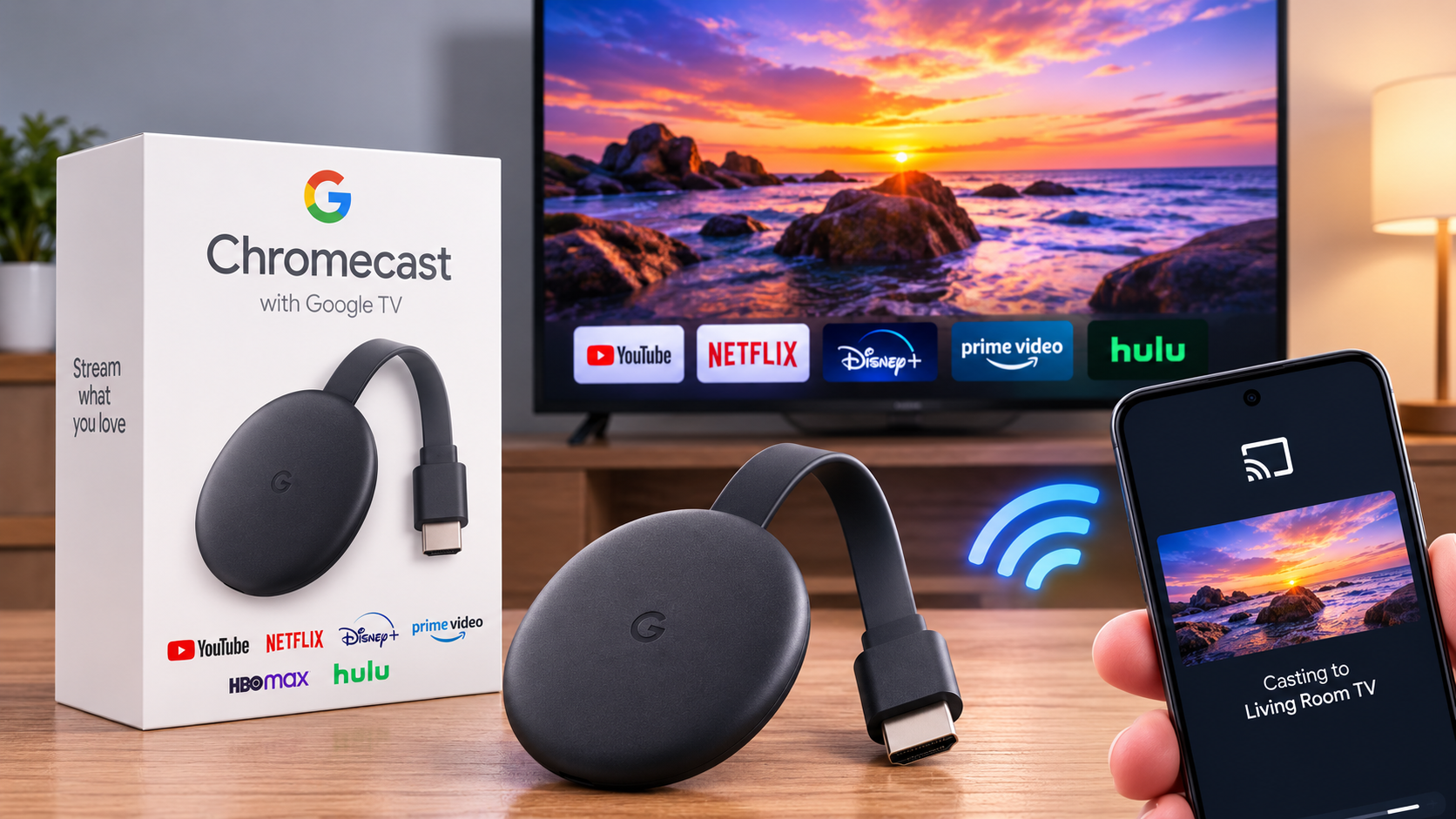
Chromecast is a digital media streaming device developed by Google that allows televisions, monitors, and projectors with an HDMI port to stream audio and video content from the internet.
Most Chromecast devices are small enough to fit comfortably in the palm of your hand. They plug directly into an HDMI port on a display and connect to your home Wi-Fi network. Once connected, they can stream movies, television shows, music, podcasts, games, presentations, and even web pages from compatible apps.
Unlike older media players that stored files locally, Chromecast is designed primarily to stream content directly from online services.
Why Chromecast Is Different From Screen Mirroring
Many people believe Chromecast simply copies everything shown on a phone or laptop screen. While Chromecast can mirror a screen when needed, that is not how it usually works.
Instead, Chromecast uses a technology called casting.
Imagine using your phone as a TV remote rather than as the movie player itself. When you tap the Cast button in an app like YouTube, your phone doesn’t continuously send the video to the television. Instead, it sends a small instruction to the Chromecast, telling it where the video is located on the internet.
The Chromecast then connects directly to the streaming service and plays the video on its own.
This approach makes streaming smoother, reduces battery usage on your phone, and allows you to continue using your device for other tasks.
The Hardware Inside Chromecast
Although Chromecast is small, it contains surprisingly capable hardware.
Inside the device is a processor that handles operating tasks, decodes video streams, and runs supported applications. Memory temporarily stores information while streaming, while internal storage contains the operating system and essential software.
Chromecast also includes a Wi-Fi radio that connects to wireless networks and an HDMI interface that sends high-quality video and audio to the television.
Some newer Chromecast models also include Bluetooth hardware, allowing accessories such as remote controls, keyboards, headphones, or game controllers to connect wirelessly.
Despite its compact size, Chromecast functions as a miniature computer optimized specifically for media streaming.
Connecting Chromecast to Your TV
Setting up Chromecast is designed to be straightforward.
After plugging the device into an HDMI port and connecting it to power, it starts searching for a Wi-Fi network.
Using the Google Home app, you connect Chromecast to your home’s wireless network and link it to your Google account if desired.
Once connected, Chromecast remains available whenever both it and your casting device are on the same Wi-Fi network.
From then on, compatible apps can automatically discover the Chromecast and display the familiar Cast icon.
The Importance of Wi-Fi
Wi-Fi is the heart of Chromecast’s operation.
Unlike traditional DVD players or cable boxes that receive signals through dedicated connections, Chromecast relies almost entirely on your wireless network.
Every instruction sent from your phone, tablet, or computer travels through Wi-Fi.
Every movie, song, or television show streamed by Chromecast also travels through the internet over Wi-Fi.
Because high-definition and 4K video require large amounts of data, a fast and stable wireless connection significantly improves streaming quality.
If the Wi-Fi signal becomes weak, buffering, lower video quality, or interruptions may occur.
What Happens When You Press the Cast Button?
Pressing the Cast button starts a fascinating sequence of events that usually takes only a few seconds.
First, your phone discovers Chromecast on the local Wi-Fi network using networking technologies that allow compatible devices to find one another automatically.
Next, your phone sends Chromecast information about the selected content, including where it is stored online.
Chromecast then contacts the streaming service directly through the internet.
After confirming that it has permission to access the content, the streaming service begins sending video or audio directly to the Chromecast.
Finally, Chromecast decodes the incoming data and displays the video on your television while sending synchronized sound through the TV speakers or connected audio system.
Throughout this process, your phone acts mainly as a controller rather than the source of the media stream.
Why You Can Still Use Your Phone While Streaming
One of Chromecast’s greatest advantages is that your phone is not responsible for continuously transmitting the movie.
Once playback begins, Chromecast independently receives data from the streaming service.
This means you can lock your phone, browse social media, answer phone calls, send messages, or even leave the room without interrupting the video.
Only playback commands such as pause, play, rewind, or volume adjustments continue passing through your phone.
This design also helps preserve battery life since your device is not constantly processing high-resolution video.
How Chromecast Streams Video
Streaming is the continuous delivery of digital media over the internet without requiring the entire file to download first.
Instead of waiting for a complete movie to arrive, Chromecast receives small portions of the video one after another.
It stores a temporary reserve of data known as a buffer.
As long as new data arrives quickly enough, playback appears perfectly smooth.
If the internet connection slows dramatically, the buffer may empty faster than it refills, causing the familiar buffering symbol while Chromecast waits for additional data.
How Chromecast Delivers High Video Quality
Modern Chromecast devices support impressive picture quality.
Depending on the specific model, they can stream content in Full HD, 4K Ultra HD, and High Dynamic Range (HDR), including formats such as HDR10, HDR10+, Dolby Vision, and Hybrid Log-Gamma (HLG), provided that the television, streaming service, and content also support those formats.
Video quality automatically adjusts according to internet speed.
When bandwidth is plentiful, Chromecast streams at higher resolutions with greater detail.
If network conditions worsen, it can temporarily lower the video quality to keep playback smooth.
This adaptive streaming technology helps minimize interruptions.
How Chromecast Handles Audio
Chromecast streams audio separately but in perfect synchronization with video.
It supports modern digital audio formats that deliver clear, high-quality sound.
If connected to compatible equipment, Chromecast can output surround sound formats that create an immersive listening experience for movies and television shows.
The device carefully keeps audio and video synchronized so speech matches lip movement on screen.
How Chromecast Uses the Internet
Unlike a television antenna or cable receiver, Chromecast depends heavily on internet services.
When you watch a movie, Chromecast contacts the streaming provider’s servers.
Those servers deliver compressed digital data through the internet.
Chromecast receives the data, decompresses it using specialized hardware, and converts it into images and sound displayed on your television.
Because much of the processing occurs on remote servers and within the Chromecast itself, your phone performs very little work after playback begins.
The Science Behind Video Compression
Streaming an uncompressed movie would require enormous amounts of data.
A single high-quality film could occupy hundreds of gigabytes if every frame were transmitted without compression.
To solve this problem, streaming services use sophisticated video compression algorithms.
These algorithms remove unnecessary information while preserving visual quality.
For example, if a background remains unchanged for several seconds, the system only needs to transmit the parts of the image that change rather than every pixel in every frame.
Chromecast decodes these compressed video streams in real time, allowing smooth playback without overwhelming internet connections.
Modern Chromecast models support advanced video codecs such as H.264, H.265 (HEVC), VP9, and AV1, depending on the device generation.
How Apps Communicate With Chromecast
Apps like YouTube, Netflix, Disney+, Spotify, and many others include built-in support for Google’s casting technology.
When you press the Cast button, the app communicates with Chromecast using standardized network protocols.
The app tells Chromecast exactly what content to play and provides any necessary authentication information.
Once playback starts, Chromecast continues communicating directly with the streaming service while the app remains available for playback controls.
This efficient division of responsibilities is one reason Chromecast performs so well.
Screen Mirroring Explained
Sometimes you may want to display something that is not available through a supported app.
In these situations, Chromecast can mirror your phone, tablet, or computer screen.
Unlike casting, screen mirroring continuously captures your device’s display, compresses each frame, sends it across Wi-Fi, and reproduces it on the television.
Because your device performs all the processing, mirroring usually consumes more battery power and may introduce a slight delay.
For videos, direct casting generally produces better quality and smoother playback than screen mirroring.
Chromecast With Google TV
Later generations of Chromecast introduced an important evolution.
Instead of relying entirely on casting from another device, Chromecast with Google TV includes its own operating system and user interface.
Users can browse streaming services directly on the television using a remote control.
Apps can be installed directly onto the Chromecast itself.
Even so, casting remains fully supported, allowing phones and tablets to continue sending content to the device whenever desired.
This combination provides both traditional streaming-box functionality and Google’s convenient casting technology.
Security and Privacy
Chromecast includes several security features to help protect users.
Devices on the same Wi-Fi network can discover Chromecast, but sensitive communications are encrypted during streaming.
Many streaming services also use encrypted internet connections to protect video and account information while content travels across the network.
Google regularly releases software updates that improve security, fix bugs, and enhance compatibility with new services.
Keeping Chromecast updated helps maintain both performance and protection.
Why Chromecast Needs Internet Access
Although Chromecast can display some locally shared content, its primary purpose is internet streaming.
Most popular entertainment services store their movies, music, and television shows on remote servers rather than inside the Chromecast.
Without internet access, the device cannot reach these online libraries.
However, if supported by compatible apps, Chromecast can also cast locally stored photos, videos, and presentations from devices connected to the same network.
Common Reasons Chromecast May Not Work
Occasionally Chromecast may fail to appear in the Cast menu or experience playback problems.
The most common cause is that the phone and Chromecast are connected to different Wi-Fi networks.
Weak wireless signals can also interrupt communication.
Outdated software, temporary network issues, incompatible apps, or restrictions on public or hotel Wi-Fi networks may prevent successful casting.
Restarting the Chromecast, the router, or the casting device often resolves temporary issues.
How Chromecast Continues to Improve
Chromecast has evolved significantly since its introduction.
Newer models offer faster processors, improved wireless performance, better video quality, support for more advanced codecs, richer audio formats, and smarter software.
At the same time, internet infrastructure continues to improve around the world, enabling smoother streaming at higher resolutions with lower latency.
As streaming technology advances, Chromecast continues adapting to new standards while maintaining the simple casting experience that made it popular.
The Technology That Quietly Changed Home Entertainment
Chromecast demonstrates how sophisticated technology can become almost invisible when designed well. Instead of requiring complicated cables, large media libraries, or powerful hardware in your hands, it quietly coordinates your phone, Wi-Fi network, cloud services, and television into a seamless entertainment system.
Behind every tap of the Cast button is a carefully orchestrated process involving wireless communication, internet protocols, cloud streaming, video compression, and real-time decoding. These technologies work together so efficiently that users rarely notice the complexity beneath the surface.
What feels like a simple click is actually the result of decades of advances in computer science, networking, digital media, and engineering. Chromecast turns those innovations into an experience that feels effortless—bringing movies, music, games, presentations, and memories from the internet to the biggest screen in your home with remarkable speed and simplicity.