A fast internet connection is only as good as the Wi-Fi that delivers it. You may pay for a high-speed broadband plan, but if your Wi-Fi signal struggles to reach every room, streaming buffers, video calls freeze, and online games become frustrating. This is where the choice between a traditional router and a mesh Wi-Fi system becomes important.
For years, a single wireless router was enough for most homes. But today’s households are filled with internet-connected devices. Smartphones, laptops, smart TVs, gaming consoles, security cameras, voice assistants, tablets, and smart home gadgets all compete for wireless bandwidth. Larger homes and modern building materials can also weaken Wi-Fi signals, creating frustrating “dead zones.”
Mesh Wi-Fi systems were developed to solve these problems. Instead of relying on a single router, they use multiple devices working together to create one seamless wireless network that covers a much larger area.
But does that mean mesh Wi-Fi is always the better choice? Not necessarily. Traditional routers remain an excellent solution for many homes and often provide outstanding performance at a lower cost.
Understanding the differences between these two technologies can help you choose the right Wi-Fi system for your needs and budget.
What Is a Traditional Wi-Fi Router?
A traditional router is the central device that connects your home network to the internet provided by your Internet Service Provider (ISP). It receives internet access through a modem or a built-in modem-router combination and broadcasts a wireless signal throughout your home.
Every Wi-Fi-enabled device connects directly to this single router.
The router acts as the traffic manager of your network. It decides where data should go, assigns local IP addresses to connected devices, manages security, and allows multiple devices to share one internet connection.
Traditional routers are available in many different performance levels, from inexpensive basic models to powerful Wi-Fi 7 gaming routers with multiple antennas and advanced networking features.
What Is Mesh Wi-Fi?
A mesh Wi-Fi system takes a different approach.
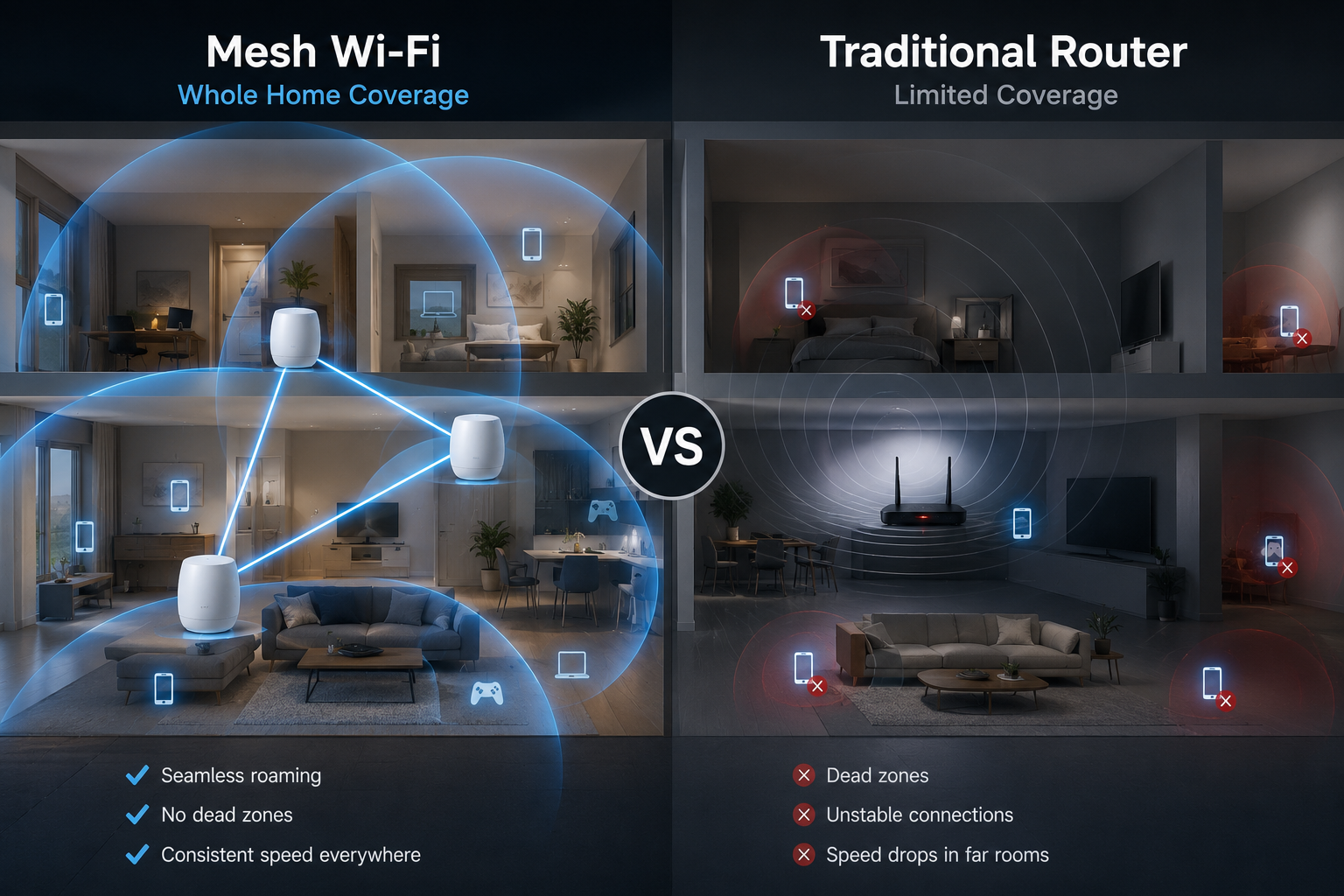
Instead of depending on one router to cover an entire home, a mesh system uses multiple devices called nodes or satellites. One node connects to your modem, while the others are placed throughout the house.
These nodes communicate with one another to create a single, unified wireless network.
Rather than broadcasting separate Wi-Fi networks, every node shares the same network name (SSID) and password. Your phone, laptop, or tablet automatically connects to whichever node provides the strongest signal as you move around your home.
This creates a seamless wireless experience without requiring users to manually switch between networks.
How Traditional Routers Work
Imagine placing a bright lamp in the center of a room.
The closer you stand to the lamp, the brighter the light appears. As you move farther away, the light becomes weaker.
A traditional Wi-Fi router behaves similarly.
Its wireless signal spreads outward in all directions. The farther your device is from the router, the weaker the signal becomes. Walls, ceilings, furniture, mirrors, metal objects, and appliances further reduce signal strength.
If your router is located in one corner of a large house, the rooms on the opposite side may receive only a weak signal—or none at all.
How Mesh Wi-Fi Works
Mesh Wi-Fi solves this problem by placing multiple wireless access points around your home.
Instead of one lamp trying to illuminate an entire house, imagine placing several lamps throughout the building.
Each node extends wireless coverage into nearby rooms.
When you walk through the house while watching a video or making a video call, your phone automatically switches to the closest node without interrupting the connection.
This process is called seamless roaming.
From your perspective, the entire house appears to have one continuous Wi-Fi network.
Coverage Area
Coverage is the biggest difference between these two technologies.
Traditional routers work best in apartments, small homes, and open floor plans where one device can easily reach every room.
However, large homes present greater challenges.
Multiple floors, thick concrete walls, brick construction, steel framing, and long hallways can all reduce Wi-Fi performance.
Mesh Wi-Fi systems are specifically designed for these environments.
Because each node rebroadcasts the network, coverage expands significantly.
Instead of trying to force one router to cover an entire property, mesh systems spread the workload across multiple devices.
For homes larger than about 2,000 square feet (roughly 185 square meters), mesh Wi-Fi often provides much more consistent coverage than a single router, although the exact benefit depends on the home’s layout and construction materials.
Wi-Fi Dead Zones
Many households experience Wi-Fi dead zones.
These are areas where the wireless signal becomes weak or disappears completely.
Common locations include upstairs bedrooms, garages, basements, patios, home offices, and rooms separated by thick walls.
Traditional routers cannot always eliminate these weak spots.
Mesh Wi-Fi is specifically designed to reduce or eliminate dead zones by placing additional nodes where stronger coverage is needed.
Roaming Between Rooms
Suppose you’re watching a movie on your phone while walking from the living room to an upstairs bedroom.
With a traditional router, your phone remains connected to that router until the signal becomes very weak. Sometimes the device may “stick” to the distant router longer than ideal, resulting in slower speeds or a brief interruption before reconnecting.
Mesh systems are designed to hand devices off between nearby nodes more smoothly. Many support standards such as 802.11k, 802.11v, and 802.11r, which help compatible devices discover and transition to better access points more efficiently. The exact experience still depends on the capabilities of both the mesh system and the client device.
This creates a much smoother experience during video calls, online gaming, and streaming.
Installation and Setup
Traditional routers usually require users to configure wireless settings through a web browser or mobile app.
Many modern routers have become easier to install, but advanced settings can still be intimidating for beginners.
Mesh systems are designed with simplicity in mind.
Most manufacturers provide smartphone apps that guide users step by step through installation.
Adding additional nodes usually takes only a few minutes.
The app often recommends the best locations for each node to maximize coverage.
Network Management
Modern networking has become much easier than it was a decade ago.
Most mesh systems include intuitive mobile apps that allow users to monitor connected devices, pause internet access, create guest networks, update firmware automatically, and perform speed tests.
Traditional routers increasingly offer similar features, especially premium models, though the quality and ease of use vary by manufacturer.
Some advanced routers provide more detailed configuration options than mesh systems, making them attractive to experienced users.
Speed Performance
Many people assume mesh Wi-Fi is always faster.
This is a common misconception.
When sitting close to a high-quality traditional router, it may actually provide equal or even better speeds than a similarly priced mesh system.
The main advantage of mesh Wi-Fi is not maximum speed—it is consistent speed throughout the home.
In large houses, users connected to distant rooms often receive much faster speeds from a nearby mesh node than they would from a single router located far away.
The design of the mesh system also matters. Some use a dedicated wireless or wired “backhaul” connection between nodes, while others share wireless capacity for both client devices and communication between nodes. Dedicated or wired backhaul can help preserve higher speeds across the network.
Latency
Latency refers to the delay before data begins traveling across a network.
Lower latency is especially important for online gaming, video conferencing, and real-time communication.
When connected directly to a router, latency differences between high-quality routers and mesh systems are usually small.
However, each wireless hop between mesh nodes can introduce a slight increase in latency, especially if the nodes communicate wirelessly rather than through Ethernet cables.
In most homes, this difference is small enough that users will not notice it during everyday internet use.
Capacity for Multiple Devices
Modern homes may contain dozens of connected devices.
Even if some devices are idle, they still communicate with the network periodically.
Traditional routers can support many devices, but performance depends on the router’s hardware, Wi-Fi standard, and overall network demand.
Mesh systems distribute wireless connections across multiple nodes.
This can improve overall performance in busy households where devices are spread across different rooms.
Rather than having every device compete for one router’s signal, nearby devices communicate with the closest node.
Wi-Fi Standards
Both traditional routers and mesh systems use the same Wi-Fi standards.
Older equipment may support Wi-Fi 4 (802.11n).
Many current devices use Wi-Fi 5 (802.11ac) or Wi-Fi 6 (802.11ax).
Newer premium models increasingly support Wi-Fi 6E or Wi-Fi 7, which offer higher speeds, improved efficiency, and, in the case of Wi-Fi 6E and Wi-Fi 7, access to the 6 GHz band where available.
The Wi-Fi standard often has a greater impact on performance than whether the system is mesh or traditional.
Security
Security is essential regardless of which system you choose.
Modern routers and mesh systems commonly support WPA3 encryption, although some older models may still rely on WPA2.
Automatic firmware updates are particularly valuable because they help patch newly discovered security vulnerabilities.
Strong passwords, updated software, and enabling the latest available security features are important for protecting your network.
Wired Connections
Traditional routers usually include several Ethernet ports for wired devices.
These connections provide maximum speed and minimal latency.
Many mesh systems also include Ethernet ports, although some smaller nodes may have only one or two.
Some advanced mesh systems support wired backhaul, where Ethernet cables connect nodes instead of relying on wireless communication.
This can significantly improve performance.
Smart Home Compatibility
Smart homes continue to grow in popularity.
Doorbells, security cameras, smart speakers, thermostats, lights, appliances, and sensors all depend on stable Wi-Fi.
Mesh Wi-Fi often performs especially well in these environments because it provides stronger coverage across an entire property.
Devices installed outdoors or in distant rooms are more likely to maintain reliable connections.
Cost
Price is another major difference.
Traditional routers are generally less expensive.
A high-quality standalone router often costs significantly less than a complete mesh Wi-Fi system.
Mesh systems require multiple nodes, increasing manufacturing costs.
Premium mesh systems with three or more nodes can be considerably more expensive than even high-end routers.
For small homes where a single router already provides excellent coverage, purchasing a mesh system may offer little practical benefit.
Which Homes Benefit Most from Traditional Routers?
Traditional routers remain an excellent choice for many situations.
Small apartments, condos, and modest-sized homes often receive excellent coverage from one well-placed router.
Users who primarily connect near the router may experience outstanding performance.
People who enjoy advanced networking features, manual configuration, VPN servers, custom firmware, or gaming optimizations may also prefer a traditional router.
For many households, a modern Wi-Fi 6 or Wi-Fi 7 router provides all the performance they need.
Which Homes Benefit Most from Mesh Wi-Fi?
Mesh systems shine in larger or more complex environments.
Multi-story homes, houses with thick walls, long floor plans, detached garages, finished basements, and outdoor entertainment areas often benefit greatly from multiple nodes.
Families with many connected devices spread throughout the home are also likely to notice more consistent coverage.
If members of the household frequently move around while streaming, making video calls, or working remotely, seamless roaming can provide a noticeably smoother experience.
Can You Mix the Two?
Yes.
Some users keep a traditional router but add separate wireless access points connected by Ethernet cables.
This approach can deliver excellent performance in homes that already have network wiring.
Others use a traditional router together with Wi-Fi extenders. While extenders can increase coverage, they often create separate networks or reduce performance more than a properly designed mesh system.
Choosing the right solution depends on your home’s layout, budget, and networking needs.
Common Myths About Mesh Wi-Fi
One common myth is that mesh Wi-Fi automatically makes your internet faster.
In reality, a mesh system cannot increase the speed of your internet service. If your ISP provides a 300 Mbps connection, your mesh network cannot magically turn it into a 1 Gbps connection.
Instead, mesh helps deliver more consistent speeds across your home by improving wireless coverage.
Another misconception is that traditional routers are outdated.
Modern routers remain highly capable and continue to improve with each new generation of Wi-Fi technology.
Many offer exceptional speed, security, and advanced networking features.
The Future of Home Wi-Fi
Home networking continues to evolve rapidly.
Wi-Fi 7 introduces technologies such as Multi-Link Operation (MLO), wider channels, and more efficient data transmission, allowing compatible devices to achieve higher throughput and lower latency under suitable conditions.
Artificial intelligence is also beginning to influence home networking.
Some routers and mesh systems can automatically optimize channels, prioritize important traffic, detect interference, and adjust performance based on network conditions.
As internet-connected devices continue to multiply, reliable whole-home Wi-Fi will become increasingly important.
Final Thoughts
Choosing between a mesh Wi-Fi system and a traditional router is not about determining which technology is universally better. It is about selecting the solution that best matches your home, your internet habits, and your expectations.
A traditional router is often the ideal choice for smaller homes, apartments, or anyone seeking strong performance at a lower cost. It can deliver excellent speeds, robust security, and advanced features when placed in a good central location.
A mesh Wi-Fi system, on the other hand, is designed to solve one of the biggest frustrations in home networking: inconsistent wireless coverage. By using multiple nodes that work together as a single network, it helps eliminate dead zones and provides a more reliable connection throughout larger or more complex homes.
Ultimately, the best Wi-Fi experience comes from combining the right equipment with thoughtful placement, up-to-date security, and a network that matches the way you live. Whether you choose a traditional router or a mesh system, understanding how each works allows you to build a home network that keeps every device connected smoothly, reliably, and ready for the demands of today’s digital world.