If you’ve ever searched for a charging cable and wondered why one connector fits perfectly while another doesn’t, you’ve already experienced the difference between USB-C and USB-A. These two connectors may look like small pieces of plastic and metal, but they represent two very different generations of technology.
For decades, USB-A was the familiar port found on computers, game consoles, televisions, and countless electronic devices. It became one of the most recognizable connectors in the world. Then came USB-C—a smaller, smarter, and much more powerful connector designed to meet the demands of modern technology.
Today, smartphones, laptops, tablets, external storage drives, cameras, monitors, and even gaming devices are increasingly adopting USB-C. As more manufacturers move away from older ports, many people wonder whether USB-A is becoming obsolete and whether USB-C is truly better.
The answer is more interesting than a simple yes or no. While USB-C offers significant technological advantages, USB-A still plays an important role in millions of devices around the world.
Understanding the differences between these two connectors can help you choose the right cable, avoid compatibility problems, and prepare for the future of digital connectivity.
What Is USB?
USB stands for Universal Serial Bus, a communication standard introduced in the mid-1990s to simplify how computers connect with external devices.
Before USB became common, computers used many different types of ports for keyboards, mice, printers, storage devices, and other accessories. Each device often required its own connector, making computers complicated to use.
USB changed everything by providing a universal connection capable of transferring data and delivering electrical power through a single cable.
Over the years, USB technology has evolved dramatically. Data transfer speeds have increased from a few megabits per second to tens of gigabits per second. Charging power has grown from just a few watts to hundreds of watts. Alongside these improvements, connector designs have also evolved, leading from USB-A to USB-C.
What Is USB-A?
USB-A, often called Type-A, is the original rectangular USB connector that most people recognize instantly.
For more than two decades, USB-A became the standard port on desktop computers, laptops, televisions, printers, game consoles, routers, and countless other devices.
One of USB-A’s defining characteristics is its rectangular shape. Because the connector has a fixed orientation, users must insert it correctly. Nearly everyone has experienced trying to plug in a USB-A cable upside down, flipping it over, and sometimes still getting it wrong before it finally fits.
Despite this small frustration, USB-A proved to be remarkably durable and reliable. It became one of the most successful connector designs in computing history.
Even today, millions of devices continue to use USB-A because it remains compatible with older hardware.
What Is USB-C?
USB-C, officially known as USB Type-C, is the newest major USB connector designed to replace older USB connectors over time.
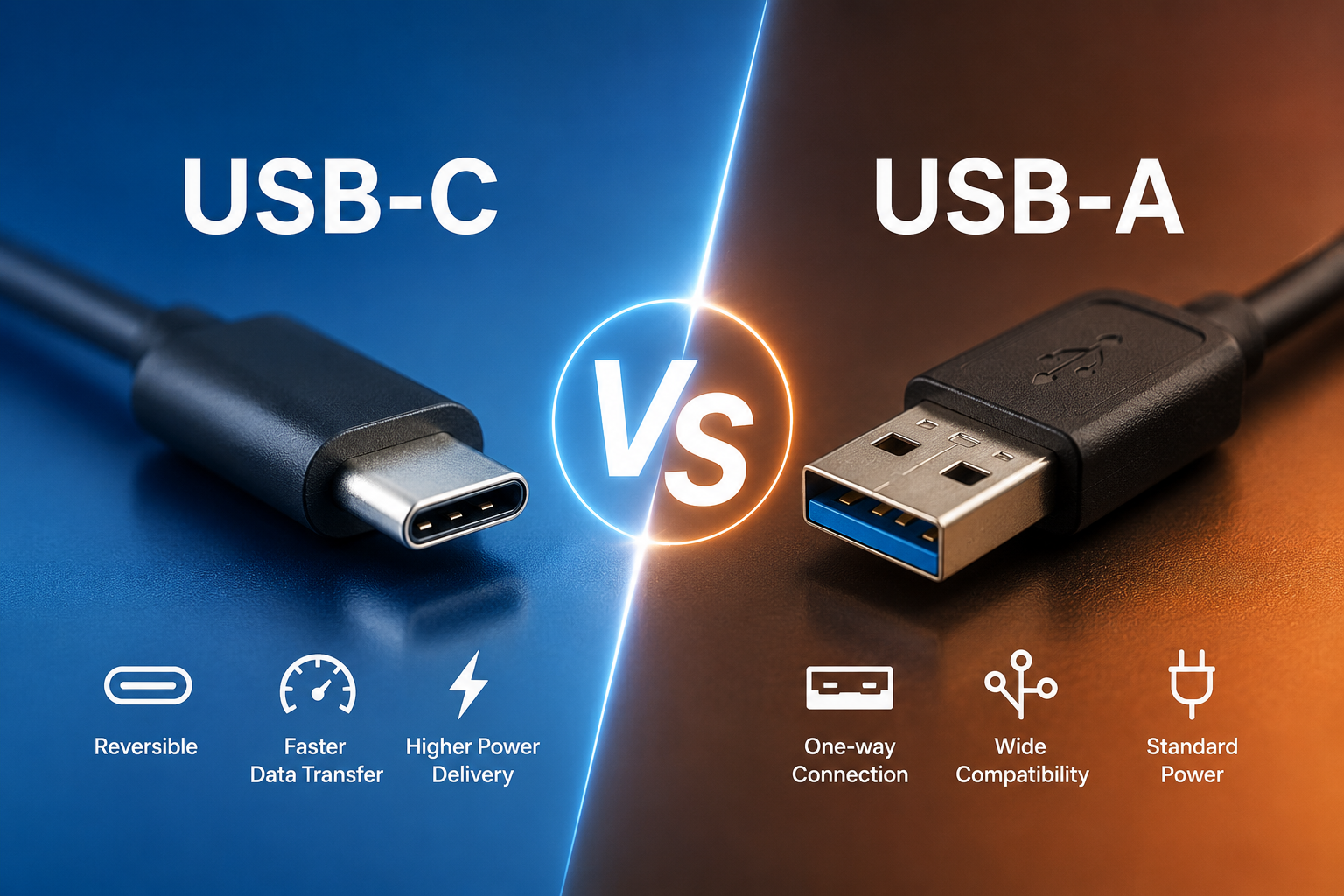
Unlike USB-A, USB-C features a small, symmetrical oval shape. It can be inserted in either direction, eliminating the need to check which side is facing up.
This reversible design is one of USB-C’s most appreciated features. Whether you’re charging a phone in the dark or connecting a laptop during a busy workday, the cable simply works regardless of orientation.
However, USB-C is much more than a convenient connector. It was designed to support faster data transfer, higher power delivery, advanced video output, and multiple communication protocols through a single compact port.
Because of these capabilities, USB-C is rapidly becoming the universal connector for modern electronics.
The Biggest Difference: Connector Design
The easiest way to distinguish USB-A from USB-C is by looking at their shapes.
USB-A has a large rectangular connector with only one correct insertion direction.
USB-C is smaller, thinner, and completely reversible.
This difference may appear minor, but it significantly improves everyday usability. Reversible connectors reduce wear caused by incorrect insertion attempts and make devices easier to use.
The compact size of USB-C also allows manufacturers to design thinner smartphones, tablets, and laptops.
Data Transfer Speeds
One of the most important differences between USB-A and USB-C involves data transfer speed.
Many people mistakenly assume that the connector itself determines speed. In reality, the USB connector and the USB standard are separate concepts.
USB-A ports can support several USB standards, including USB 2.0, USB 3.0, USB 3.1 Gen 1, and USB 3.2 Gen 1. Depending on the version, transfer speeds can range from 480 megabits per second to 5 or even 10 gigabits per second in some implementations.
USB-C is also compatible with multiple USB standards. Modern USB-C ports commonly support USB 3.2, USB4, or USB4 Version 2. Depending on the specific standard and device, USB-C connections can reach speeds of 20, 40, or even up to 80 gigabits per second with USB4 Version 2 under supported conditions.
This means the connector alone does not guarantee speed. Two USB-C cables may look identical while offering dramatically different performance depending on the technology they support.
Charging Power
Charging capability is one area where USB-C clearly surpasses USB-A.
Traditional USB-A ports were originally designed to provide relatively small amounts of electrical power, enough for devices such as keyboards, computer mice, and simple accessories. As USB technology evolved, later USB-A implementations supported higher charging currents, allowing many phones and tablets to charge more quickly, though often using manufacturer-specific methods.
USB-C introduced a far more advanced approach through USB Power Delivery (USB PD). This standard allows compatible devices to negotiate voltage and current intelligently, enabling much higher power levels than traditional USB-A connections.
Modern USB Power Delivery can provide up to 240 watts using the latest Extended Power Range (EPR) specification and compatible cables. That is enough to power many high-performance laptops, professional monitors, docking stations, and other demanding devices.
Because of this capability, many modern laptops no longer require separate power connectors and instead charge through USB-C.
One Cable for Almost Everything
One of USB-C’s greatest strengths is versatility.
A single USB-C cable can often perform many different tasks.
It can charge a laptop.
It can transfer files.
It can connect an external display.
It can carry digital audio.
It can power accessories.
It can connect external storage devices.
It can communicate with cameras and smartphones.
Depending on the hardware and supported protocols, one cable may replace several older cables.
USB-A, by comparison, primarily focuses on data transfer and basic power delivery.
Video Output
USB-A was never designed to transmit modern display signals.
USB-C, however, can support video output using technologies such as DisplayPort Alternate Mode or, in some devices, HDMI Alt Mode. This allows compatible USB-C ports to connect directly to monitors, televisions, or projectors with the appropriate cable or adapter.
Many modern laptops use a single USB-C port for charging, connecting external displays, transferring files, and attaching accessories simultaneously through a docking station.
This flexibility has made USB-C especially valuable for professionals who want cleaner and simpler workspaces.
Device Compatibility
USB-A still dominates older hardware.
Many desktop computers, printers, flash drives, keyboards, mice, gaming accessories, and industrial equipment continue to rely on USB-A.
USB-C, meanwhile, has become increasingly common on newer devices.
Most flagship smartphones now use USB-C.
Many tablets have adopted it.
Modern laptops increasingly feature multiple USB-C ports.
Portable SSDs, cameras, headphones, and gaming handhelds also increasingly rely on USB-C.
As manufacturers continue updating their products, USB-C compatibility continues to expand.
Why Many New Phones Use USB-C
Smartphone manufacturers have embraced USB-C for several reasons.
Its compact design fits slim devices.
Fast charging allows batteries to recharge much more quickly than older USB technologies.
High-speed data transfer makes moving large videos and photos easier.
The reversible connector improves everyday convenience.
Additionally, regulatory requirements in some regions have encouraged the adoption of USB-C as a common charging standard, helping reduce electronic waste by allowing more devices to share compatible chargers and cables.
Why Some Computers Still Include USB-A
Even as USB-C becomes more common, many desktop computers and laptops still include USB-A ports.
The reason is simple: compatibility.
Millions of people continue using USB-A flash drives, external hard drives, printers, webcams, keyboards, mice, microphones, and other accessories.
Removing USB-A entirely would make many existing devices difficult to use without adapters.
As a result, many manufacturers include both connector types during the ongoing transition.
USB-C Is More Than Just USB
One fascinating aspect of USB-C is that the connector can carry multiple communication protocols.
Depending on the device, a USB-C port may support technologies such as USB data transfer, DisplayPort, Thunderbolt, PCI Express tunneling (through Thunderbolt), or USB Power Delivery.
However, not every USB-C port supports every feature. Two ports that look identical may have different capabilities based on the hardware inside the device.
That is why checking the technical specifications of your computer, phone, or accessory is often more important than simply looking at the connector.
Cable Quality Matters
Not all USB cables are created equal.
Some USB-C cables support only charging.
Others support charging and data transfer.
Some are certified for high-speed USB4 connections.
Others support high-power charging through USB Power Delivery.
Premium cables often include electronic marker chips that help compatible devices safely negotiate higher power levels and performance.
Using a low-quality or incompatible cable can reduce charging speed, limit data performance, or prevent certain advanced features from working.
Choosing certified, high-quality cables helps ensure reliable performance and safety.
Durability and Everyday Use
Both USB-A and USB-C are designed for repeated use, but USB-C incorporates several design improvements.
Its symmetrical connector reduces stress caused by incorrect insertion.
Its smaller size makes it easier to integrate into compact devices.
Many users also find USB-C connectors easier to handle because they require less attention during insertion.
That said, the lifespan of any connector depends on manufacturing quality, how often it is used, and how carefully it is handled.
Can USB-A and USB-C Work Together?
Yes.
Adapters and hybrid cables make it easy for USB-A and USB-C devices to communicate.
For example, you can connect a USB-C smartphone to a USB-A charger using an appropriate cable. You can also plug a USB-A flash drive into a USB-C laptop with an adapter.
However, the overall performance will usually be limited by the capabilities of the slower device, port, or cable in the connection.
Is USB-A Going Away?
USB-A is gradually becoming less common, but it is unlikely to disappear overnight.
Technology transitions often take many years.
Older computers remain in use.
Businesses continue relying on legacy equipment.
Industrial systems may operate for decades.
Millions of USB-A accessories continue functioning perfectly well.
For these reasons, USB-A will likely remain relevant for years, even as USB-C becomes the preferred connector for new consumer electronics.
Which One Is Better?
The answer depends on your needs.
If you’re using modern devices, USB-C is generally the superior choice. It offers a reversible design, supports much faster data transfer with newer USB standards, enables significantly higher charging power through USB Power Delivery, and can combine charging, data, video, and other functions through a single compact connector.
USB-A, however, remains an excellent option for compatibility with older hardware. It continues to work reliably for keyboards, mice, printers, flash drives, and countless accessories that millions of people use every day.
Rather than replacing USB-A instantly, USB-C is gradually becoming the universal connector for the next generation of technology.
The Future Belongs to USB-C
Technology is constantly evolving, and USB-C represents one of the biggest improvements in digital connectivity since the original USB standard was introduced. Its compact reversible design, impressive charging capabilities, support for ultra-fast data transfer, and ability to carry video and power through a single cable make it an ideal solution for today’s increasingly connected world.
While USB-A remains an important part of the technology landscape and will continue serving millions of devices for years to come, the momentum behind USB-C is unmistakable. As smartphones, laptops, tablets, monitors, gaming devices, and countless accessories continue adopting this versatile connector, USB-C is steadily becoming the universal standard that brings simplicity, speed, and flexibility to modern electronics.
Whether you’re buying a new laptop, choosing a charging cable, or upgrading your workspace, understanding the differences between USB-A and USB-C allows you to make smarter decisions today while preparing for the technology of tomorrow.