Every time you open a website, stream a movie, send an email, or play an online game, your device communicates with countless other devices across the internet. Behind this seamless exchange of information lies a system of digital addresses known as Internet Protocol (IP) addresses. Without IP addresses, computers, smartphones, smart TVs, and other connected devices would have no way of finding or communicating with one another.
However, not all IP addresses serve the same purpose. Some are visible to the entire internet, while others exist only inside your home, school, or office network. These two categories are known as Public IP addresses and Private IP addresses. Although they work together, they have very different roles in networking.
Understanding the difference between public and private IP addresses is essential for anyone who uses the internet. Whether you’re setting up a Wi-Fi router, troubleshooting network problems, hosting a website, or simply wondering how your home network works, knowing how these addresses function can make the digital world much easier to understand.
What Is an IP Address?
An Internet Protocol (IP) address is a unique numerical identifier assigned to a device connected to an Internet Protocol network. It works much like a mailing address for a house. Just as a postal service needs your home address to deliver a package, the internet needs an IP address to send data to the correct device.
Every device that communicates using the Internet Protocol requires an IP address. This includes computers, smartphones, tablets, gaming consoles, printers, smart speakers, surveillance cameras, and even modern refrigerators connected to the internet.
When you request a webpage, your device sends packets of data containing your IP address and the destination server’s IP address. The server then knows exactly where to send the requested information.
Without IP addresses, internet communication would be impossible.
Why Different Types of IP Addresses Exist
In the early days of the internet, the number of connected devices was relatively small. As the internet expanded to billions of devices worldwide, engineers realized that simply assigning a unique globally accessible address to every device would not be practical, especially with the limited number of IPv4 addresses available.
To solve this challenge, networking experts introduced private IP addresses. Instead of every device requiring a globally unique address, multiple devices inside a local network could share one public IP address while using private addresses internally.
This approach dramatically reduced the demand for public IP addresses while improving network organization and security.
What Is a Public IP Address?
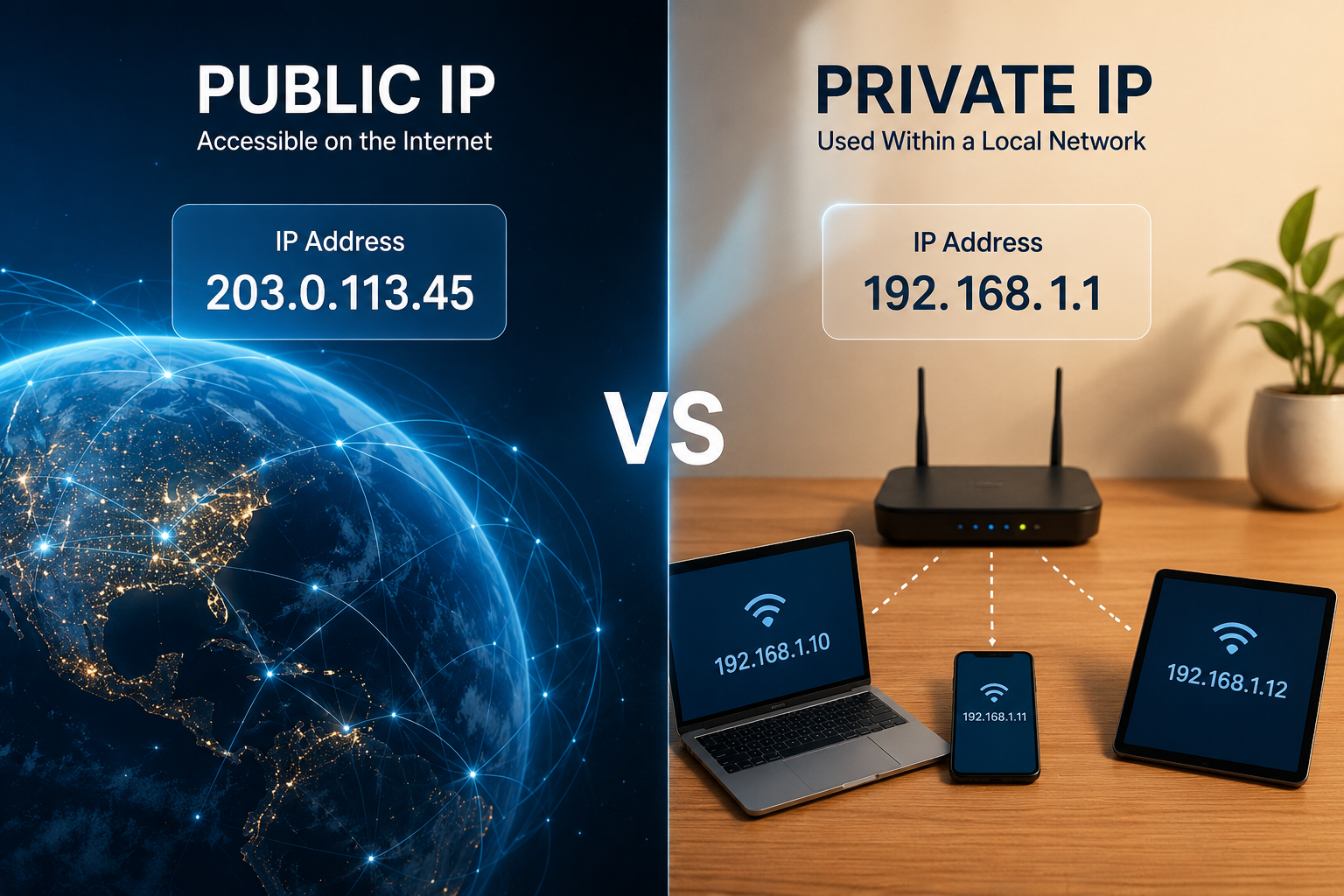
A public IP address is an IP address that is globally unique and accessible over the internet.
It identifies your entire network to the outside world.
When your internet service provider (ISP) connects your home or business to the internet, it assigns your router a public IP address. Every website you visit sees this address as the source of your internet traffic unless you use technologies such as a VPN or proxy service.
Public IP addresses are managed globally to ensure that no two internet-connected networks use the same public address simultaneously.
Whenever someone accesses your home network from outside the internet, they communicate through your public IP address.
How a Public IP Address Works
Imagine your home as a large apartment building.
The building has one official street address recognized by the postal service.
Anyone sending mail to someone living there uses that single building address.
Similarly, your home network has one public IP address recognized across the global internet.
When data arrives from websites or online services, it first reaches your router through this public IP address. The router then determines which device inside your home requested the information and forwards it accordingly.
This process happens within milliseconds, making internet communication appear almost instantaneous.
Who Assigns Public IP Addresses?
Public IP addresses are typically assigned by Internet Service Providers such as cable, fiber, DSL, satellite, or mobile network companies.
These providers receive blocks of public IP addresses through a global allocation system coordinated by the Internet Assigned Numbers Authority (IANA) and distributed by Regional Internet Registries (RIRs). Internet service providers then assign addresses to customers.
Depending on your internet plan, your public IP address may remain the same for long periods or change periodically.
Dynamic and Static Public IP Addresses
Most home internet connections use dynamic public IP addresses.
A dynamic IP address is assigned automatically and may change after your router restarts or after a certain lease period expires.
Dynamic addresses simplify management for internet providers and efficiently use available address space.
Some businesses, organizations, and advanced home users require static public IP addresses.
A static public IP remains constant over time. This consistency is useful for hosting websites, operating email servers, providing remote access, or managing enterprise systems.
What Is a Private IP Address?
A private IP address is an address used only within a local network.
Unlike public addresses, private IP addresses are not reachable directly from the internet.
They allow devices inside homes, schools, offices, hospitals, factories, and other organizations to communicate with one another without consuming globally unique addresses.
Your laptop, smartphone, printer, smart television, security camera, and wireless speaker may each have their own private IP address assigned by your router.
These addresses work perfectly inside your local network but are invisible to the wider internet.
How Private IP Addresses Work
When your smartphone prints a document to a wireless printer, both devices usually communicate using private IP addresses.
Similarly, when your computer streams a movie stored on a local network storage device, all communication remains inside your local network.
None of this internal traffic needs to travel across the internet.
Your router manages these private addresses and ensures that devices can find each other efficiently.
Reserved Private IP Address Ranges
The Internet Engineering Task Force (IETF) has reserved specific IPv4 address ranges exclusively for private networking.
These include addresses beginning with 10.x.x.x, 172.16.x.x through 172.31.x.x, and 192.168.x.x.
These address ranges can be reused by millions of different networks because they never appear directly on the public internet.
For example, millions of homes worldwide may each contain a device with the private address 192.168.1.100, yet no conflicts occur because each address exists only within its own local network.
Why Private IP Addresses Are Necessary
Private IP addresses solve several major networking challenges.
First, they conserve public IP addresses. Instead of assigning unique public addresses to every device inside every home, only one public IP is generally needed for the router.
Second, they simplify local networking. Devices can communicate directly without involving internet infrastructure.
Third, they improve security because private devices are not directly exposed to the public internet.
Finally, they allow organizations to build large internal networks without needing enormous blocks of public addresses.
The Relationship Between Public and Private IP Addresses
Public and private IP addresses are not competitors. They work together.
Imagine a family living in one house.
The house has one street address, but each family member has a different name.
Mail arrives at the house’s street address, after which family members deliver it to the intended recipient.
Similarly, your router has one public IP address visible to the internet.
Inside your network, every connected device has its own private IP address.
The router serves as the intermediary between the public internet and your private network.
Network Address Translation (NAT)
One of the most important technologies connecting public and private IP addresses is Network Address Translation, commonly known as NAT.
NAT allows multiple devices with private IP addresses to share a single public IP address.
When your computer requests a webpage, the router temporarily records which internal device initiated the request.
The router replaces the private source address with its public IP before sending the request across the internet.
When the website responds, the router consults its translation table and forwards the response to the correct private device.
This process occurs automatically and continuously for every connected device.
Without NAT, modern home networking would be far less practical.
Why NAT Is So Important
Network Address Translation became one of the most significant innovations in internet networking.
It dramatically reduced the exhaustion of IPv4 addresses.
It enabled entire homes and businesses to operate behind a single public IP address.
It also added an additional layer of protection by preventing unsolicited incoming internet traffic from directly reaching private devices unless explicitly allowed.
Although NAT was originally introduced to conserve address space, it has become a standard feature of nearly every home and business router.
Can Someone See Your Private IP Address?
Normally, no.
When you visit a website, the server sees your public IP address rather than the private address assigned to your computer.
Private IP addresses remain within your local network unless shared intentionally through specialized networking configurations.
Because of this, websites cannot directly identify your laptop’s internal address.
Can Someone See Your Public IP Address?
Yes.
Whenever your device communicates with an internet server, that server can see the public IP address associated with your connection.
This visibility is necessary for communication because servers need to know where to send responses.
However, a public IP address alone usually does not reveal your exact home address or personal identity.
It may indicate your approximate geographic region and internet service provider, but precise location information generally requires additional data.
Security Differences Between Public and Private IP Addresses
Public IP addresses are directly connected to the internet, making them visible to external systems.
Because of this exposure, routers often include firewalls that filter incoming traffic and block unauthorized access attempts.
Private IP addresses are generally shielded behind routers and NAT systems.
This isolation reduces exposure to direct internet attacks, although devices can still become compromised through malware, phishing, or vulnerable software if users are not careful.
Maintaining strong passwords, installing software updates, and using secure network practices remain essential regardless of whether devices use public or private addresses.
Public IP Addresses and Remote Access
Some applications require outside users to connect to devices inside your network.
Examples include remote desktop software, home security systems, gaming servers, and personal cloud storage.
Since private IP addresses are inaccessible from the internet, these services typically rely on your public IP address along with carefully configured router settings or cloud-based relay services.
Many modern services simplify remote access by using secure cloud infrastructure rather than requiring users to configure networking manually.
Public IP Addresses and Websites
Every website on the internet has at least one public IP address.
When you type a domain name into your browser, the Domain Name System (DNS) translates that human-readable name into a public IP address.
Your browser then connects to that public address to retrieve the website’s content.
Without public IP addresses, websites could not be reached from anywhere in the world.
Private Networks Inside Businesses
Large organizations often operate enormous private networks.
A university may have tens of thousands of computers using private IP addresses.
Hospitals connect medical equipment through private networks.
Factories use private networks to manage industrial machines.
Banks rely on private internal networks for secure operations.
Even though these organizations may have only a limited number of public IP addresses, NAT and internal routing allow thousands of devices to function efficiently.
IPv4 and IPv6
The discussion of public and private IP addresses usually refers to IPv4, the version of the Internet Protocol that has powered the internet for decades.
IPv4 uses 32-bit addresses, providing approximately 4.3 billion unique addresses. While this seemed enormous when IPv4 was designed, the rapid growth of internet-connected devices eventually exhausted the available address space.
IPv6 was developed to address this limitation.
Using 128-bit addresses, IPv6 supports an almost unimaginably large number of unique addresses—enough to assign a globally unique address to virtually every internet-connected device for the foreseeable future.
IPv6 also defines local-use address ranges that serve a role similar to private IPv4 addresses, although networking with IPv6 differs in several important ways.
As IPv6 adoption continues to grow, both IPv4 and IPv6 coexist across today’s internet.
How to Find Your Public IP Address
Finding your public IP address is relatively simple.
Many websites display it instantly when you visit them because they can see the address from which your request originates.
Your router’s administrative interface may also display the public IP assigned by your internet service provider.
Because this address represents your entire internet connection, every device sharing the same router generally appears to websites under the same public IP.
How to Find Your Private IP Address
Every operating system provides a way to view a device’s private IP address.
Your router’s management interface also lists connected devices and their assigned private addresses.
Most home routers automatically assign these addresses using a protocol called Dynamic Host Configuration Protocol (DHCP), which eliminates the need for manual configuration.
Common Misunderstandings
Many people assume that every device connected to the internet has its own public IP address. In reality, most homes use only one public IP address shared by many devices through NAT.
Others believe that private IP addresses provide complete security. While they reduce direct exposure, they are not a substitute for secure software, strong authentication, and safe online behavior.
Another common misconception is that changing a device’s private IP address changes its online identity. Websites identify your connection primarily through the public IP address assigned to your router, not the private address inside your home network.
Why Understanding Public and Private IP Addresses Matters
Although IP addresses usually operate quietly in the background, they form the foundation of every online experience. Public IP addresses connect networks to the global internet, while private IP addresses organize communication within homes, schools, businesses, and organizations.
Together, they create a networking system that is both efficient and scalable. Public addresses ensure that information can travel anywhere in the world, while private addresses allow billions of local devices to communicate without exhausting the limited pool of globally unique IPv4 addresses.
Every webpage you visit, every video call you join, every smart device you control, and every online service you use depends on the seamless cooperation between these two types of IP addresses. Understanding how they differ not only makes networking less mysterious but also provides a deeper appreciation for the invisible infrastructure that keeps the modern internet running every second of every day.