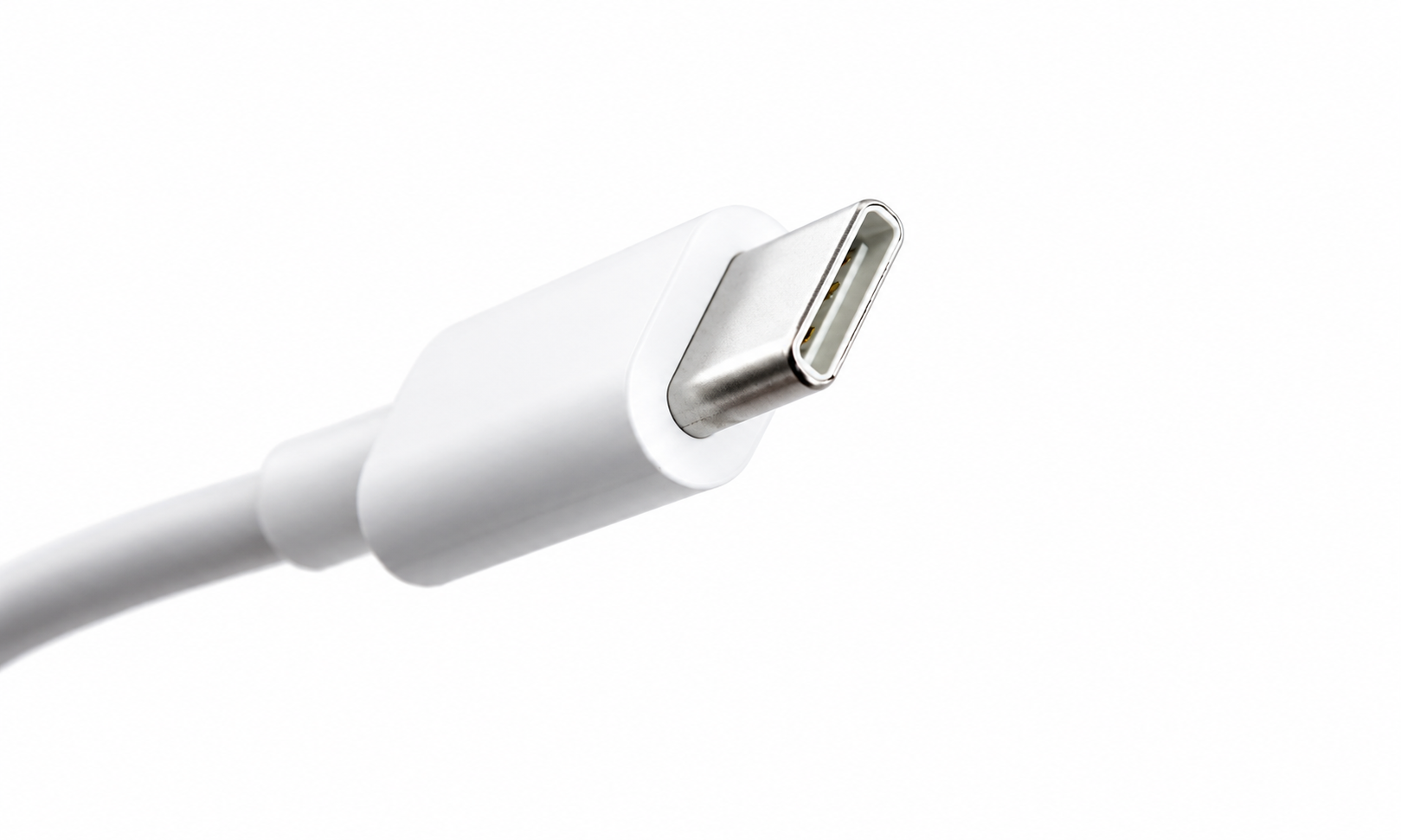
If you’ve bought a new smartphone, laptop, tablet, or even a pair of wireless earbuds in recent years, you’ve probably noticed one thing they increasingly have in common: a small, oval-shaped port called USB-C. It may look simple, but this tiny connector has quietly become one of the most important technologies in modern electronics.
For years, people struggled with a tangled collection of charging cables. One device needed a Micro-USB cable, another required Apple’s Lightning connector, while external hard drives, cameras, and printers often used completely different plugs. Carrying several cables became a normal part of everyday life.
USB-C changed that.
Today, one cable can charge a smartphone, power a laptop, connect a monitor, transfer massive files, drive external storage, and even deliver high-quality audio and video. It has become the universal connector that many engineers envisioned for decades.
But USB-C is much more than just another charging cable. It represents a major leap forward in convenience, performance, and technology.
What Is USB-C?
USB-C, officially called USB Type-C, is a universal connector standard developed by the USB Implementers Forum (USB-IF), a group of technology companies responsible for maintaining USB standards.
Unlike older USB connectors, USB-C was designed to serve many purposes with a single, compact connector. It can transfer data, deliver electrical power, transmit video, carry audio, and connect countless accessories using the same physical port.
The connector is small enough to fit modern smartphones while being powerful enough to charge high-performance laptops.
Perhaps its most recognizable feature is its symmetrical shape. There is no “right side up.” You can plug it in either way, and it works immediately.
That simple improvement has eliminated one of the most common frustrations people experienced with earlier USB connectors.
What Does USB Stand For?
USB stands for Universal Serial Bus.
The name reflects its original goal: creating a universal method for computers and electronic devices to communicate with one another.
Before USB became common, connecting devices often required different ports and specialized cables. Printers, keyboards, mice, cameras, and storage devices frequently used incompatible connectors.
USB simplified everything by creating a single standard that manufacturers around the world could adopt.
USB-C is the latest evolution of that vision.
Why Was USB-C Created?
Technology has changed dramatically over the past two decades.
Devices have become thinner, lighter, faster, and far more powerful. Smartphones now perform tasks once reserved for desktop computers. Laptops have become slimmer than ever before.
Older USB connectors were designed during a very different era. They were larger, slower, and less flexible. They also had one major inconvenience: they could only be inserted in one orientation.
Engineers wanted a connector that could handle modern technology while remaining compact enough for future devices.
USB-C was created to solve these challenges.
Instead of designing separate connectors for charging, data transfer, and video output, engineers combined all these capabilities into a single universal port.
A Small Connector with Big Capabilities
At first glance, USB-C appears to be just another charging connector.
In reality, it is one of the most versatile connectors ever developed.
A single USB-C cable can supply power to charge batteries, transfer digital files at extremely high speeds, connect multiple displays, link external storage devices, support docking stations, and communicate with countless accessories.
The connector itself does not determine every feature. Different devices may support different capabilities depending on the hardware inside them.
This is why two USB-C ports can sometimes behave differently even though they look identical.
The Reversible Design Everyone Appreciates
One of USB-C’s most celebrated improvements is its reversible connector.
Older USB plugs often required several attempts before they were inserted correctly.
USB-C eliminates that problem.
Because both sides of the connector are identical, users no longer need to check which side faces upward.
This seemingly small improvement has saved billions of people countless moments of frustration.
How USB-C Transfers Data
USB-C acts as a pathway through which digital information travels between devices.
When you connect a smartphone to a computer, photos, videos, music, documents, and other files travel through the cable as electrical signals.
Modern USB standards can move enormous amounts of information every second.
Depending on the version supported by both the cable and the connected devices, transferring a large movie that once required several minutes can now take only seconds.
The exact speed depends not only on the connector but also on the USB technology implemented inside the devices.
How USB-C Charges Devices
Charging is another area where USB-C excels.
Instead of supplying a fixed amount of electricity, USB-C can intelligently negotiate how much power should be delivered.
When a charger and a device are connected, they communicate electronically.
The charger identifies how much power it can safely provide.
The receiving device reports how much power it needs.
Only after this communication does charging begin at an appropriate level.
This intelligent process helps improve compatibility while reducing the risk of supplying excessive power to devices designed for lower power levels.
USB Power Delivery Explained
One of the most important technologies associated with USB-C is USB Power Delivery, commonly abbreviated as USB PD.
USB Power Delivery allows compatible devices to exchange significantly higher amounts of electrical power than older USB standards.
This enables USB-C to charge not only smartphones but also tablets, portable gaming systems, monitors, professional cameras, and many laptops.
Modern USB Power Delivery specifications can support power levels high enough for demanding portable computers, although the actual power available depends on the charger, cable, and device.
Can USB-C Replace Laptop Chargers?
For many laptops, the answer is yes.
Instead of carrying bulky proprietary charging adapters, many modern laptops use USB-C for charging.
This provides remarkable flexibility.
A compatible USB-C charger may be able to recharge multiple types of devices, including smartphones, tablets, laptops, and wireless headphones.
Travelers especially appreciate carrying one charger instead of several different power adapters.
USB-C and Video Output
USB-C is not limited to charging and file transfers.
Many USB-C ports can also transmit video signals.
This allows users to connect laptops or tablets directly to external monitors, televisions, or projectors using compatible cables or adapters.
Some devices can even support multiple high-resolution displays through a single USB-C connection when paired with an appropriate docking station.
This capability has made USB-C extremely popular in offices and creative work environments.
USB-C Can Carry Audio Too
Many people are surprised to learn that USB-C can also transmit digital audio.
As smartphone manufacturers began removing traditional 3.5 mm headphone jacks, USB-C became an alternative method for connecting wired headphones.
USB-C also supports adapters that allow traditional headphones to work with compatible devices.
Because audio is transmitted digitally, manufacturers can integrate advanced sound processing directly into compatible accessories.
USB-C and Thunderbolt
USB-C and Thunderbolt are closely related but are not the same technology.
Thunderbolt uses the USB-C connector but adds additional capabilities and, depending on the Thunderbolt version, can provide higher bandwidth and support more advanced features than standard USB alone.
Many premium laptops include Thunderbolt ports that look exactly like ordinary USB-C ports.
This can sometimes confuse users because the connectors appear identical even though the supported features differ.
Manufacturers often identify Thunderbolt ports with a small lightning bolt symbol.
Why Do Some USB-C Cables Work Differently?
One of the biggest sources of confusion is that not every USB-C cable supports the same features.
Some cables are designed mainly for charging.
Others support high-speed data transfer.
Some are capable of transmitting video.
Others can handle much higher electrical power.
Although they all share the same connector shape, their internal wiring and supported specifications may differ.
For this reason, using a cable that matches your device’s capabilities is important, especially for demanding tasks such as connecting external displays or transferring large amounts of data.
USB-C in Smartphones
USB-C has become the standard charging connector for most Android smartphones.
It allows faster charging, quicker data transfer, and improved compatibility with accessories.
More recently, USB-C has also become increasingly common across a wider range of smartphones as manufacturers move toward a universal charging standard.
For consumers, this means fewer cables and greater compatibility between devices.
USB-C in Tablets
Tablets benefit greatly from USB-C.
Beyond charging, USB-C allows tablets to connect to keyboards, external storage, cameras, monitors, audio interfaces, and other professional accessories.
Some tablets can even function much like desktop computers when connected to external displays through USB-C.
USB-C in Laptops
Modern laptops increasingly rely on USB-C.
Some models use USB-C for charging, external displays, networking, storage devices, docking stations, and accessories—all through a single port.
This simplifies laptop design while reducing the number of different connectors users need.
Many docking stations can expand one USB-C connection into multiple USB ports, HDMI, Ethernet, memory card readers, and audio connections.
USB-C in Gaming
Gaming devices have also embraced USB-C.
Portable gaming systems, wireless controllers, gaming headsets, external solid-state drives, and various accessories now commonly use USB-C for charging and communication.
Its combination of high-speed data transfer and power delivery makes it well suited for modern gaming hardware.
USB-C in Cameras
Many digital cameras now include USB-C.
Photographers can recharge batteries, transfer photos, update firmware, and connect accessories using a single cable.
For professionals who work with thousands of large image files, faster transfer speeds can significantly reduce workflow time.
USB-C in Everyday Life
USB-C has become part of everyday routines, often without people realizing how much they depend on it.
You may charge your phone overnight using USB-C.
Later, you connect your laptop to a monitor with the same type of cable.
At work, an external hard drive transfers files through USB-C.
Your wireless earbuds recharge through USB-C before you leave home.
Even portable power banks increasingly use USB-C to both charge themselves and recharge other devices.
This widespread adoption reflects the connector’s remarkable versatility.
Is USB-C Faster Than Older USB Connectors?
In many cases, yes.
USB-C supports modern USB technologies capable of much higher data transfer speeds than older USB connectors.
However, the connector alone does not guarantee faster performance.
Actual speed depends on the USB version supported by both the connected devices and the cable itself.
A USB-C cable connected to older hardware may operate at lower speeds than another USB-C cable connected to newer hardware.
Is USB-C Safe?
USB-C is designed with multiple safety features.
Compatible devices negotiate voltage and current before significant power transfer begins.
Quality chargers and certified cables help ensure reliable operation.
However, poorly manufactured or uncertified accessories may not meet official safety standards.
Using reputable chargers and certified cables helps reduce potential risks and ensures devices operate as intended.
Environmental Benefits of USB-C
One of USB-C’s greatest advantages extends beyond convenience.
A universal charging standard can reduce the number of different chargers and cables people need to purchase.
Fewer incompatible accessories can help reduce electronic waste over time.
As more manufacturers adopt USB-C, consumers can continue using existing chargers across multiple generations of devices rather than replacing them with proprietary alternatives.
This contributes to more sustainable use of electronic accessories.
The Future of USB-C
USB-C continues to evolve alongside new USB specifications.
Each new generation increases performance while maintaining the familiar connector shape.
Engineers are working toward faster data transfer, higher charging power, improved display capabilities, and broader compatibility.
The connector’s flexibility means it can continue supporting future technologies without requiring a completely new physical design.
As computing devices become increasingly interconnected, USB-C is expected to remain a central part of the technology ecosystem for years to come.
Why USB-C Has Become the Universal Standard
USB-C represents far more than a new charging cable. It is the result of decades of engineering aimed at simplifying how electronic devices connect, communicate, and receive power. By combining charging, data transfer, audio, video, and accessory support into a single compact connector, USB-C has replaced a confusing collection of specialized cables with one remarkably versatile solution.
Its reversible design, broad compatibility, intelligent power management, and support for rapidly evolving technologies have made it an essential feature of modern electronics. Whether you’re charging a smartphone, connecting a laptop to multiple displays, transferring large files, or powering professional equipment, USB-C has become the small connector that makes today’s digital world simpler, faster, and more connected than ever before.