Every day, billions of people use computers, smartphones, and the internet without realizing that invisible threats may be lurking behind an email attachment, a fake software download, or even a compromised website. Among the most well-known forms of malicious software are viruses, worms, and Trojans. These names have become so common that many people use them interchangeably. However, they are not the same thing.
Although all three are types of malware, each one spreads differently, behaves differently, and poses unique risks. Understanding these differences is one of the most effective ways to recognize cyber threats and protect your devices.
Learning about viruses, worms, and Trojans is not just for cybersecurity professionals. Anyone who uses a computer or smartphone benefits from knowing how these digital threats work and how they can be prevented.
What Is Malware?
Before exploring viruses, worms, and Trojans, it is important to understand the broader term malware.
Malware, short for malicious software, refers to any software intentionally designed to damage systems, steal information, spy on users, disrupt computer operations, or provide unauthorized access to devices.
Malware is not a single program or technology. Instead, it is a broad category that includes many different types of malicious software, such as viruses, worms, Trojans, ransomware, spyware, adware, rootkits, keyloggers, botnets, and others.
Viruses, worms, and Trojans are among the oldest and most influential forms of malware, and many modern cyberattacks still rely on techniques derived from them.
What Is a Computer Virus?
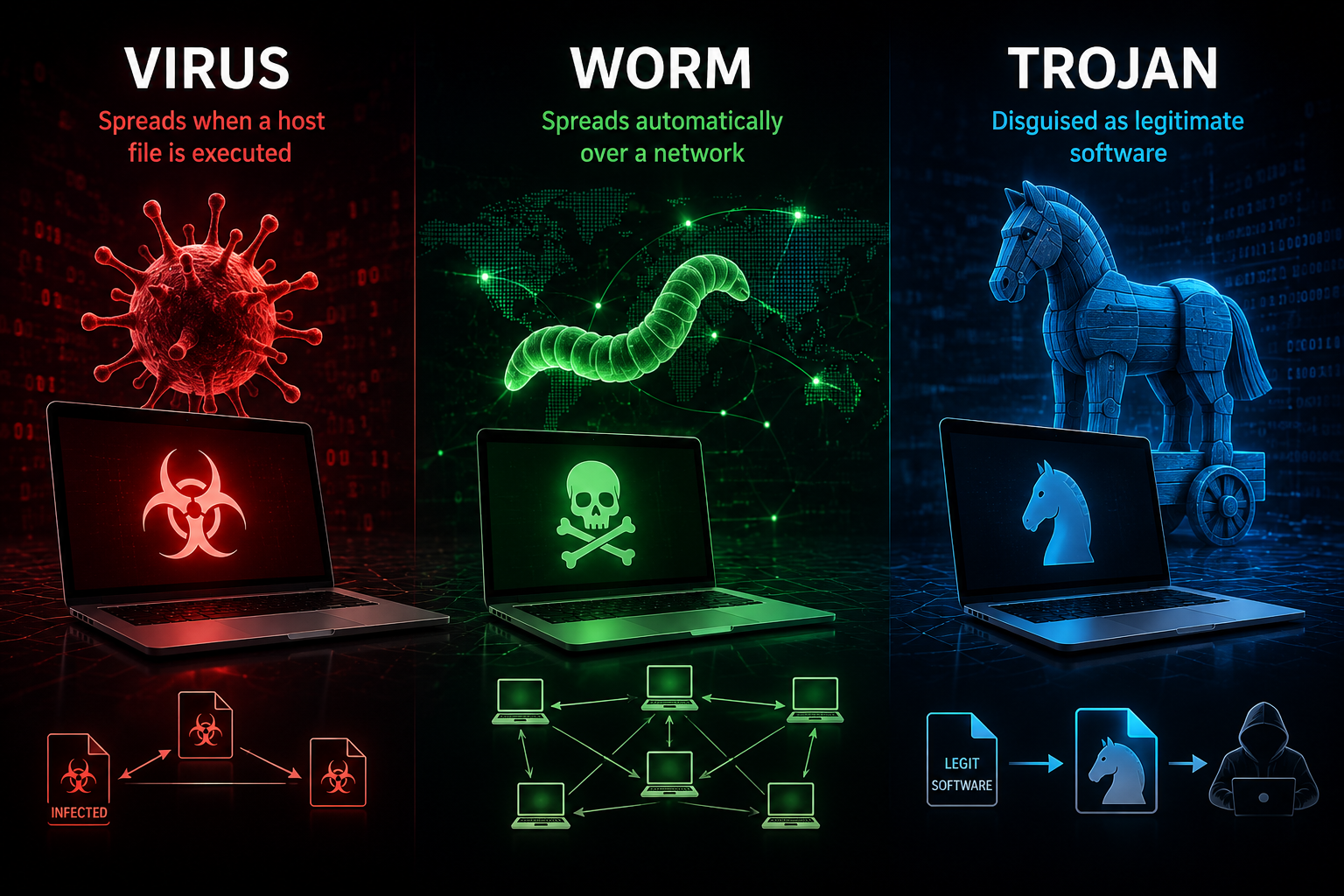
A computer virus is a type of malware that attaches itself to another file or program. Much like a biological virus needs a living cell to reproduce, a computer virus needs a host file to spread.
When an infected file is opened or executed, the virus becomes active. It copies itself into other files or programs on the same computer. As more infected files are shared with others through USB drives, email attachments, or downloads, the virus continues to spread.
A virus cannot normally spread by itself. It depends on human actions, such as opening an infected document, installing compromised software, or running an infected application.
Once activated, a virus may perform many harmful actions. Some viruses delete files, corrupt documents, slow down computers, display unwanted messages, disable security software, or damage operating systems. Others quietly remain hidden while stealing sensitive information.
How Computer Viruses Spread
A virus relies on user activity to move from one computer to another.
An infected email attachment may contain malicious code hidden inside a document.
A pirated software installer may secretly include a virus.
A USB flash drive connected to multiple computers can transfer infected files.
Even seemingly harmless downloads from untrusted websites may carry viruses.
Without someone opening or executing the infected file, the virus usually cannot continue spreading.
Characteristics of Computer Viruses
One defining characteristic of a virus is that it requires a host file.
Another important feature is self-replication after activation. Once running, it attempts to infect additional files on the same device.
Most viruses spread relatively slowly compared with worms because they rely on people to unknowingly distribute infected files.
Some viruses are designed simply to replicate, while others include destructive payloads that activate immediately or on specific dates.
What Is a Computer Worm?
A computer worm is malware that can spread automatically without attaching itself to another program.
Unlike a virus, a worm is an independent program.
This independence makes worms particularly dangerous because they do not require users to copy infected files manually after the initial infection.
Instead, worms often search computer networks for vulnerable devices. If they find a security weakness, they copy themselves directly to those systems.
A single worm can infect thousands or even millions of computers within hours if enough vulnerable devices are connected to the internet.
How Worms Spread
Worms usually exploit weaknesses in operating systems, software, or network services.
Once a worm infects one computer, it begins scanning nearby devices or internet-connected systems for similar vulnerabilities.
When it discovers another vulnerable computer, it automatically transfers itself without requiring any user interaction.
This process repeats continuously, allowing worms to spread extremely rapidly.
Some worms also distribute themselves through email, shared folders, instant messaging systems, removable storage devices, or network shares, but their defining feature is their ability to spread independently.
Characteristics of Computer Worms
The most important characteristic of a worm is autonomous replication.
Unlike viruses, worms do not need users to copy infected files from one device to another.
They consume network bandwidth as they spread, sometimes causing entire networks to slow dramatically or even crash.
Many worms also install additional malware, create backdoors for attackers, steal information, or recruit infected computers into botnets.
Even when a worm causes little direct damage, its rapid spread can overwhelm computer systems and internet infrastructure.
What Is a Trojan?
A Trojan, or Trojan horse, is malware that disguises itself as legitimate software.
Its name comes from the famous ancient Greek story of the Trojan Horse, in which soldiers secretly hid inside a large wooden horse presented as a gift.
Similarly, a Trojan appears harmless or useful, encouraging users to install or open it voluntarily.
A Trojan does not infect other files like a virus.
It also does not automatically replicate across networks like a worm.
Instead, its success depends on deceiving users into installing it.
How Trojans Trick Users
Cybercriminals often disguise Trojans as attractive software.
A Trojan may pretend to be a free game.
It may appear to be a video player, antivirus program, software update, document viewer, or productivity tool.
Some Trojans are hidden inside cracked software, illegal downloads, fake mobile applications, or phishing emails.
Because users believe they are installing legitimate software, they unknowingly grant the malware permission to run.
Once installed, the Trojan reveals its true purpose.
What Trojans Can Do
Trojans can perform many different malicious activities.
Some steal passwords.
Others record keyboard activity using keyloggers.
Some secretly capture screenshots.
Others allow attackers to remotely control the infected computer.
Certain Trojans download additional malware, including ransomware or spyware.
Some monitor online banking sessions and steal financial information.
Others disable antivirus software to make future attacks easier.
Unlike viruses and worms, Trojans focus more on deception than replication.
Comparing Virus, Worm, and Trojan
Although these three types of malware are closely related, their methods are fundamentally different.
A virus depends on another file and usually requires users to spread it by opening or sharing infected programs.
A worm operates independently and spreads automatically by exploiting network vulnerabilities.
A Trojan disguises itself as legitimate software and tricks users into installing it willingly.
Another difference lies in replication.
Viruses and worms are capable of self-replication after infection.
Trojans generally do not replicate themselves. Instead, they concentrate on carrying out malicious activities once installed.
Their goals also vary.
Viruses often focus on infecting files.
Worms emphasize rapid network propagation.
Trojans prioritize deception, unauthorized access, data theft, or installing additional malware.
Which Is More Dangerous?
There is no simple answer because each type of malware poses different risks.
A worm can spread faster than almost any other malware, infecting enormous numbers of computers within a short period.
A virus may spread more slowly but can corrupt important files or damage operating systems.
A Trojan may infect only one computer initially, but it can silently steal passwords, banking information, personal photographs, confidential business documents, and other sensitive data for months without being detected.
Ultimately, the level of danger depends on the malware’s specific capabilities rather than whether it is classified as a virus, worm, or Trojan.
Famous Computer Viruses
Throughout computing history, several viruses have demonstrated how damaging malicious software can become.
The Michelangelo virus gained worldwide attention in the early 1990s because it was programmed to activate on a specific date and overwrite data on infected computers.
The CIH virus, sometimes called Chernobyl, damaged computer hard drives and even corrupted system firmware on certain devices.
Melissa spread rapidly through email by infecting Microsoft Word documents, becoming one of the earliest examples of large-scale email malware.
These incidents showed how quickly malicious code could spread through everyday computing activities.
Famous Computer Worms
Some of the most destructive malware outbreaks have involved worms.
The Morris Worm, released in 1988, became one of the first internet worms and unintentionally disrupted thousands of connected computers.
Code Red spread rapidly by exploiting vulnerabilities in Microsoft web servers.
SQL Slammer infected hundreds of thousands of servers in minutes, causing widespread internet slowdowns.
Conficker infected millions of Windows computers worldwide by exploiting operating system vulnerabilities.
WannaCry, although widely known as ransomware, also used worm-like capabilities to spread automatically across vulnerable Windows systems in 2017, affecting hospitals, businesses, and government organizations around the world.
These examples demonstrate how dangerous self-replicating malware can become when security updates are missing.
Famous Trojans
Many well-known cyberattacks have involved Trojans.
Zeus became one of the most infamous banking Trojans, stealing online banking credentials from millions of victims.
Emotet initially appeared as a banking Trojan before evolving into one of the world’s most sophisticated malware distribution platforms.
TrickBot specialized in stealing financial information while also downloading additional malware.
Remote Access Trojans, often called RATs, allow attackers to control infected computers from anywhere in the world.
These threats illustrate how deception can be just as dangerous as rapid replication.
Can One Malware Be More Than One Type?
Modern cybercriminals often combine multiple malware techniques into a single attack.
For example, a Trojan may secretly install ransomware.
A worm may carry spyware.
A virus may download a backdoor.
Some malware begins as a Trojan delivered through a phishing email, then behaves like a worm by spreading across a corporate network, and finally installs ransomware to encrypt files.
As a result, modern malware is often more sophisticated than traditional categories suggest.
Nevertheless, understanding viruses, worms, and Trojans remains essential because these categories describe the primary methods by which malware infects and spreads.
How Antivirus Software Detects Malware
Modern antivirus software uses several techniques to identify malicious programs.
Signature-based detection compares files against databases of known malware.
Heuristic analysis searches for suspicious behavior that resembles malware even if it has never been seen before.
Behavioral monitoring watches running programs for dangerous activities such as unauthorized encryption, password theft, or attempts to disable security software.
Cloud-based threat intelligence allows security vendors to rapidly identify and block newly discovered malware worldwide.
Because cyber threats constantly evolve, antivirus software works best when it receives regular updates.
How to Protect Yourself
The strongest defense against malware begins with safe computing habits.
Keeping operating systems and applications updated closes security vulnerabilities that worms often exploit.
Installing reputable security software provides protection against known threats.
Downloading software only from trusted developers greatly reduces the risk of Trojans.
Being cautious with unexpected email attachments, suspicious links, and unsolicited downloads helps prevent infections.
Strong passwords, multi-factor authentication, regular data backups, and firewall protection further reduce the impact of cyberattacks.
Awareness remains one of the most powerful cybersecurity tools because many attacks rely on human mistakes rather than technical weaknesses alone.
Common Myths About Viruses, Worms, and Trojans
Many people believe that every type of malware is a virus.
In reality, viruses represent only one category of malicious software.
Another common misconception is that smartphones cannot become infected.
Although mobile operating systems include strong security protections, malicious apps, phishing attacks, and mobile Trojans continue to target smartphone users.
Some people assume antivirus software guarantees complete protection.
No security solution can stop every attack. Effective cybersecurity combines updated software, secure browsing habits, reliable backups, and informed decision-making.
Another myth is that only large companies are targeted.
In reality, cybercriminals frequently attack individuals, students, small businesses, and families because they often have weaker security defenses.
The Future of Malware
As technology evolves, malware evolves alongside it.
Cybercriminals increasingly use automation, artificial intelligence, and sophisticated social engineering techniques to create more convincing attacks.
Cloud computing, smart devices, connected vehicles, and the Internet of Things have expanded the number of devices that require protection.
Future malware may become even more adaptive, capable of changing its behavior to avoid detection or targeting emerging technologies.
At the same time, cybersecurity continues to improve through machine learning, advanced threat detection, stronger encryption, and better software security practices.
The contest between attackers and defenders is an ongoing race, making cybersecurity education more important than ever.
Conclusion
Viruses, worms, and Trojans are three distinct forms of malware, each with its own method of infecting computers and causing harm. A virus attaches itself to other files and spreads when those files are executed or shared. A worm operates independently and can rapidly spread across networks without human assistance. A Trojan disguises itself as legitimate software, relying on deception to gain access to a device before carrying out malicious actions.
Understanding these differences helps explain why cybersecurity involves more than simply installing antivirus software. Safe online behavior, regular software updates, trusted downloads, strong authentication, and informed users are all essential parts of digital security. As our dependence on connected technology continues to grow, recognizing how these threats operate is one of the best ways to protect personal information, devices, and the increasingly digital world in which we live.