Imagine turning on your computer one morning only to find that every photo, document, project, and memory has suddenly become inaccessible. Instead of your familiar desktop, a frightening message appears demanding payment in exchange for restoring your files. For individuals, businesses, schools, hospitals, and even governments, this nightmare has become an increasingly common reality. The culprit is ransomware.
Ransomware is one of the most damaging forms of cybercrime in the modern world. It can lock valuable files within minutes, disrupt critical services, and cause enormous financial losses. Yet despite its sophistication, ransomware often succeeds because of simple security mistakes that can be prevented.
Understanding how ransomware works—and how to defend against it—is one of the most valuable cybersecurity skills anyone can develop. Fortunately, preventing ransomware is not about relying on a single tool. Instead, it involves building multiple layers of protection that work together to stop attackers before they can do any damage.
What Is Ransomware?
Ransomware is a type of malicious software, or malware, that prevents users from accessing their files or computer systems. Most ransomware does this by encrypting files with powerful cryptographic algorithms. Once encrypted, the files cannot be opened without the correct decryption key.
After encryption, the attackers display a ransom note demanding payment, usually in cryptocurrency. They often threaten to permanently destroy the decryption key or publish stolen information if the victim refuses to pay.
Modern ransomware has evolved beyond simple file encryption. Many ransomware groups first steal sensitive information before encrypting systems. This strategy, known as double extortion, increases pressure on victims because they face both data loss and potential public exposure.
Why Ransomware Is So Dangerous
Unlike many other forms of malware, ransomware immediately affects its victims in obvious and often devastating ways.
Families can lose years of irreplaceable photographs and personal documents.
Businesses may lose access to customer records, financial information, manufacturing systems, and daily operations.
Hospitals can experience delays in medical care.
Schools may lose educational records and online learning systems.
Critical infrastructure such as energy providers, transportation networks, and government agencies may also become targets.
The consequences extend far beyond the ransom payment itself. Recovery costs, lost productivity, legal expenses, damaged reputation, and disrupted services often exceed the amount of money demanded by attackers.
How Ransomware Infects Computers
Ransomware does not appear out of nowhere. Attackers need a way to gain access to a device or network.
One of the most common entry points is phishing. A victim receives an email that appears legitimate and opens an infected attachment or clicks a malicious link. The ransomware silently installs itself before beginning its attack.
Other infections occur through compromised websites, malicious advertisements, pirated software, fake software updates, infected USB drives, or vulnerabilities in outdated software.
In organizations, attackers may exploit weak passwords or exposed remote access services to enter a network. Once inside, they often spend days or even weeks exploring systems before launching ransomware.
Prevention Begins with Awareness
Technology alone cannot stop ransomware.
People remain one of the most important parts of cybersecurity.
Understanding common attack techniques dramatically reduces the chance of becoming a victim.
Cybercriminals often rely on urgency, fear, curiosity, or excitement to trick people into opening malicious files. They may impersonate coworkers, banks, delivery companies, government agencies, or technical support.
Taking a few extra moments to verify unexpected messages can prevent a costly mistake.
Keep Your Operating System Updated
Software updates are among the simplest and most effective defenses against ransomware.
Operating systems regularly receive security patches that fix vulnerabilities discovered by researchers and software developers.
Attackers frequently exploit computers running outdated software because known weaknesses remain unpatched.
Enabling automatic updates helps ensure that security fixes are installed as quickly as possible.
This applies not only to Windows, macOS, and Linux but also to smartphones, tablets, and other connected devices.
Update All Applications
Ransomware attackers also target outdated applications.
Web browsers, office software, PDF readers, media players, communication tools, and other programs can all contain security flaws.
Keeping every installed application updated significantly reduces the number of opportunities available to attackers.
Many modern applications include automatic update features that should remain enabled whenever possible.
Install Reputable Security Software
Reliable antivirus and endpoint security software provide an important layer of protection.
Modern security programs do much more than detect known viruses.
They monitor suspicious behavior, identify ransomware-like activity, block malicious downloads, and isolate dangerous files before they execute.
Many advanced security products use machine learning and behavioral analysis to detect previously unknown ransomware variants.
Although no security software guarantees complete protection, it greatly improves overall security when combined with safe user habits.
Create Regular Backups
Backups are one of the strongest defenses against ransomware.
If important files exist only on one computer, encryption may permanently destroy access to them.
Maintaining current backups allows data to be restored without relying on attackers.
Effective backups should not remain permanently connected to the main computer because some ransomware attempts to encrypt connected backup drives as well.
Cloud backup services that retain previous file versions provide an additional layer of protection. External backup drives stored offline after backup completion can also help preserve data if an attack occurs.
Regularly testing backups ensures they can actually be restored when needed.
Use Strong, Unique Passwords
Weak passwords make it easier for attackers to compromise systems before deploying ransomware.
Each online account should have its own strong, unique password.
Reusing passwords across multiple websites increases risk because a breach at one service may expose credentials that attackers can try elsewhere.
Long passwords or passphrases containing multiple unrelated words are generally easier to remember and more resistant to guessing than short, complex combinations.
Password managers can securely generate and store unique passwords for every account.
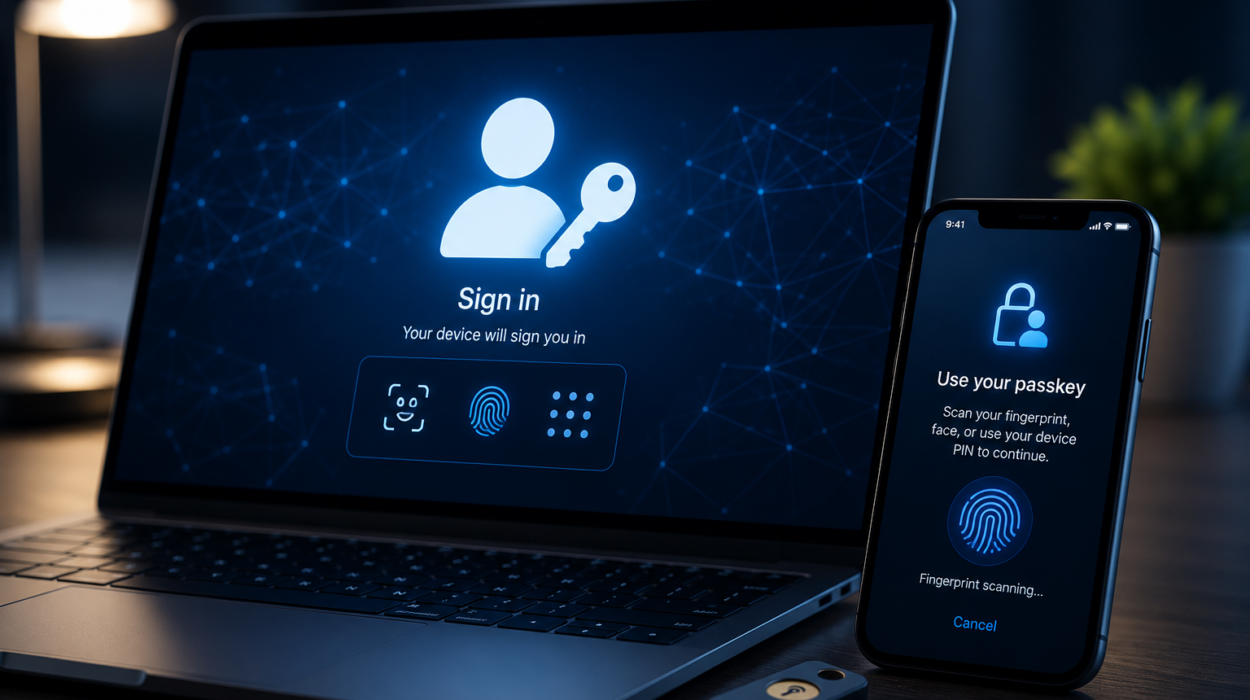
Enable Multi-Factor Authentication
Multi-factor authentication adds another layer of security beyond passwords.
Even if attackers obtain a password, they must also provide a second verification factor before gaining access.
This second factor may involve an authentication app, hardware security key, biometric verification, or temporary verification code.
Multi-factor authentication significantly reduces the risk of unauthorized account access and has become one of the most effective defenses against credential theft.
Be Careful with Email Attachments
Email remains the primary delivery method for ransomware.
Unexpected attachments should always be treated with caution.
Even messages appearing to come from trusted organizations may be fraudulent if attackers have spoofed the sender’s identity.
Before opening attachments, verify that the message is genuine.
Unexpected invoices, resumes, shipping notices, tax documents, or payment requests deserve particular attention.
If something feels unusual, contacting the sender through a known phone number or official website can confirm whether the message is legitimate.
Think Before Clicking Links
Malicious links can install ransomware or direct users to fake websites designed to steal credentials.
Before clicking, carefully examine where a link actually leads.
Attackers often register websites with names that closely resemble legitimate organizations.
Small spelling differences, extra characters, or unusual domain names may indicate fraud.
Typing important website addresses directly into the browser instead of clicking links from unsolicited messages provides additional protection.
Avoid Pirated Software
Illegal software downloads are a frequent source of malware infections.
Cracked programs, unauthorized activation tools, and pirated games often contain hidden malicious code.
Cybercriminals know that users seeking free software may disable security protections during installation.
Obtaining software only from official developers or trusted app stores greatly reduces the risk of infection.
Disable Unnecessary Macros
Some ransomware campaigns distribute malicious Microsoft Office documents containing harmful macros.
Macros automate tasks but can also execute dangerous code.
Modern Office applications disable macros in documents downloaded from the internet by default because they have long been abused by attackers.
Macros should remain disabled unless absolutely necessary and only be enabled for documents from trusted sources.
Limit Administrator Privileges
Using administrator accounts for everyday activities increases security risks.
If ransomware executes while running with administrative privileges, it may gain greater control over the operating system.
Using a standard user account for daily work limits what malicious software can modify.
Administrator privileges should only be used when performing tasks that genuinely require elevated access.
Secure Remote Access
Many organizations allow employees to work remotely.
Unfortunately, attackers frequently target poorly secured remote access services.
Remote Desktop Protocol and similar technologies should never be exposed directly to the internet without strong protections.
Secure remote access requires strong authentication, updated software, encrypted connections, and careful monitoring.
Restricting access to only authorized users reduces potential attack opportunities.
Protect Your Home Network
Home Wi-Fi networks have become critical components of cybersecurity.
Changing default router passwords is an important first step.
Modern encryption standards should always be enabled to protect wireless communications.
Router firmware should also receive regular updates because networking equipment occasionally contains security vulnerabilities.
Guest devices should ideally connect to separate guest networks rather than sharing the primary network with personal computers.
Be Cautious with USB Drives
Portable storage devices can spread malware between computers.
Unknown USB drives should never be connected simply out of curiosity.
Organizations often restrict removable storage devices because they present both accidental and intentional security risks.
Scanning removable media before opening files provides additional protection.
Watch for Warning Signs
Ransomware attacks are sometimes preceded by unusual system behavior.
Unexpected slowdowns, disabled security software, unknown user accounts, repeated password failures, or unexplained file activity may indicate malicious activity.
Recognizing these early warning signs can allow security teams to respond before ransomware activates.
Prompt investigation of suspicious behavior often prevents larger incidents.
Protect Business Networks
Organizations face unique ransomware challenges because one infected computer can affect an entire network.
Separating networks into smaller segments limits how far attackers can spread.
Carefully controlling user permissions ensures employees only access systems necessary for their work.
Continuous monitoring helps identify suspicious activity before encryption begins.
Organizations also benefit from detailed incident response plans that define exactly how to react during a cyberattack.
Educate Everyone
Cybersecurity is not solely an IT responsibility.
Every employee, student, family member, and computer user plays a role.
Regular cybersecurity awareness training helps people recognize phishing emails, suspicious websites, fraudulent messages, and other common attack techniques.
Knowledge significantly reduces human error, which remains one of the leading causes of ransomware infections.
Never Ignore Security Warnings
Modern operating systems and security software frequently display warnings about suspicious files, unsafe downloads, or potentially dangerous websites.
These alerts should never be dismissed automatically.
Although occasional false positives occur, security warnings often identify genuine threats before they cause harm.
Taking time to understand why a warning appears is far safer than ignoring it.
What to Do If You Suspect an Infection
If ransomware is suspected, immediate action can reduce damage.
Disconnecting the infected computer from the internet and any local network may help prevent the malware from spreading to other devices. Avoid restarting the system unless instructed by cybersecurity professionals, as some malware may continue operating or complicate forensic analysis after a reboot.
Organizations should activate their incident response plans, isolate affected systems, preserve evidence, and notify their cybersecurity team.
Individuals should seek assistance from trusted technical professionals rather than attempting risky internet fixes.
If backups are available and confirmed to be free of malware, they can be used during recovery after the infection has been removed.
Should You Pay the Ransom?
Paying a ransom does not guarantee that files will be recovered.
Cybercriminals may simply disappear after receiving payment.
Some victims receive faulty decryption tools, while others are targeted again because attackers know they are willing to pay.
Additionally, paying ransoms can encourage future criminal activity by making ransomware more profitable.
For these reasons, cybersecurity experts and many law enforcement agencies generally discourage paying whenever other recovery options exist.
Strong backups and effective prevention remain far more reliable than hoping criminals will honor their promises.
The Future of Ransomware
Ransomware continues to evolve as attackers develop new techniques.
Artificial intelligence may enable more convincing phishing campaigns and faster identification of vulnerable systems.
At the same time, defenders are also using artificial intelligence to detect threats earlier, analyze suspicious behavior, and automate security responses.
Improved authentication, stronger encryption, zero-trust security models, and better threat intelligence are helping organizations become more resilient.
The ongoing challenge is a constant race between attackers seeking new opportunities and defenders building stronger protections.
Building a Culture of Cybersecurity
Preventing ransomware is not a one-time task. It is an ongoing habit of making smart security decisions every day.
Every software update installed, every suspicious email ignored, every strong password created, and every successful backup completed makes it harder for cybercriminals to succeed.
No single defense can eliminate ransomware entirely. However, combining regular updates, reliable backups, strong authentication, secure networks, trusted security software, and informed users creates multiple layers of protection that dramatically reduce the risk of infection.
As our lives become increasingly digital, protecting our information is becoming just as important as protecting our homes or personal belongings. Ransomware may be one of today’s most serious cyber threats, but with knowledge, preparation, and consistent cybersecurity practices, individuals and organizations can greatly reduce their risk and keep their valuable data safe.